Release information BCS 26.2
BCS 26.2: Services in Focus, and Better Guidance in Day-to-Day Work
With BCS 26.2, services beyond traditional project business move even more firmly into focus. The new Services workspace provides greater transparency when handling customer requests and, for the first time, makes customer satisfaction visible and measurable through direct feedback in the ticket. Enhanced assistants, informative tooltips, and more clearly structured views provide important information at a glance and guide users more confidently through their daily tasks. The release is rounded out by numerous enhancements in invoicing, project management, Scrum, CRM, HR administration, security, and AI.
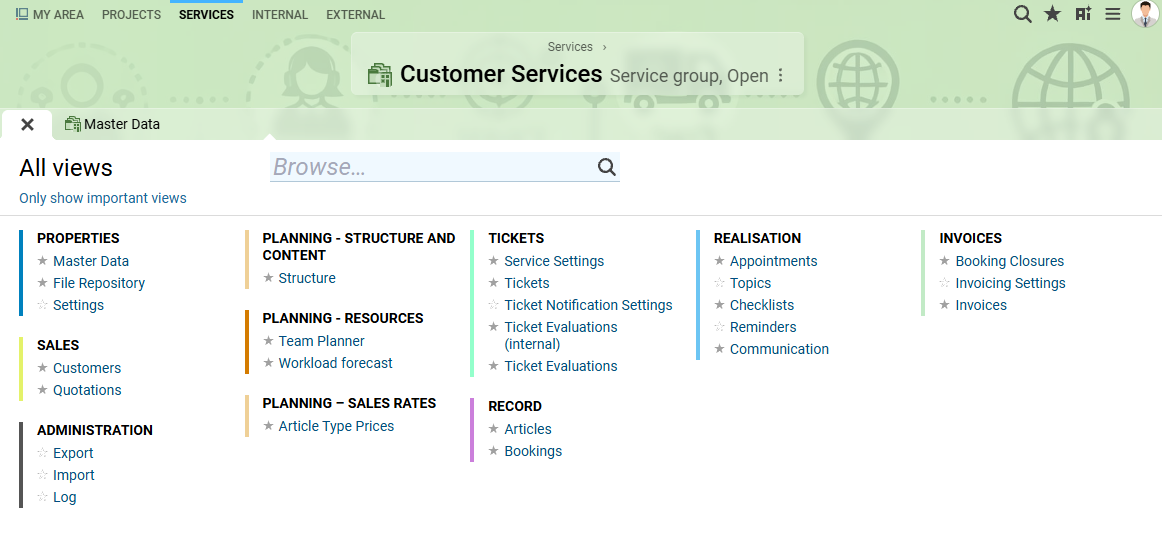
New “Services” Workspace: Centrally Organize Ongoing Service Processes
BCS 26.2 introduces the new “Services” workspace. It was designed specifically for long-term support, maintenance, and operations services that continue on an ongoing basis after a project has been completed. Instead of managing these activities through project groups and ongoing tasks, you can now clearly separate projects from recurring service work.
The new workspace brings together all key features for day-to-day service operations. These include all features related to the ticket module, resource utilization, time tracking, and personal work organization, including appointments, workflows, checklists, and follow-ups. Quotes, invoices, products, reports, and analyses are also available directly within the service context. Roles such as Service Manager, Service Administrator, and Service Observer ensure clear responsibilities across the team.
For resource planning, you can account for recurring workloads through baseline capacity requirements and temporary workloads through capacity allocations. The new capacity allocations support both utilization planning and the prevention of overbooking. The configurable ticket score makes it easier to prioritize tickets. You can also conduct customer satisfaction surveys directly within a ticket and analyze the results afterward.
Starting with BCS 26.2, the workspace is available as a separate module that can be activated and is also available for BCS.light.
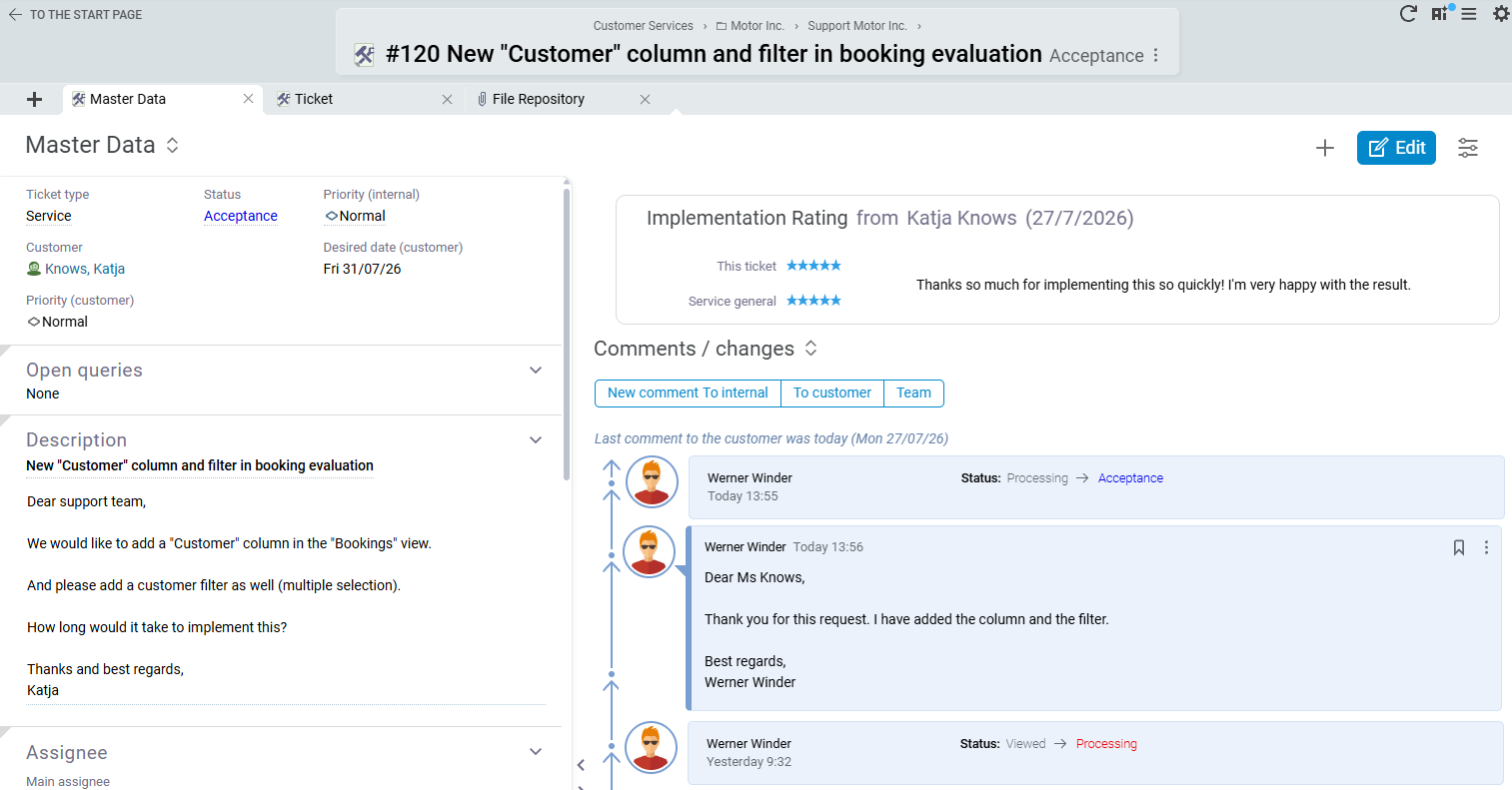
Record and Analyze Customer Satisfaction Directly in the Ticket
With the new feature, your customers can provide feedback after a ticket has been closed, either through a simple rating, such as stars, or by leaving a free-text comment. This feedback is displayed directly in the ticket and can also be included in lists, reports, and analyses. In addition to traditional metrics, BCS can now capture the more qualitative dimension of customer satisfaction.
This benefits both customers and internal stakeholders. Customers can share specific feedback about their experience, while service managers, account managers, and executive management gain a clearer overview of satisfaction at both the ticket and customer level. With this optional new module, you can measure the quality of your customer relationships and collaboration.
The feature is available for BCS.light.
Interactive Tooltips: More Information Directly in Your Work Context
With BCS 26.2, tooltips have been significantly enhanced. In addition to descriptive guidance, they now provide additional information and relevant links as well as, in some cases, direct actions exactly where they are needed.
For example, contacts, customers, project managers, agenda items, invoice line items, payment information, and related documents can be viewed more quickly without having to open the corresponding detail view. Longer content is also presented more clearly, links can conveniently be opened in a new tab, and switching between tooltips is smoother.
The result: fewer clicks and less mouse movement, a faster overview, and an overall more consistent and intuitive user experience in day-to-day work.
The feature is also available in BCS.light.
Improved and More Flexible Assistant Navigation
In BCS 26.2, working with assistants is significantly easier. The assistant remains open even when you switch to other views. This allows you to look up information or complete additional tasks and then continue exactly where you left off.
Within the assistant, you can move flexibly between individual steps and, when needed, jump directly to a later step. Views you have already visited are clearly marked, so you can always see which areas you have already completed.
The result: less loss of orientation, greater flexibility, and a more structured approach, even for complex workflows.
The feature is also available in BCS.light.
Additional selected features of 26.2
GUI & Usability
- Manage email notifications more selectively and clearly
- Share views, including filter and display settings, via direct links
- Create follow-ups for additional objects directly through Personal Work Organization
- Standardized project filters across seven views and added recursive selection options
- Standardized keyboard shortcuts on macOS in line with platform conventions
- Performance optimization: Stop loading tree structures early when too many results are returned
AI in BCS
- AI-generated summaries of requirements
- Use AI to summarize the customer contact history from the past year
HR Administration
- Use remaining vacation entitlement beyond the expiration date when vacation begins on time
- Record sickness appointments without limiting them to the target working time when required
Invoicing
- Visualize the XML content of outgoing ZUGFeRD invoices directly for easier review
- Create ZUGFeRD invoices with SEPA direct debit and stored mandate data
- Standardized incoming invoice detail views and preconfigured them according to the invoice type
- Standardized incoming invoice list views for projects and tasks, with optimized filters, columns, and presets
- Finalize invoices sequentially through number range-specific queues, independently of the user session
Scrum
- Create product items individually, in batches, or with an assistant via the New menu
- Automatically create and link follow-up user stories, including copied master data and open tasks
Project Planning & Controlling
- Assign resources via drag and drop in the Project Plan and Effort Plan
- Display personal and team-wide actual effort transparently and consistently for tasks planned at team level
- Prevent the total planned effort for interval-planned tasks from exceeding the available capacity
- Analyze cost accounting for cost objects, cost centers, and employee cost centers using enhanced tree structures
- Reduce project structures in the Non-Personnel Cost Plan to elements with planned or actual non-personnel costs
- Project Controlling: Add flexible analysis columns and custom indicators to interval-based Non-Personnel Cost Plans
Security
- Integrate ES256 as an encryption algorithm in BCS
- Securely reauthenticate password changes and resets using a passkey
Additional Improvements
- New view for analyzing inquiries at department level
- Optimized applicant management and more efficient access-rights configuration
- CRM: Display sales contacts on a map and add contacts directly to mailings or surveys
- Quote Creation: Create quotes without separately stated VAT and include the legally required VAT notice
- Time Tracking: Display effort recorded for general tasks separately in the daily chart
- Tickets: Filter personal tickets by primary and additional responsibility
And That’s Not All!
Discover even more new features and find detailed descriptions of all enhancements in the BCS release notes and documentation.