Release information BCS 25.4
BCS 25.4 – More Overview, Informed Decisions, Simple Organization
With BCS 25.4, users benefit from significantly improved project controlling, greater transparency, and more efficient daily work. Modernized diagrams and an interactive milestone chart simplify the analysis of costs, project progress, and trends, making deviations and opportunities immediately visible. At the same time, an optimized Kanban Board enables fast and intuitive personal work organization in daily operations. Additional new filtering and reporting functions in tickets, time tracking, and resource planning take processes to the next level.
Modernized Cost Diagram with Tree Structure
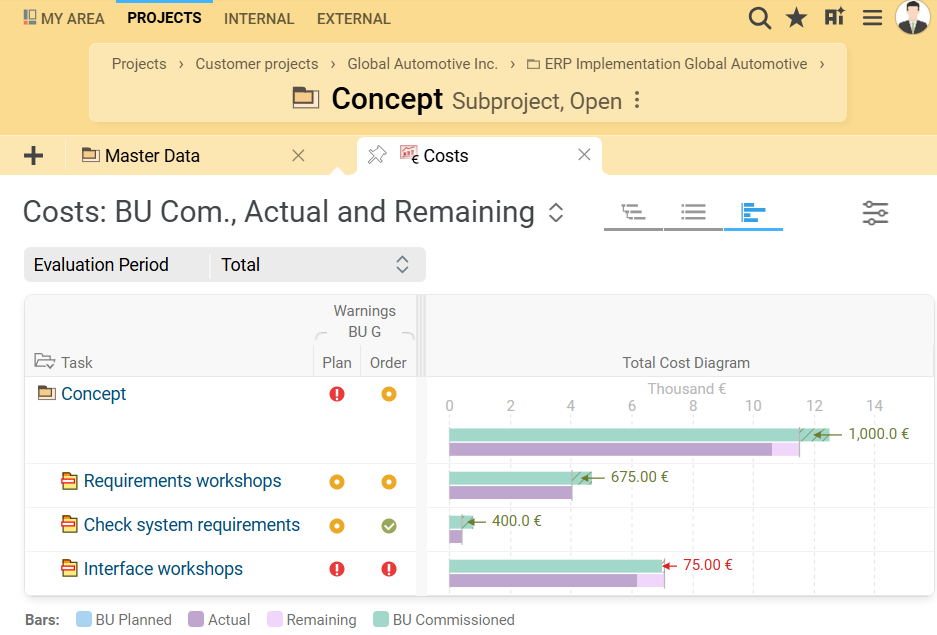
The cost diagram (total, personnel, and material costs) in BCS has been technically and visually modernized and switched to D3 chart technology. It now aligns consistently with other diagrams such as the effort diagram, project plan, and Gantt chart. The new tree structure maps the entire project hierarchy and allows flexible expansion and collapse of WBS elements.
Project managers and controllers gain a much better overview of total, personnel, and material costs at all levels—from programs to individual work packages. Budget deviations are easier to spot thanks to clear bar and traffic-light visualizations. Filter and display options allow targeted analysis by cost type, time period, or planning model. The new cost diagram improves transparency and supports informed decisions in project controlling.
This feature is also available for BCS.light.
Interactive Milestone Chart with D3 and New Analysis Functions
The milestone chart in BCS has been migrated to D3 and updated to match the modern styling of the historical line chart. Line labels are now displayed directly at the line ends and move on hover. Users can click to access milestone master data directly. Tooltips have been enhanced to show category information and shortened labels.
Users benefit from a clear, interactive chart, a new time-range filter, consistent display in overview board elements, and the ability to embed the chart in reports. The layout has been optimized. The modernization facilitates analysis, makes trends immediately visible, and ensures a consistent, intuitive presentation of milestone progress.
This feature is also available for BCS.light.
Optimization of Views and Usability in “My Kanban Board”
The “My Kanban Board” view in “My Area,” including the subviews “Cards” and “List” and the card editing dialog, has been GUI-optimized. New defaults, column and filter adjustments allow large numbers of cards to be searched, edited, and displayed more quickly. A text filter searches multiple attributes simultaneously. Meta-information such as category and priority is visible directly on the cards. The list view has been enhanced with new columns, inline editing, edit buttons, and new/copy functions.
Cards can now be deleted directly in all Agile boards and in “My Kanban Board” via the Delete key. These changes make the personal Kanban board much clearer, faster, and more intuitive, greatly increasing efficiency when managing large numbers of cards.
These features and functions are also available for BCS.light.
Ticket Evaluations via Keywords
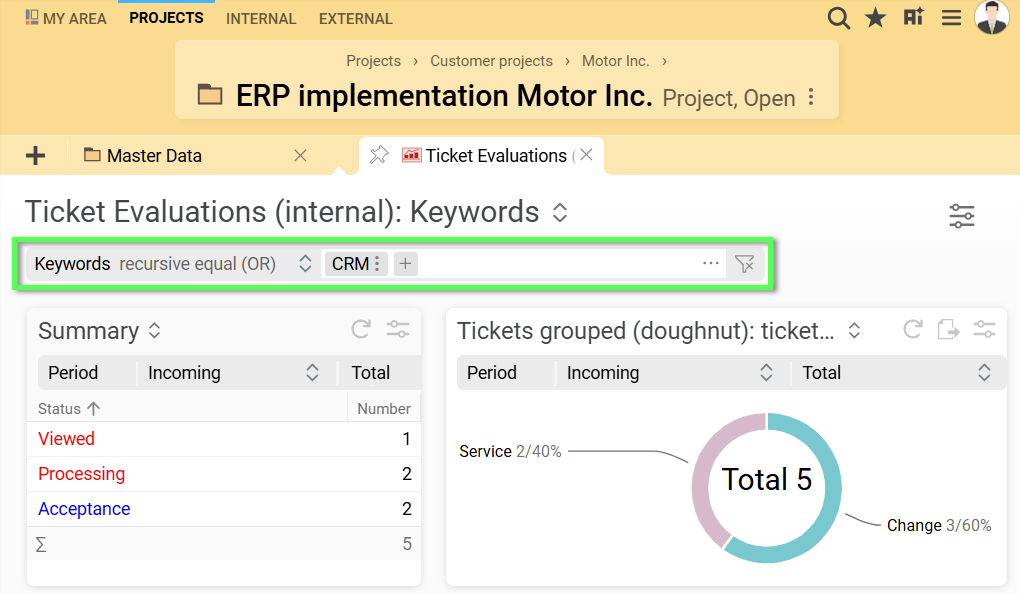
A keyword filter has been added in the “Ticket Evaluations” view, allowing tickets to be analyzed by topic, even if they are distributed across different customers or projects. The filter searches all relevant board elements simultaneously and can be defined directly on the board, enabling targeted analysis by keyword.
This allows staff to quickly assess the importance of individual topics or ticket types without manually reviewing all tickets. The filter provides more efficient, focused evaluations and eases work, especially with large ticket volumes.
This feature is also available for BCS.light.
Additional selected features of 25.4
GUI & Usability
- Unified object copy functionality
- Marking of fixed WBS elements in the project plan
- Context menu with direct access to assistants
Agenda & Appointments
- Display mobile work in the deployment plan
- Linking meeting minutes in contact histories
- Direct jump to agenda items in appointments via link
CRM
- Automatic duplicate check
- Reporting in the “External” workspace at root level
Invoicing & Expenses
- Editable billable effort in booking views
- Employee expense report linked to incoming expense invoices
- Create supplier credits separately per order
Tickets
- Enhanced subscription management for tickets and tags
- Ticket status history: real-time updates for current tickets
Time Tracking (Daily Logging)
- More compact search results
- Actions on bookings: copy booking, move booking
- Default settings for presence in daily logging
Resource Planning
- Resource requests for user groups
- Automatic integration of resource requests into the effort plan
- Automatic distribution of resource requests to employees
Administration
- Permission definition – filter by technical name
- CSV download of the permission matrix
- Permission log with mandatory change reason
Scrum
- Map relationships between tickets and user stories
- List view for user stories and epics in the “Products” area
- Instant notifications for changes to user stories
Contract Management
- Multi-currency support for contracts
- Contract costs per interval
Security
- Update passwords in the vault
- Improved management and security of API keys
Other
- Configurable calculation methods for proportional analyses
- Structure plan for operational activities
And that's not all!
You can find even more new features and detailed descriptions of all new functions in the release notes and documentation for BCS.