Release information BCS 25.3
The new features of BCS Release 25.3
BCS 25.3 makes everyday project work smarter and clearer: AI provides support for tickets and user questions, maps visualize customer locations and sales potential, while advanced verification mechanisms for e-invoices and the implementation of Swiss QR guidelines ensure security and compliance.
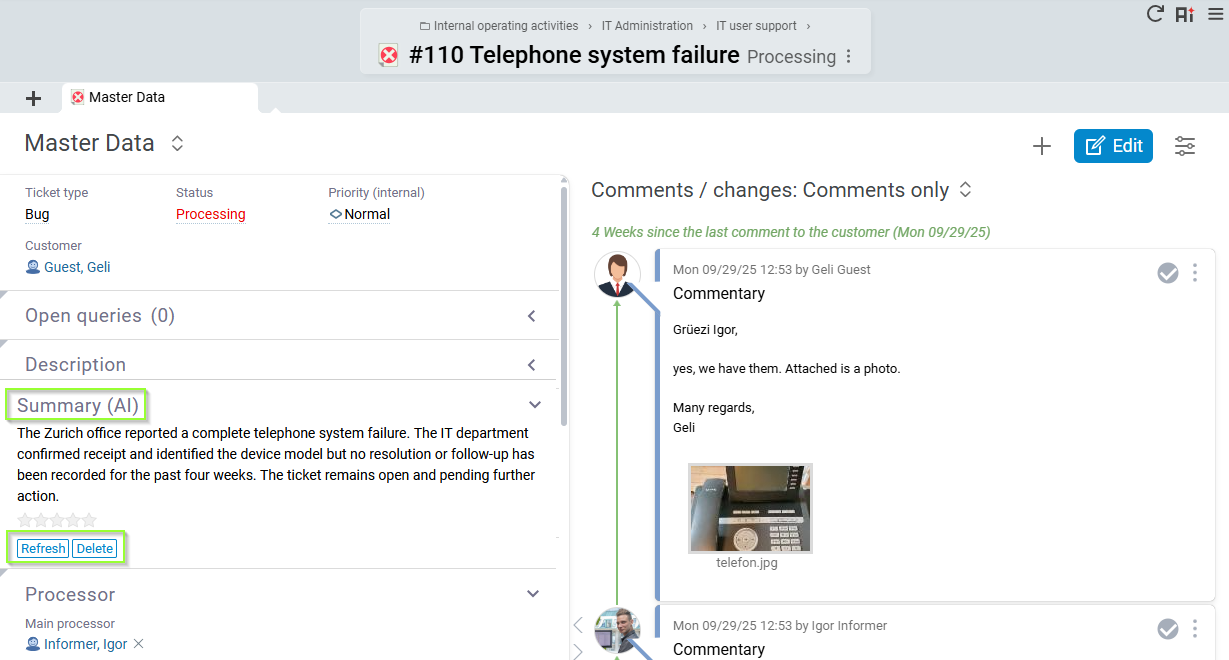
AI-generated ticket summary
Starting with BCS 25.3, the new AI ticket summary automatically creates a compact overview of a ticket's content, processing status, and history. This allows users to see at a glance what has already been done and what steps are still pending—without having to read or scroll through long texts. The AI is gateway-controlled, secure, and versionable. Requests are forwarded to the Projektron server and then on to Mistral AI – La Plateforme via the Projektron API gateway. Processing takes place exclusively on EU servers to reliably protect company data.
This feature is not available for BCS.light.
AI-based user help
How do I create a ticket? Where can I record project risks? How do I enter work deadlines? BCS users can now get quick and competent answers to questions like these from AI. Starting with BCS 25.3, AI-supported user help is also available to on-premises customers. This provides users with quick, accurate answers to user questions about BCS. The AI accesses the extensive BCS documentation and company-specific knowledge.
Administrators and project teams can flexibly configure the AI and use it for their own use cases. Thanks to RAG technology (Retrieval-Augmented Generation), answers are reliably generated from internal data sources – ideal for sensitive corporate environments.
Communication takes place via the Projektron API gateway, which forwards requests to the Projektron server. The AI assistant currently uses the OpenAI platform (GPT-4o), whereby no company data is transmitted. The use of Mistral AI – La Plateforme is planned from November.
The function is available for BCS.light.
Location data of contacts visualized with maps
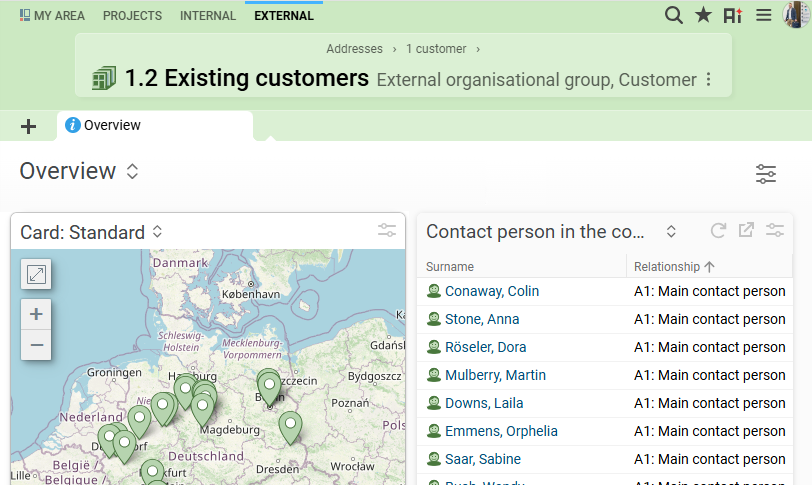
Is your customer's company headquarters located in Podunk? To help you quickly see where your customers are located in the future, you can use a location map based on OpenStreetMap starting with BCS 25.3. The map not only shows the locations, but also visualizes the sales potential. The new GeoService is provided via the API gateway operated by Projektron. Each BCS installation automatically authenticates itself via an API key, which is delivered with the license file from version 25.3 onwards.
This function is not available for BCS.light.
E-incoming invoices rounded off: duplicate check, plausibility check, and extended profile support
BCS now provides even more comprehensive support for capturing and checking e-incoming invoices.
A new duplicate check compares invoices by date, total, supplier, and invoice number. Three matches trigger a warning, four matches trigger a red flag. A link leads directly to similar invoices, while rejected invoices are excluded from the check. The check period can be configured, and the check is performed automatically.
In addition, a plausibility check ensures that invoice data is compared with the recipient and supplier data stored in BCS, such as address data or IBAN. Discrepancies are displayed as warnings. The check is performed automatically and can be triggered again manually.
In addition to the ZUGFeRD profiles EN16931 and XRechnung, EXTENDED and BASIC are now also supported.
BCS also processes incorrect PDFA files, provided that the XML document is recognizable and validated. These imported invoices are marked as conditionally valid.
The functions for importing and processing incoming e-invoices are also available to customers who do not use the invoicing module.
These functions are available for BCS.light.
Swiss Implementation Guidelines for QR Invoices, Version 2.3, valid from November 21, 2025, implemented
With version 25.3 of BCS, we are implementing the updated Swiss Implementation Guidelines for QR invoices (version 2.3), which will be binding from November 21, 2025. This innovation will benefit all BCS customers in Switzerland who use QR invoices. With this implementation, you can ensure that your QR invoices remain legally and technically compliant even after the deadline – without any manual adjustments. The new features have also been merged into 25.2.12. The new regulation integrates seamlessly into your existing e-invoicing processes with BCS, allowing you to continue working efficiently as usual.
The function is available for BCS.light.
Additional selected features of 25.3
GUI & Usability
- Easier creation of projects and project structure elements without an assistant
- Redesigned login screen
- Total display for marked/selected rows in lists
- Lists within lists: clearer display and easier editing
- Optimized keyboard control via tab and arrow keys
- Optimized detail views of full-text search and full-text search for PSP elements
- OID token output improved
- New facet autocompletion on various objects
- Intelligent tooltips added
Agenda & Appointments
- Appointment agenda: new default setting and full-text search.
- Cards can be created from agenda items
- “Create memo from appointment” action easier to access
- Resources for appointments are displayed in categories
Product Management
- Mouseover information shows when a person is expected to be present again
- Easily change checklist entry responsible persons
- New “Change Properties” tool in the Product Management module
- Structure, project, and schedule: Start, end, and duration are now consistently editable directly and are calculated automatically
- Person groups can be entered as observers on objects
- New plan overbooking block on interval-planned projects
- New predefined settings for subtypes
CRM
- Creation and sending of circulars directly at the organization group level
- Circulars can now be created and edited directly in the “Add recipient” tool
Quotes & orders
- Optional update of text blocks when copying quotes
- Generate and update quote previews directly from the quote structure.
- Implementation of a key date logic in the “Invoicing/Project” view
Time recording
- Assign activities directly to appointments when booking daily
- Can be booked on Scrum elements in addition to tickets
- Export of daily report template supplemented with path
- Activity types for appointment types can be pre-assigned automatically
Invoicing
- No more invoices to departments to avoid debtor errors.
- Payment amount automatically calculated for “Paid with discount” status
- E-outgoing invoices: Version changes for ZUGFeRD and XRechung implemented
- “Billing > Export settings” module removed and content migrated to the “Invoicing” module
Project management
- Processing of material costs for closed projects made more transparent
- Modernized expense chart: Better overview and comparability
- Project manager's comments: Project traffic light and escalation functions now displayed more clearly and uniformly.
- Material cost plan: Percentage adjustments to planned sales prices possible
Capacity utilization forecasts
- Capacity utilization forecast: Expansion of the “Move tasks/tickets” function
- Capacity utilization forecast: New ‘Quarter’ and “Year” display options
Security
- Email to admins in case of failed login attempts
- Email and instant notification when password is changed
- 2-factor authentication can be activated centrally
In addition
- Person group administrator: “Responsible” persons for a person group can be stored
- BPMN: Start multiple BPMN processes simultaneously via selected rows
- Invoices: “Accounting data” view bundles all relevant invoice attributes
- “Effort/day” effort chart: fixed line at 10 hours per day
And that's not all!
You can find even more new features and detailed descriptions of all new functions in the release notes and documentation for BCS.