ERP for professional services: all business processes, one system

BCS connects sales, projects, resources, time tracking, controlling, and billing

Manage your business processes on a shared data basis – from customer contacts and quotations to planning, service and time tracking, controlling, and invoicing. BCS is ERP software from Germany and supports professional services organizations with integrated workflows, flexible structures, and high standards for data protection and information security – in the cloud or on-premises.

Get to know BCS in an online presentation
✔ Free of charge✔ No obligation✔ 14-day trial afterward
GetApp ReviewsGetApp BadgeTrusted Bewertung für BCS, sehr gutCapterra Reviews für BCSOMR Rating Widget für BCSOMR Badge für BCS

What is an ERP system for professional services?

An ERP system for professional services connects the commercial and operational processes of a service organization. The focus is often on customer projects and services. Typical questions include:

  • Who is responsible for which task?
  • What capacity is available?
  • How much effort has been delivered?
  • What can be billed?
  • How is the project budget developing?

A suitable system brings the required data together. For example, it connects CRM, quotations, project planning, time tracking, resource management, invoicing, and controlling. Which functions matter most depends on the business model: a consulting firm bills different services than an IT service provider with ongoing service contracts. What matters is whether day-to-day processes work together without constant manual data transfers.

BCS: ERP for service providers with integrated project management

BCS connects the commercial and operational processes of your service company on a shared data foundation. From customer contacts and quotations to projects, resources, service recording, and invoicing, the functions work together seamlessly. Customer service, document management, and personnel management complement your project business. Automated processes and AI support help reduce routine work and make information available faster. Click the following views to enlarge them.

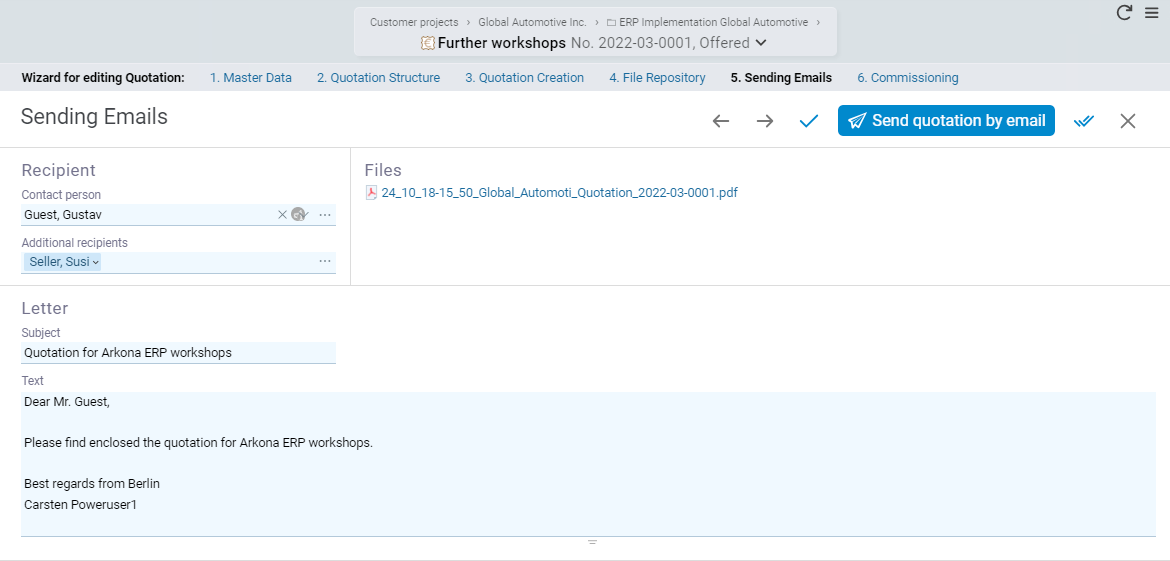
Quotation wizard in BCS with integrated email sending

Customer management and quotations

Record contacts, customer inquiries, and sales opportunities in the CRM. Information from customer management and project planning flows directly into your quotations. This enables you to calculate services, effort, and prices transparently and reuse existing data for subsequent order processing.

Quotation preparation
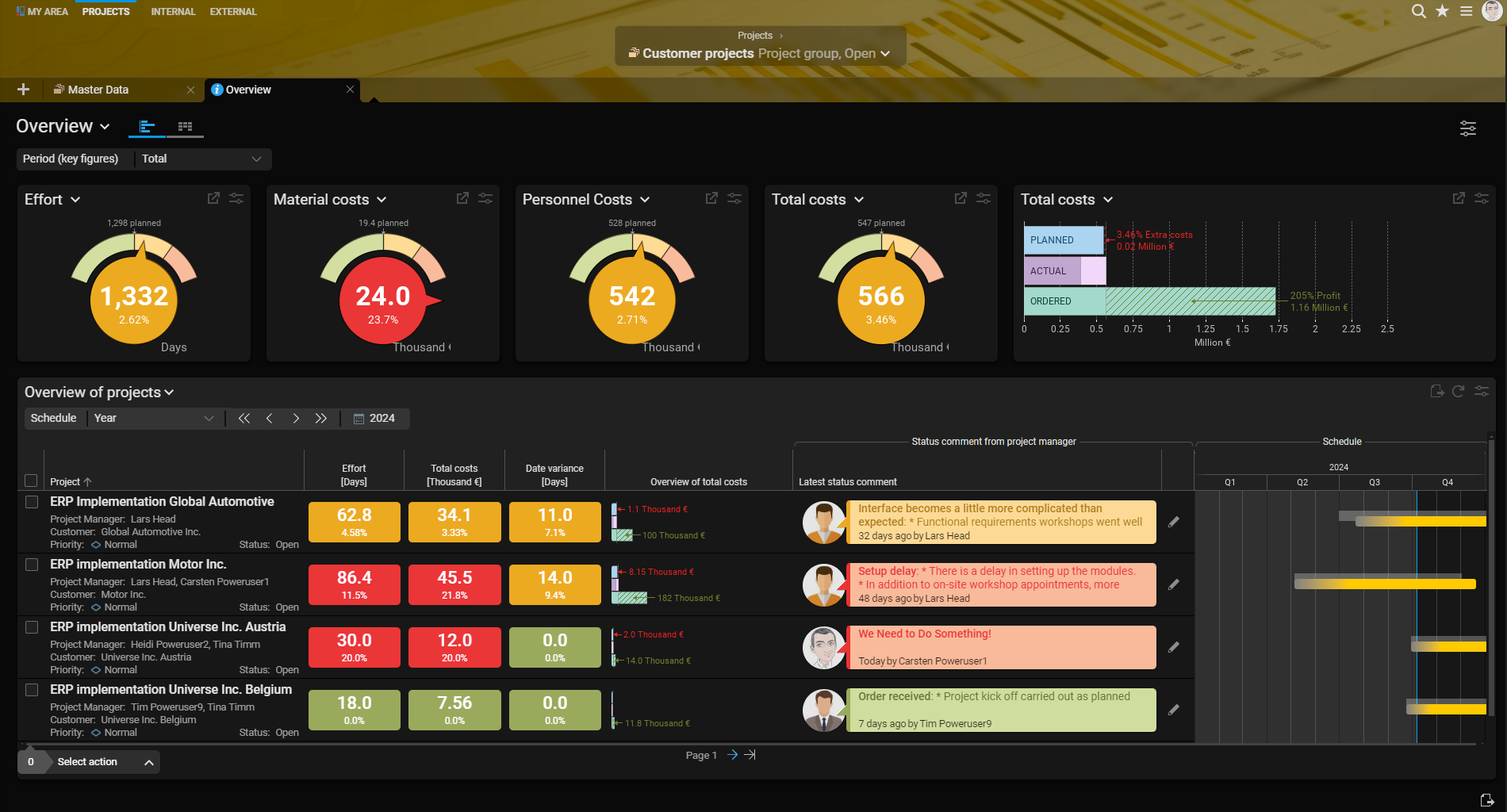
Multi-project overview in BCS

Plan projects and resources

Structure tasks, deadlines, budgets, and responsibilities. Resource management shows available employees and potential bottlenecks. Even with several customer projects running in parallel, you retain an overview of capacities, dependencies, and priorities.

Project planning
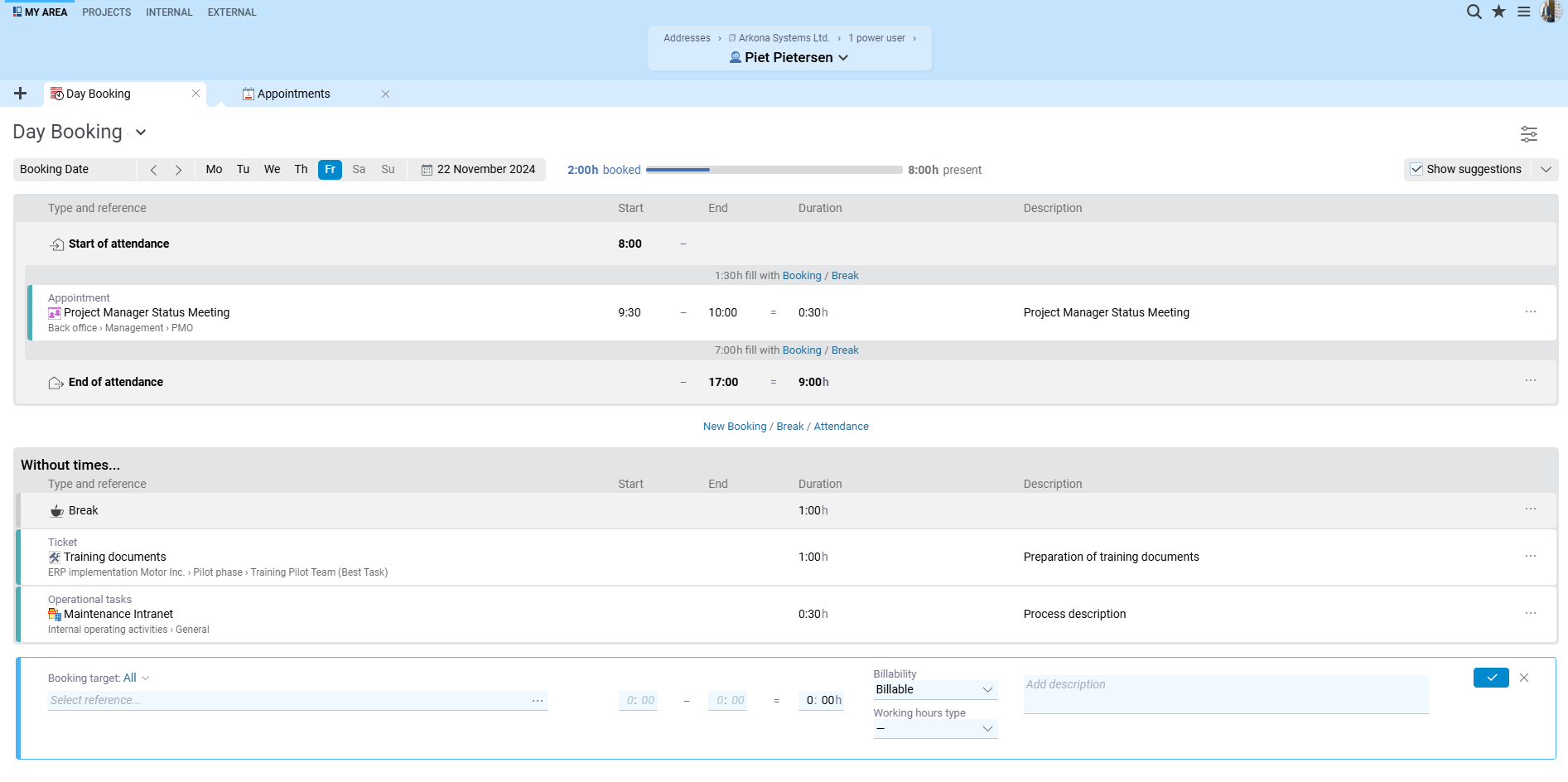
Day Booking in BCS with project-related time recording

Record time and services

Employees record time against projects, tasks, orders, or tickets. The recorded services are immediately available for analysis and subsequent invoicing. Billable work therefore does not have to be collected from different applications.

Time recording
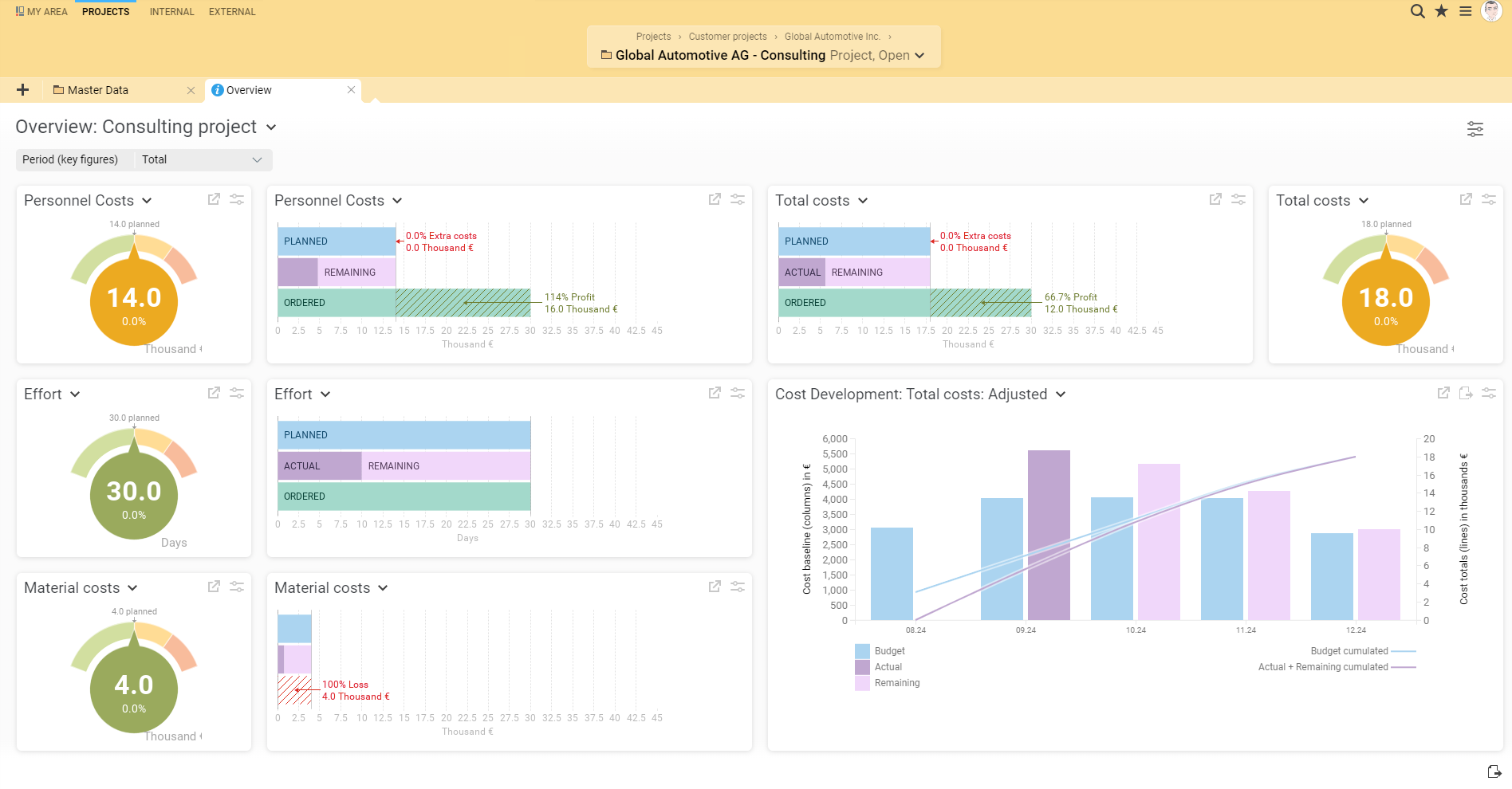
Project overview in BCS with KPIs and cost progression

Manage profitability and budgets

Compare planned and actual effort, costs, and budgets. KPIs and analyses reveal deviations at an early stage. Project managers can see how customer projects are developing financially and where action is required.

Project controlling
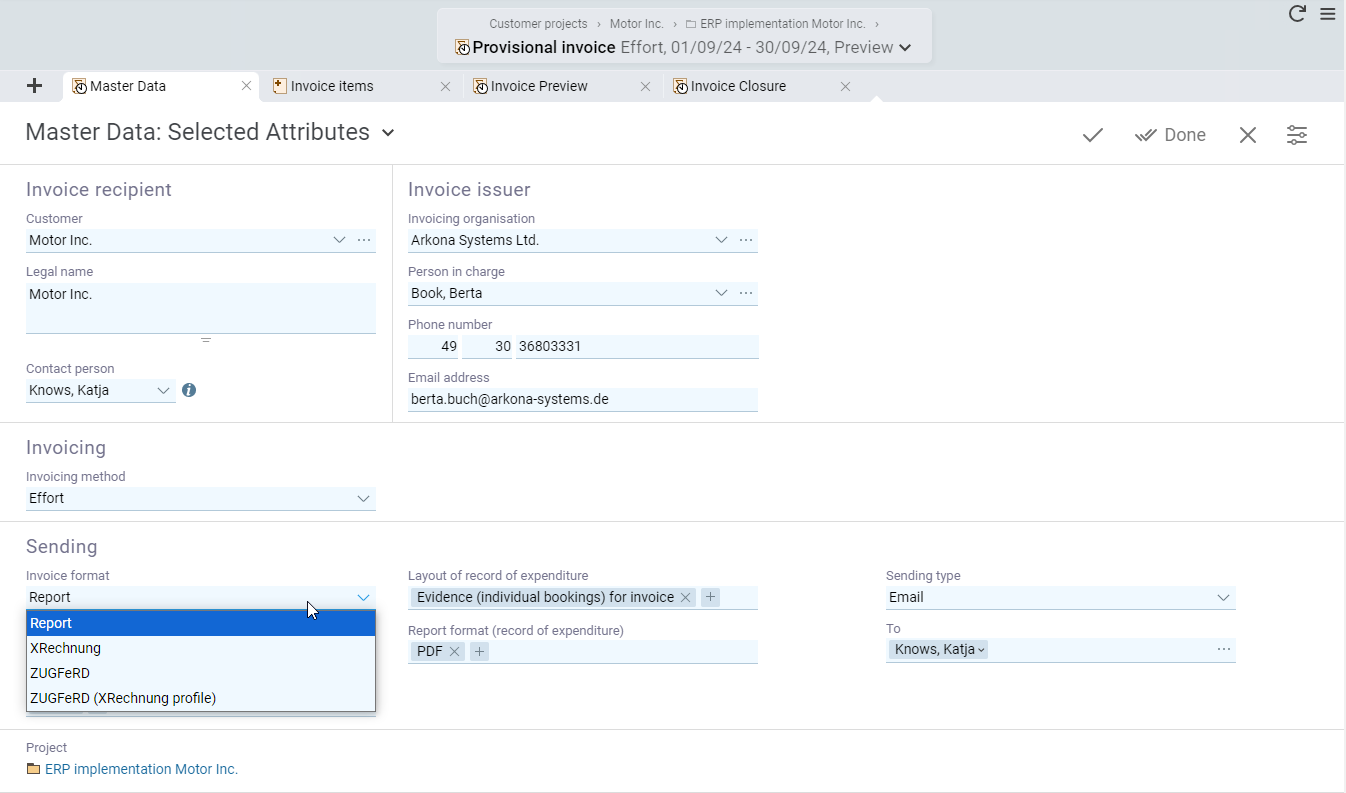
Master data of an invoice in BCS

Invoice services

Use project data and recorded services to create invoices based on effort, fixed prices, or payment milestones. BCS supports electronic invoice formats such as XRechnung and ZUGFeRD. This connects operational service recording directly with commercial invoicing.

Invoicing
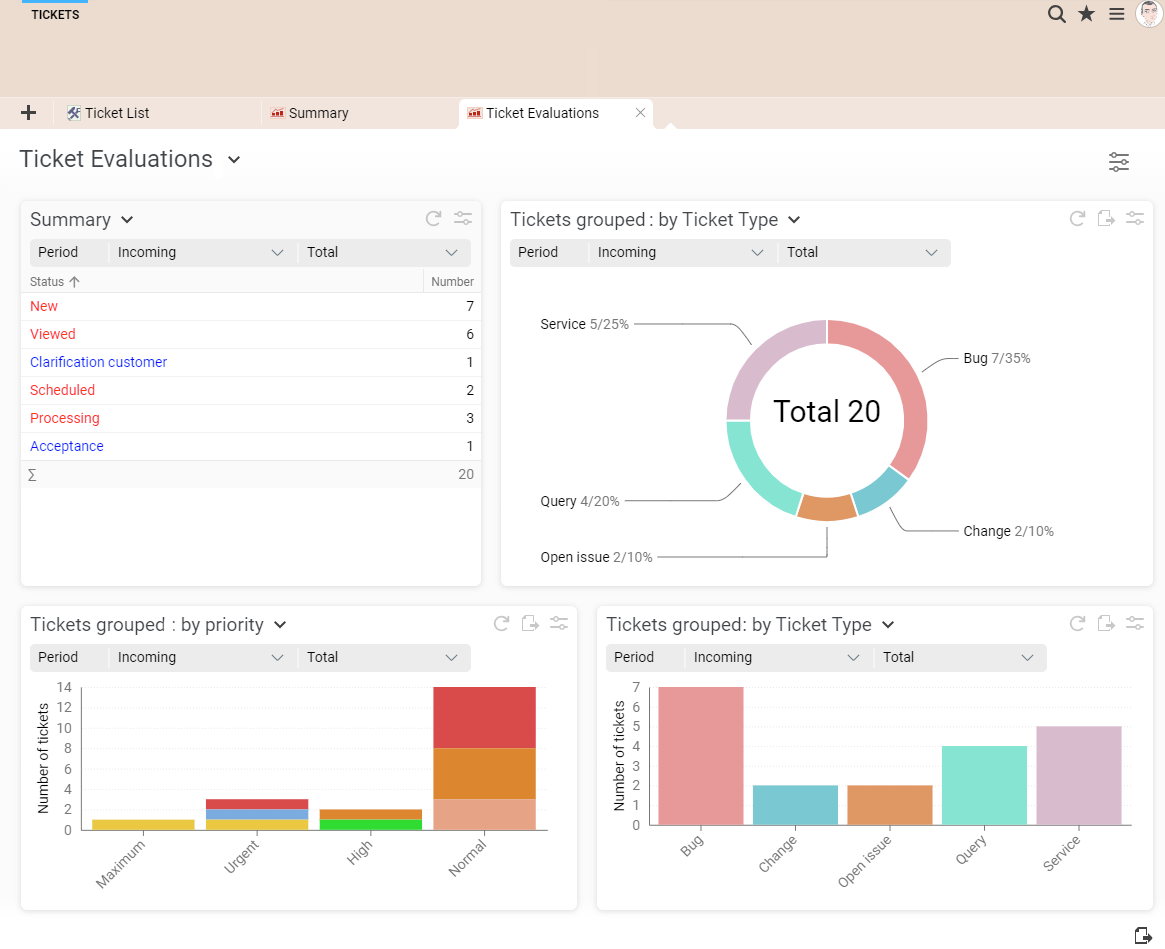
Ticket analysis in BCS with tables and charts

Process tickets and support requests

Record, prioritize, and process customer requests and internal tickets in one central location. Comments, responsibilities, and processing statuses remain transparent. Time can be recorded directly against tickets and used for analyses and invoicing.

Ticketing system
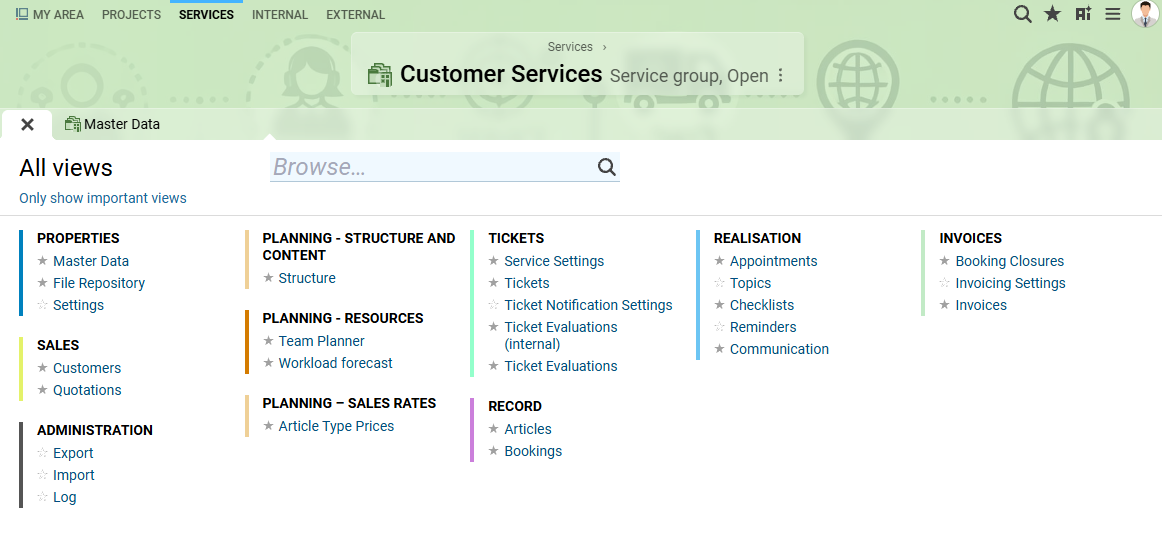
View selection in the BCS Services workspace

Organize services and customer support

Organize your ongoing service business in the Services workspace. The customer portal, service hours, and agreed response times support customer service. Early warnings and escalations help your team handle urgent requests on time.

Ticketing & Services
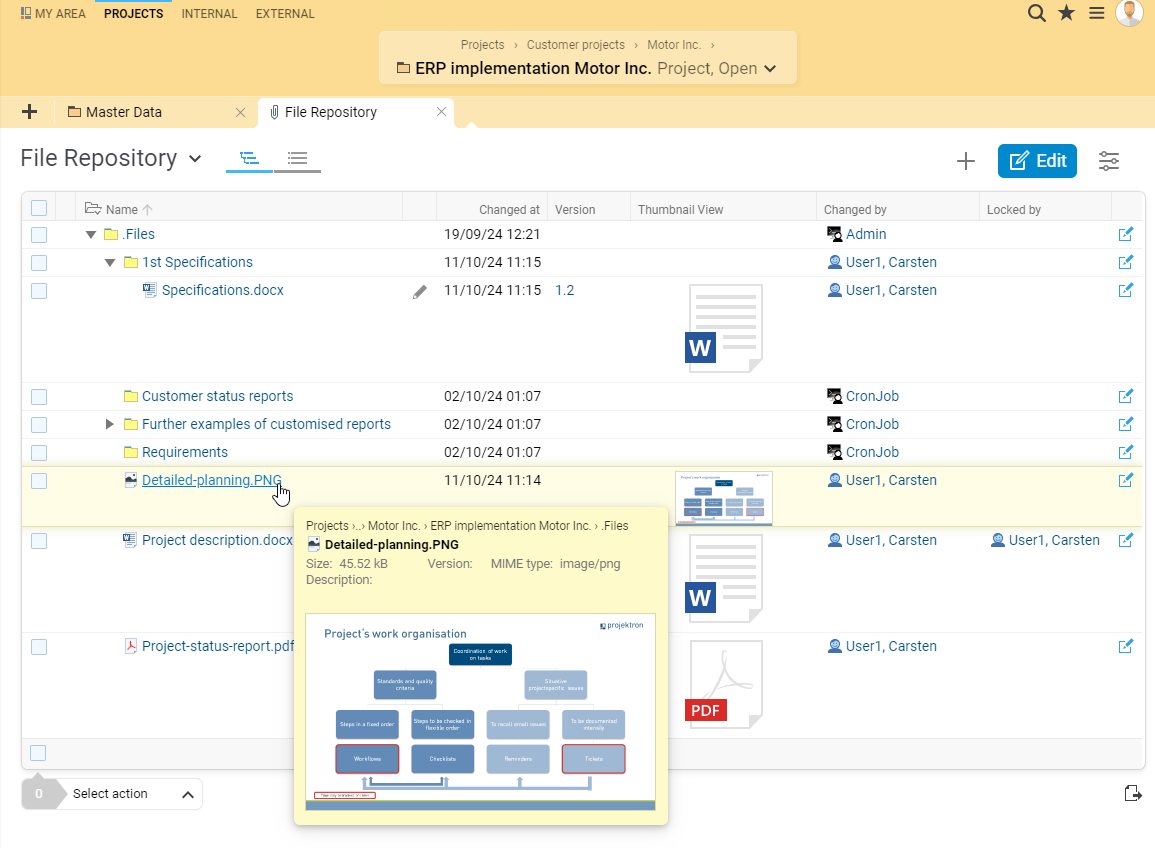
File repository in BCS document management

Manage documents and contracts

Keep quotations, project documents, and contract documents centrally available. Document management supports collaborative work on files. In addition, contract management helps you organize agreements and related documents.

Document management
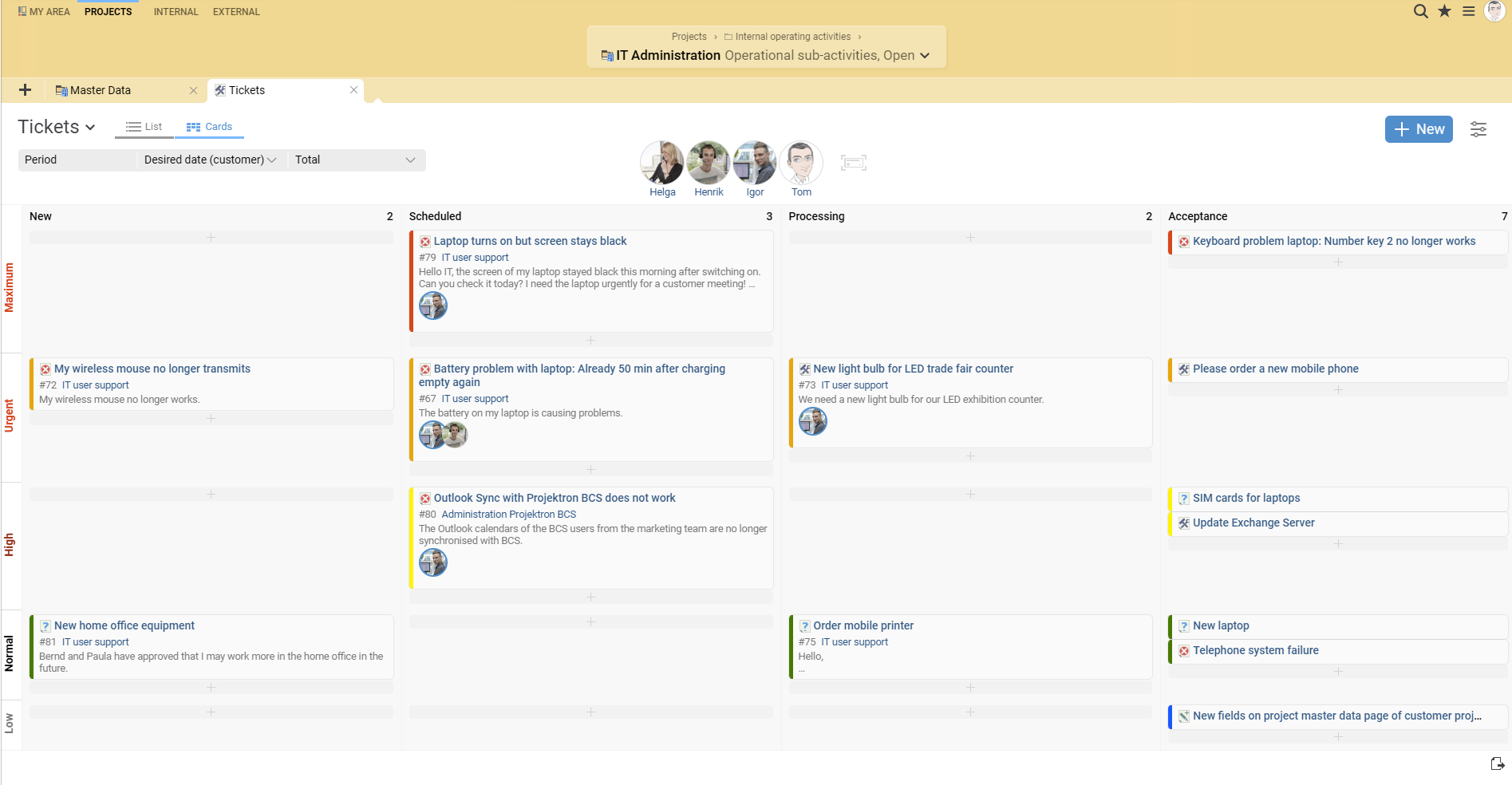
Kanban board for tickets in BCS

Coordinate collaboration and tasks

Connect the work of different teams with shared tasks, Kanban boards, calendars, and structured meetings. Information remains directly available on projects, tasks, and tickets. Clear responsibilities and transparent processing statuses simplify coordination and handovers.

Teamwork
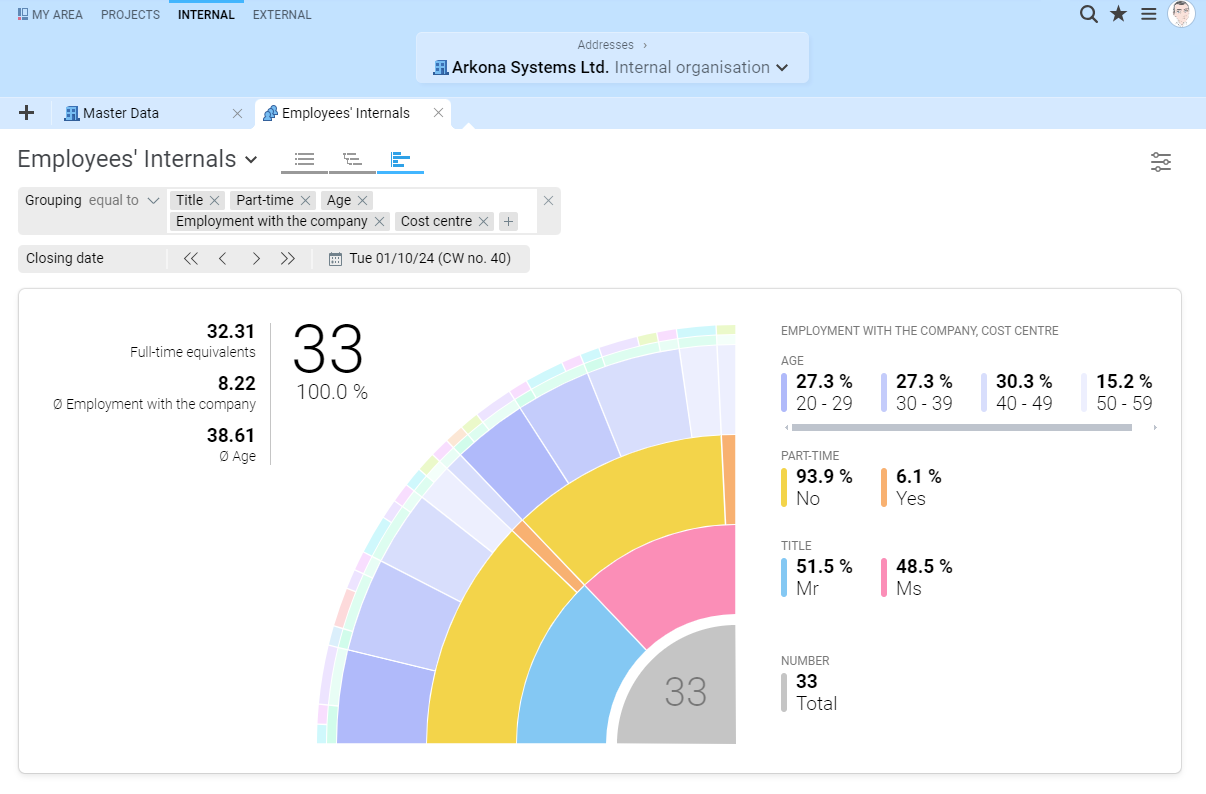
Internal employee data in BCS personnel management

Manage personnel and organization

Connect personnel management, skill management, working time, and absences. This allows you to take available skills and capacities into account when planning assignments. Roles and permissions control responsibilities and access to sensitive employee, customer, and project data.

Personnel management
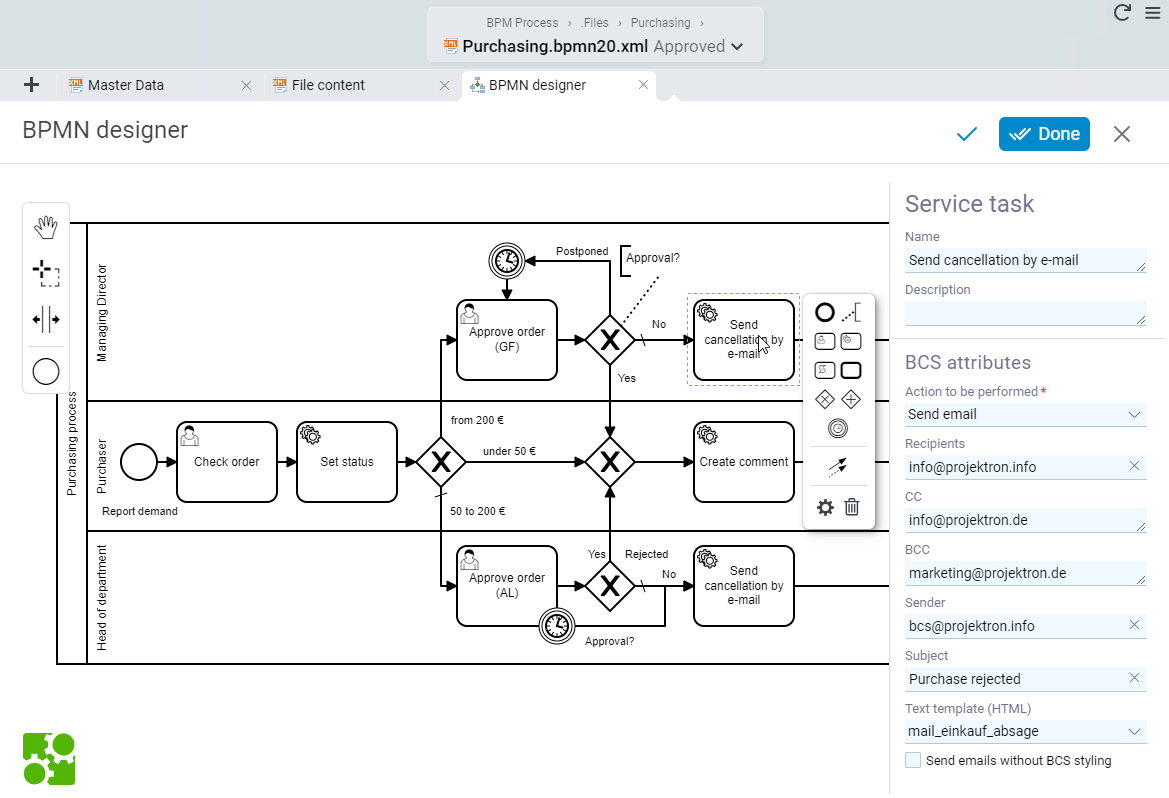
Editing a business process in the BCS BPMN designer

Automate processes and approvals

Model and manage business processes with workflows and the integrated BPMN designer. Automate quotation reviews, invoice approvals, or onboarding processes, for example. Tasks are assigned to the responsible employees; service tasks can automatically create tickets, appointments, and emails.

Process management
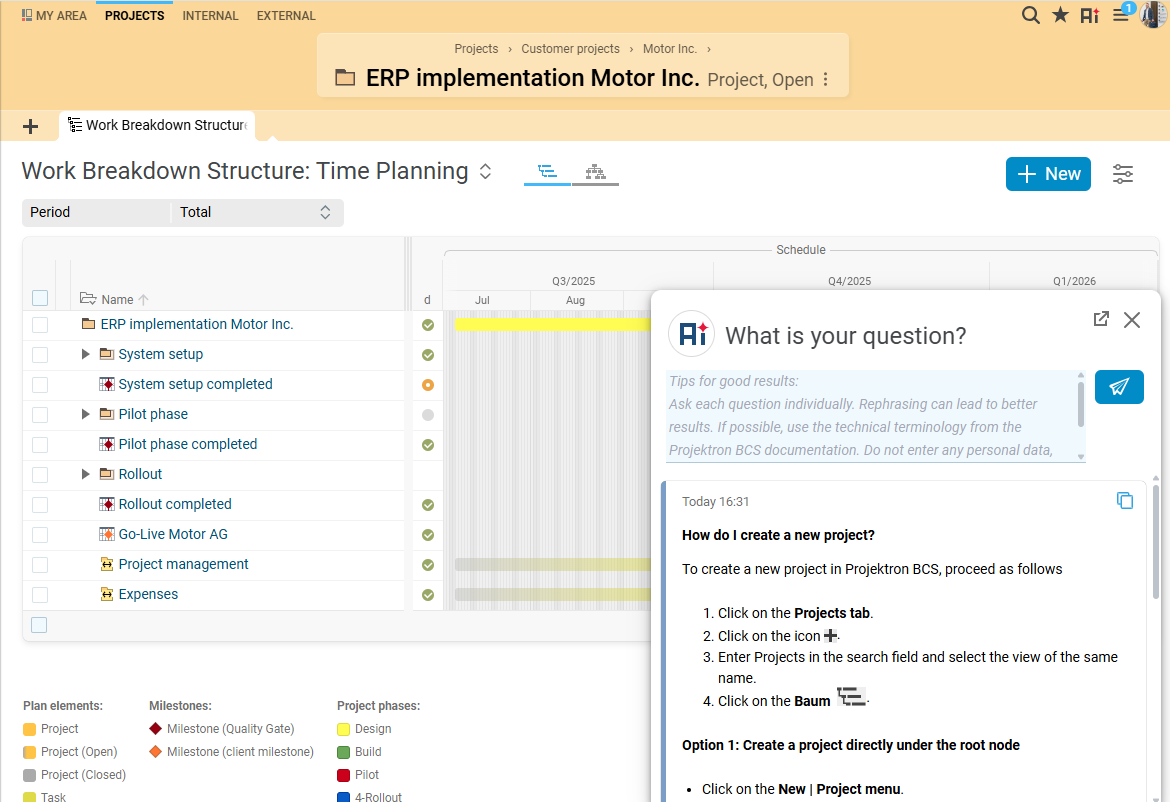
AI Help in BCS answering questions about using the software

Use AI and reduce routine work

AI Help answers questions about using BCS based on the documentation and provides relevant sources. AI summaries condense information from tickets, tasks, and selected project areas. The task assistant answers questions directly within the context of a task. This simplifies onboarding, handovers, and everyday information searches.

AI in BCS

How can service providers find the right ERP system?

Comparing features is helpful, but it is not enough to make a decision. Use a typical customer engagement to check whether the system supports your workflows from end to end. These five questions are particularly important:

  • Does the ERP system fit your services and business model?

    Do you handle one-off projects, ongoing service engagements, or both? How do you calculate and bill your services?

  • Can the system coordinate your teams and projects?

    How many teams, locations, and parallel projects do you need to coordinate? Which roles and reports do you need?

  • How does the ERP system fit into your existing IT landscape?

    Which applications should remain in place, for example for accounting, collaboration, or BI? Where should data flow without duplicate maintenance?

  • Which deployment model meets your security requirements?

    Is SaaS or an on-premises deployment the better option for you? What requirements do your IT and compliance policies impose?

  • What effort is required for implementation and ongoing operation?

    Which data needs to be migrated, who needs training, and which workflows need to be adapted? In addition to licenses, consider implementation, operation, and support.

The most important test: your own customer engagement

Evaluate BCS using a workflow that matters to your company. In an individual online presentation, we show you the relevant functions – for example, from quote to invoice or from service ticket to proof of performance.

Schedule a free online presentation
Approx. 90 minutes Focus areas of your choice Then test BCS free of charge for 14 days

For an overview of different providers: ERP for service providers compared

Customer testimonials

BCS is successfully used by numerous service providers. Here is what our customers say:

Arne Hennes

Arne Hennes

Project Management Office, DVZ Datenverarbeitungszentrum Mecklenburg-Vorpommern GmbH

“As the IT service provider for the German state of Mecklenburg-Western Pomerania, we have managed all our projects according to PRINCE2 since 2008. BCS simplifies our project work and intelligently combines functions.”

Franz Essl, IT administrator at Best-Tech GmbH in Austria

Franz Essl

IT Administrator, Best-Tech GmbH (Austria)

“It became clear that BCS, with its focus on projects, could be a better fit for us as a technical service provider than other established ERP systems that seemed to be designed more for manufacturing companies.”

Benedikt Budde

Benedikt Budde

Consultant at Kemény Boehme Consultants SE (KBC)

“We have been using BCS since 2013 to efficiently manage leads and projects, create invoices based on payment milestones, and keep an eye on profitability at all times.”

Christian Otto Grötsch

Christian Otto Grötsch

Managing Director, dotSource SE

“With BCS, we were able to replace our heterogeneous system landscape and benefit every day from the software’s wide range of functions.”

Software Made in GermanyOMR 2026 Top RatedTÜV Rheinland ISO/IEC 27001, 27017, 27018TISAX Result availableSHiG 2026

Implementation, operation, and costs

A successful ERP implementation starts with clear requirements. The key factors are the workflows you want to connect, the right deployment model, and the costs of implementation and ongoing operation.

Start with your own processes

An ERP system should connect existing workflows in a meaningful way. Start by clarifying:

  • What data is required?
  • Which teams will work with it?
  • Which workflows should be mapped in BCS first?

BCS can be implemented step by step and adapted to roles, processes, and existing systems. The implementation effort depends, among other factors, on the scope of functions, data migration, integrations, and training requirements.

Consider the deployment model and costs together

BCS is available as a cloud solution (SaaS) or on-premises. The software is developed in Germany, and the SaaS version is operated in German data centers – Software Hosted in Germany. In addition to functionality, factors such as data protection, internal IT resources, and required integrations are important when choosing a deployment model. Costs depend on the deployment model, the number of users, and the required scope of functions.

Editions and pricing

Learn more about editions, deployment models, and pricing.

Editions and pricing

ERP for service providers

Find out what matters when comparing, testing, and implementing an ERP system.

ERP guide

Software implementation

Compare a step-by-step implementation with a complete switchover on a fixed date.

Implementation strategies

Frequently asked questions about ERP for service providers

How does ERP for service providers differ from a traditional ERP system?

For project-oriented service providers, projects, employees, services delivered, and billable time are at the center of operations. For every service, it must be clear how much effort was incurred and what can be billed. Project planning, resource management, time tracking, sales, and billing should therefore work together. In a product-focused company, by contrast, purchasing, inventory, and the movement of goods may play a greater role.

Is project management software sufficient?

That depends on your processes. If you only need to plan tasks and deadlines, you may not need a comprehensive ERP system. However, if quotes, capacities, time entries, invoices, and project KPIs need to be connected, isolated project planning is often not enough. An ERP solution can bring these areas together so that data does not have to be transferred manually at every step.

Is BCS suitable for small and large service companies?

BCS is used in organizations of different sizes. The right configuration depends on your processes, the number of users, and the required level of planning detail. The area in which you want to start also matters: a team can initially use individual functions and later include additional processes. During a presentation, you can use specific use cases to determine which functions you actually need.

Is BCS available as cloud ERP and on-premises?

Yes. You can use BCS as a SaaS solution or operate it in your own infrastructure. With cloud ERP, the provider handles tasks related to technical operation; with on-premises deployment, more of this responsibility remains with your organization. The option you choose should match your requirements for IT operations, data protection, security, and integration.

What should service providers consider when comparing ERP solutions?

Evaluate solutions based on your actual workflows: How does an inquiry become a quote, how is a resource scheduled, and how are recorded services billed? This path from the first customer contact to the invoice is often referred to as an end-to-end process. An individual tool may excel at one step; what matters is whether all required steps work together. This also applies when comparing BCS with solutions such as SAP or weclapp. Open-source solutions should additionally be evaluated in terms of operating, maintenance, and implementation effort.

What role do vendors and users play when evaluating an ERP system?

The vendor can explain functions, operation, and implementation services. For a well-founded evaluation, however, future users should also test typical tasks themselves. For example, ask to see how straightforward time tracking, resource planning, and project billing work in everyday use. This helps you determine whether the business software fits your workflows.

Can existing systems such as SAP be connected to BCS?

BCS provides interfaces and options for exchanging data, including connections to SAP. The appropriate solution depends on which data needs to flow between the systems and which system should be the leading system for that data. With web services, a connected third-party system can access the services provided as a client. Clarify in advance whether an existing interface is sufficient for your specific use case or whether additional configuration or an add-on is required.

How much does an ERP system for service providers cost?

Total costs depend on the number of users, deployment model, required functions, and the effort involved in implementation, data migration, and customization. You should therefore compare the costs of your desired usage scenario rather than license prices alone. Initial information about BCS is available under Editions and pricing . A specific quote depends on your requirements.

How long does it take to implement BCS?

This depends on the scope and approach. A team with clearly defined processes can get started differently from a company that integrates several departments and existing systems. When planning, consider requirements analysis, configuration, data migration, testing, and training. If new workflows are being introduced, you should also allow time for user feedback.

How does the trial period work?

During a free online presentation, Projektron will show you BCS with the areas of focus you choose. The appointment takes around 90 minutes. Afterwards, you can test the software with demo data for 14 days. Register for an online presentation .

Find out how BCS connects your processes

Every professional services organization works differently. In a tailored online presentation, you can see the workflows that matter most to your business – from quotation creation and resource and project planning to billing.

Schedule a free online presentation
Approx. 90 minutes Topics of your choice 14-day free trial afterward