IPMA
From model to practice: Efficient project management according to IPMA standards with BCS
The IPMA (International Project Management Association) defines three areas of expertise that characterize modern and successful project management. In Germany, the GPM sets these standards. BCS, the Business Coordination Software from Projektron, reinforces the expertise that people bring to the table with professional structures, clear processes, and maximum transparency. With BCS—the secure ERP solution developed in Germany for project-based organizations—you can manage your projects holistically and efficiently in line with IPMA and GPM standards. Whether in the cloud or on-premises, BCS accompanies the entire project lifecycle and creates the basis for predictable results, smooth collaboration, and reliable decisions.
BCS: All-in-one software that optimally supports IPMA and GPM competencies
What if you had a project management software for your IPMA projects that...
➤ supports you in defining objectives and guides you through the entire process up to the project application?
➤ would provide you with comprehensive tools for project environment analysis and risk management?
➤ enable detailed and efficient project planning through various specialized tools and assistants?
➤ support your project team in the implementation and execution of projects?
➤ supports your project management in managing your projects with comprehensive project controlling functions?
➤ also facilitates the closing phase with reporting and document management functions?
Phases I and II: Initialization and definition
Right from the start of a project, it is crucial to carefully prepare the initialization and definition phases. The initialization phase involves defining the project idea, rough objectives, feasibility, risks, roles, and project organization. The definition phase involves specifying the project objectives, creating a rough project structure plan, defining milestones and success criteria, and organizing the project team.
IPMA emphasizes that project managers should have the appropriate technical, contextual, and social skills to initiate and prepare projects professionally.
Project preparation can be fully mapped in BCS: The “Apply for project” wizard guides you step by step through all the necessary stages—from the initial project idea to the finished project application.
Project goals: Software-supported target definition
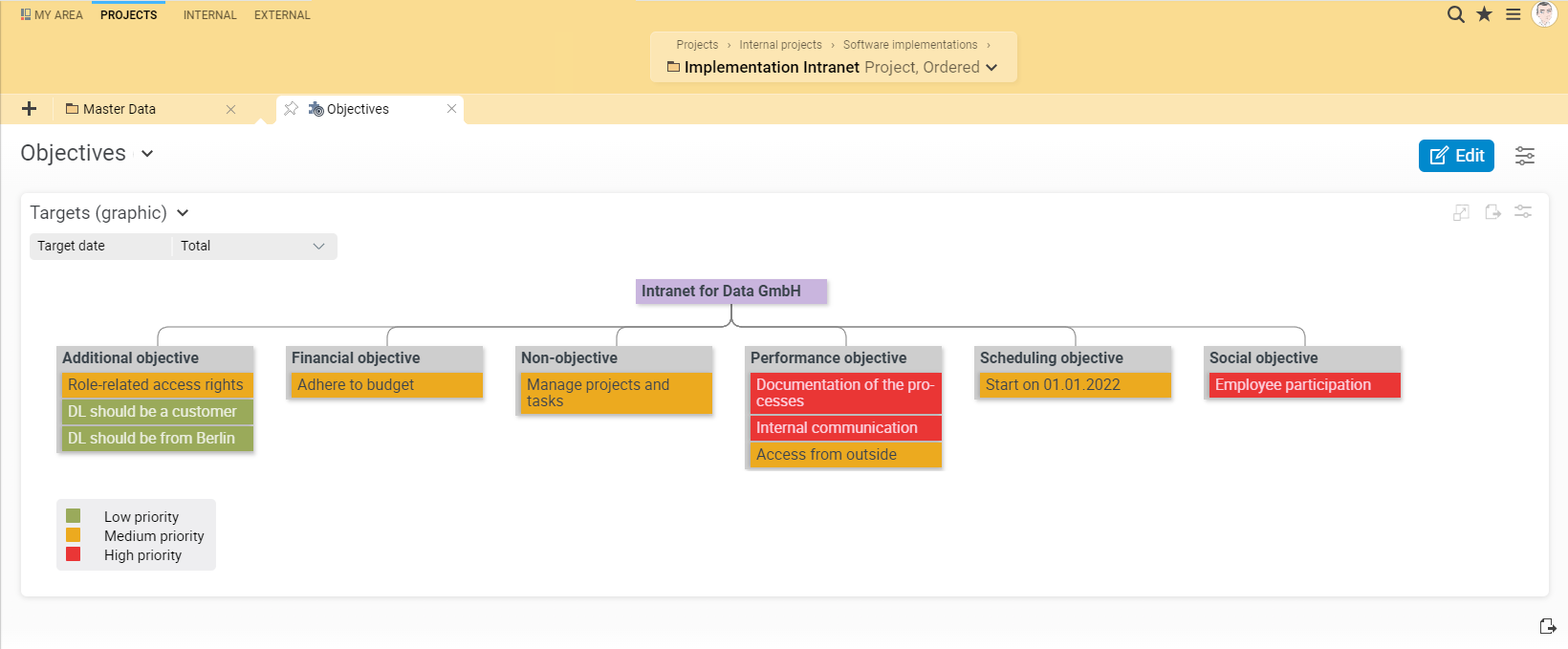
The project goals should be roughly outlined at the start of the project in order to clarify the project framework and make success measurable. The goals are then specified in more detail in the subsequent phase of detailed definition. IPMA emphasizes the importance of the project manager's skills in this regard, both in terms of methodology and in social and contextual terms.
With BCS, you can efficiently structure your specific goals: main and sub-goals, performance, deadline, cost, social, and non-goals can be recorded directly. Thanks to the dynamic goal hierarchy graphic, you can keep track of your goals throughout the entire course of the project.
Project Environment Analysis and Stakeholder Management
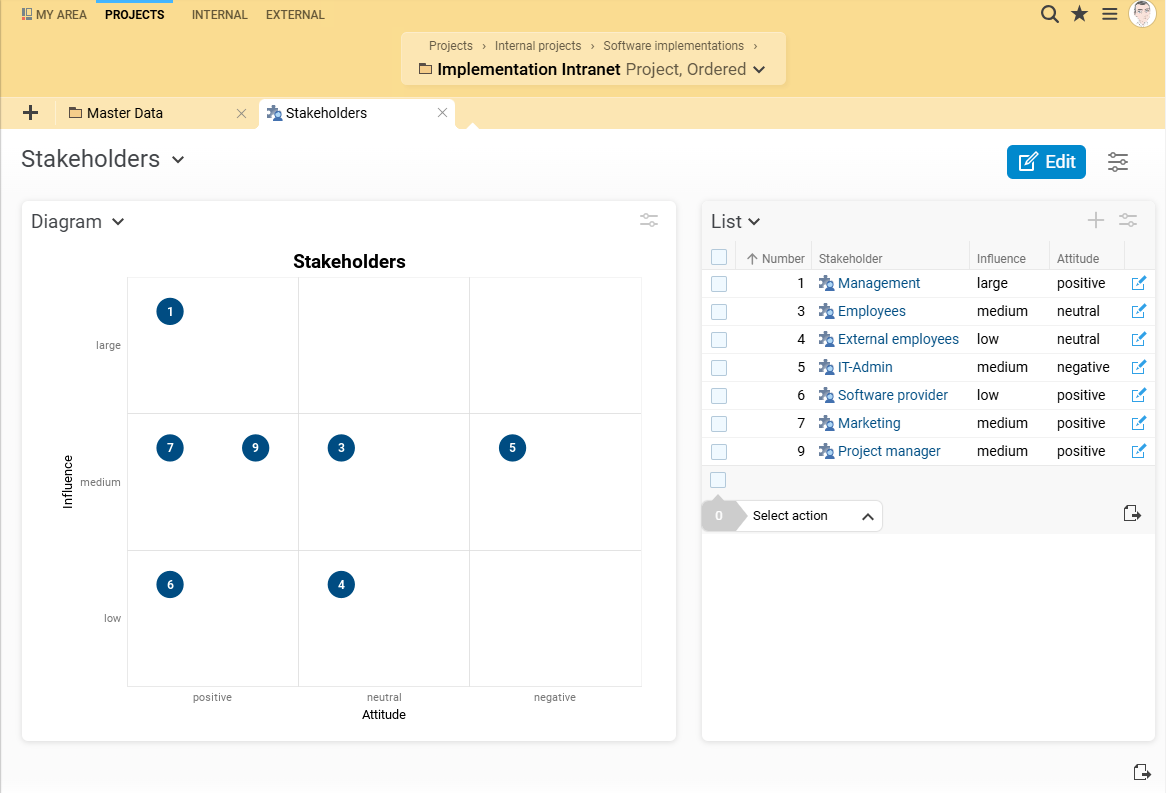
The aim of a project environment analysis is to record, examine, evaluate and document all factors influencing the project. Both the strategic importance and the possible effects of parallel projects are taken into account, including synergy effects and conflicting relationships.
BCS supports you in the analysis with the Environment view, in which you can differentiate between the following factors:
Internal environment factors
External environment factors
Factual environment factors (factual factors)
Social environment factors
With BCS, you can quickly record the most important framework conditions of your project and visualize the environmental factors in the form of a clear diagram. This allows you to keep an eye on all relevant influencing factors and take targeted measures to ensure the success of the project.
You can record and analyze the interests and influences of social influencing factors (stakeholders) by attitude and influence using a dynamic matrix (stakeholder portfolio diagram). The contact management (CRM) integrated in BCS enables you to declare external persons, organizational units or groups as stakeholders. This allows you to plan the appropriate communication strategy for each stakeholder group at an early stage (communication plan) and define assessment criteria for controlling the strategies.
Risk management: recording countermeasures
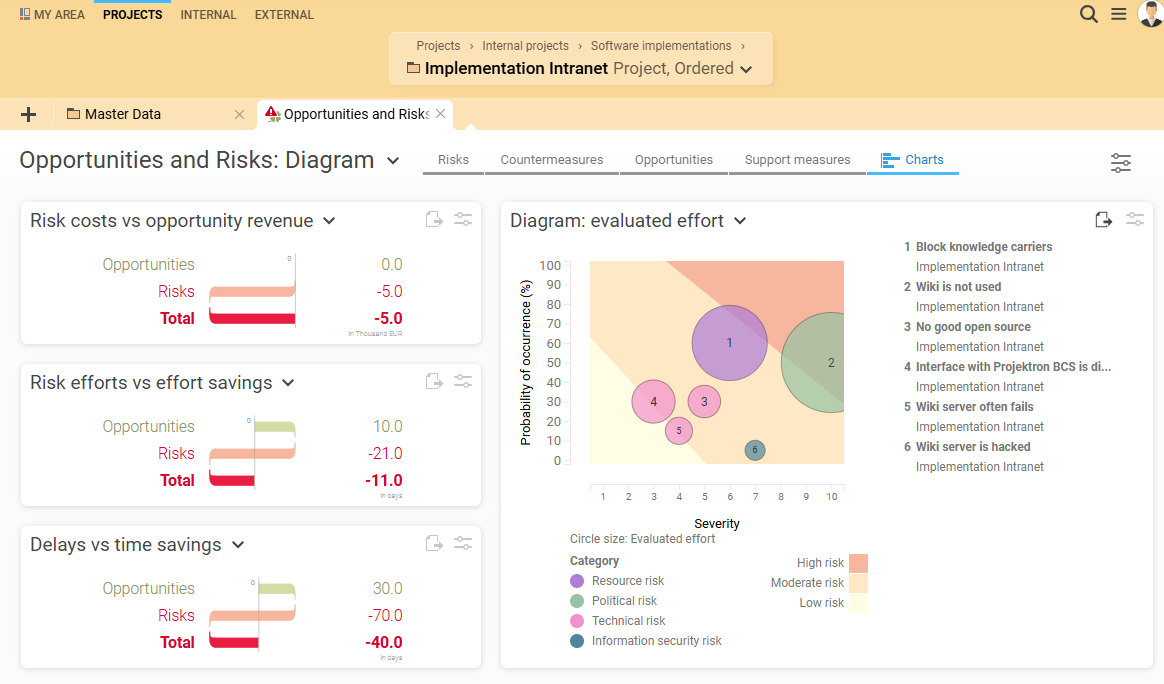
Despite careful preparation and sound planning, internal and external events can disrupt or jeopardize the course of a project. BCS helps you to identify risks, analyze them qualitatively and quantitatively, assess them realistically and choose the right approach to effectively avoid, reduce or shift risks or make provisions in the budget.
You also identify opportunities to generate revenue or save time.
Risks can be categorized according to their type, e.g. political risk, schedule risk, economic risk, resource risk, technical risk and information security risk. Sub-risks can be created and filtered for better structuring. BCS supports you in developing preventive measures to minimize risks. The software automatically calculates the cost reduction and shows the efficiency of the measures. You can enter the reduction in the probability of occurrence due to a countermeasure and compare the values in the risk diagram.
Contract management included
When defining a project, it is important to clarify how contracts will be handled and what content will be included in contracts with customers. Later, during detailed project planning, contracts with suppliers will be coordinated and drafted.
IPMA recommends that project managers have the appropriate technical and contextual skills in these areas to confidently manage legal, organizational, and economic aspects. BCS equips you with the integrated ERP functions of inventory and contract management as well as CRM for all eventualities and requirements of your contract creation and management.
Phase III: Project planning
In the project planning phase, the project plan is created first and foremost, which is made up of numerous individual planning steps and plans:
Project organization plan
Phase plan and milestones
Work breakdown structure (WBS)
Sequence plan
Schedule / timetable
Resource plan
Cost plan / budget plan
Work packages and processes must be described in detail and plans for dealing with changes (change requests) and quality assurance must also be drawn up.
BCS offers comprehensive options for project planning based on proven methods and the necessary technical, contextual, and social skills recommended by IPMA. The software not only provides an assistant and the appropriate tools for project planning, but also allows you to save successful planning steps as templates. This enables you to continuously increase the efficiency and quality of your project planning.
Phase plan and milestones
| Define project phases: Define central project phases individually and display them in a color-coded Gantt chart. | |
| Generate phase plan: Project managers can create project-specific phase plans with just a few clicks and refer back to them at any time. | |
| Use milestones to mark the phase transitions of your project. BCS visualizes these phase transitions in the Gantt chart and in the schedules. | |
| In the multi-project overview, you can see at a glance which phases your projects are currently in. |
Work breakdown structure (WBS): Versatile display and design options
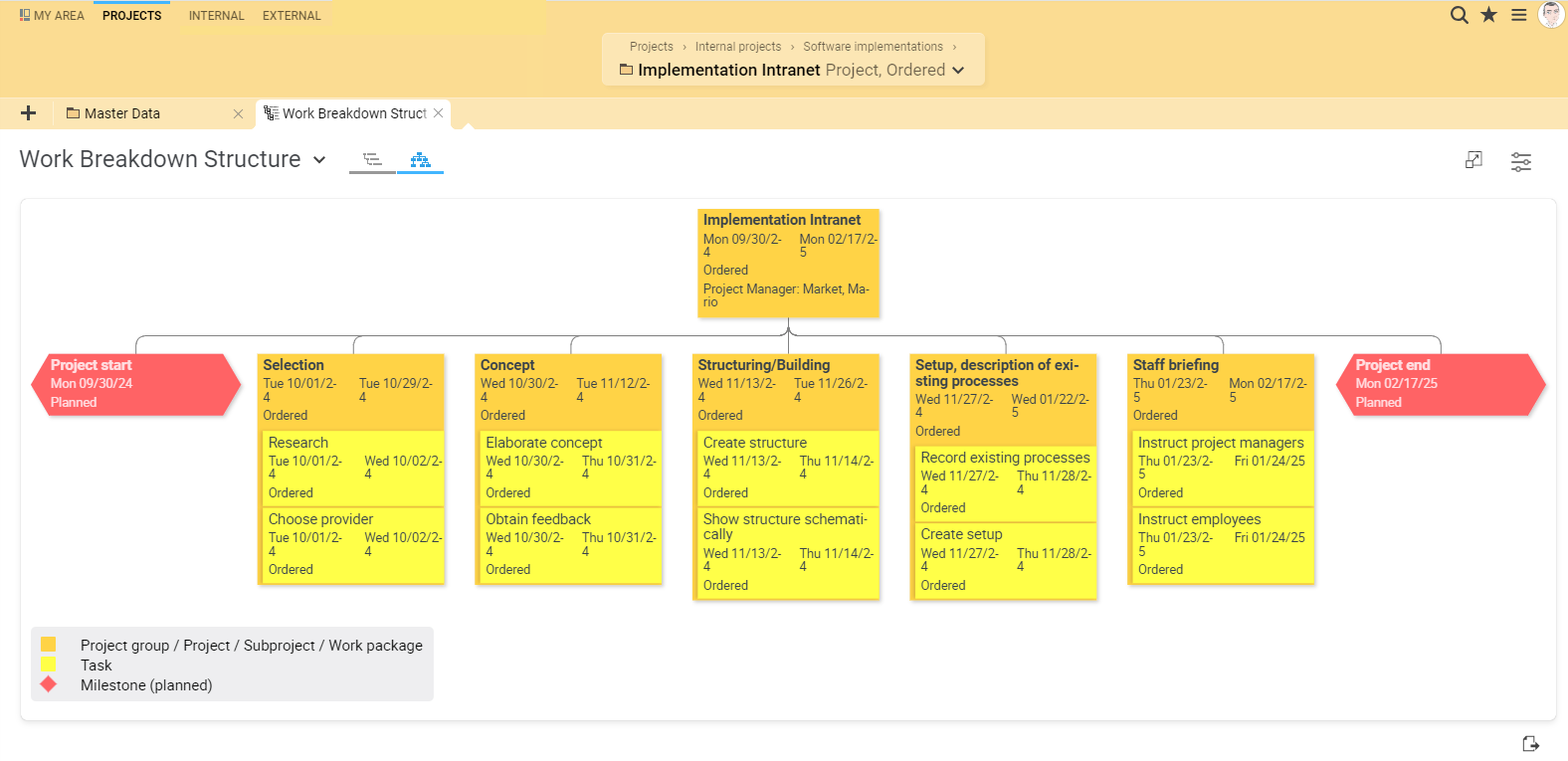
| Tree view: Navigate flexibly within the structure levels and edit every part of your project structure. | |
| Graphical view: Record hierarchical project structures and personnel assignments at a glance. Status colors show the processing status of the project structure elements. | |
| Sub-projects/sub-sub-projects, work packages, tasks, milestones and ongoing tasks: Use a variety of elements for detailed and flexible planning. | |
| Set dependencies: Establish the relationships between structural elements (end/start, start/end). | |
| Effort estimates: Record efforts in the tree view and integrate checklists and workflows. |
Interactive Gantt chart
| Drag-and-drop function: Organize sub-projects, tasks and work packages simply by dragging and dropping. | |
| Schedule as network plan and critical path: The Gantt chart shows activities, tasks and milestones, their chronological order and the critical path. | |
| Automatic schedule calculation: BCS calculates the appropriate schedule based on the duration and dependencies of the structural elements. |
Resource planning and management
| Project organization chart: You can map your project organization clearly as an organizational chart, optionally embedded in your entire company organization. | |
| Team planning: Determine team members, roles and hierarchies using drag-and-drop. Use placeholders and person groups for personnel who have not yet been determined. | |
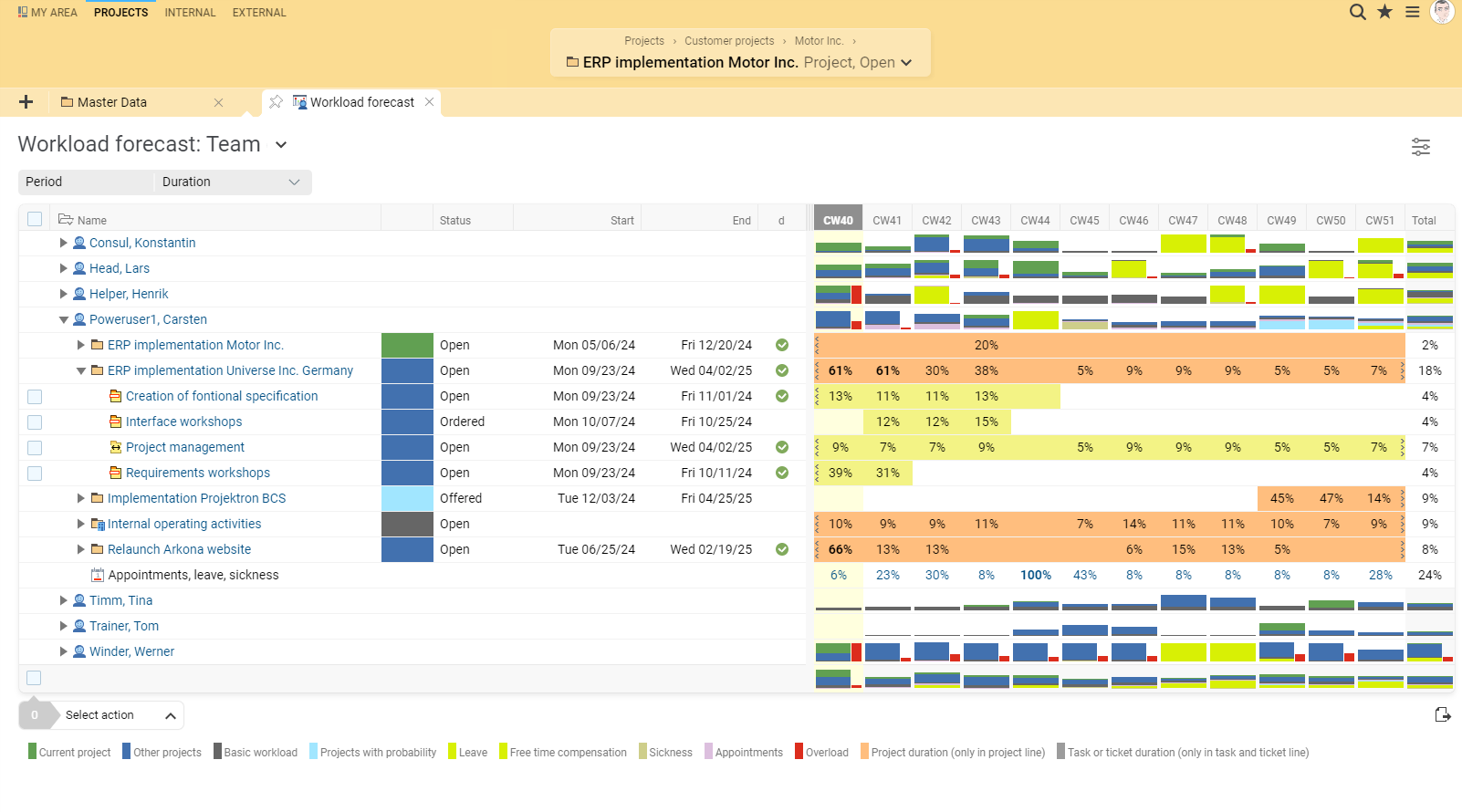
| Resource planning: Determine which project participants are needed for the implementation of your project and how much effort is required, and get an overview of whether this can be planned without overloading the project participants. | |
| Resource utilization: Keep an eye on the availability of employees in the dynamic display of resource utilization (stacked workload diagram). | |
| Knowledge and capacities: The tool shows in real time which employee has free capacities and necessary knowledge. | |
| Resource-appropriate scheduling: Automatic adjustment of the planning so that the maximum capacity utilization of employees is not exceeded. |
Cost planning
Multi-level cost planning: Create well-founded calculations based on your structure and expenditure plan.
Automatic personnel cost calculation: Based on resource requirements and stored hourly rates.
Material cost plan: You plan which material costs, such as materials or external services, are necessary for processing the project.
Cost allocation and evaluation: Assign calculated costs to cost centers, cost types, and cost units and evaluate them in detail.

Anna Pieler
Application Manager | x-tention Informationstechnologie GmbH
[We] use those BCS functions that are required for the creation of IPMA-compliant project manuals. These include, for example, project management tools such as file storage, the structure plan, resource planning, project status, risks and opportunities and target definition.

Sarah Bergemann
Project Management Office | e.discom Telekommunikation GmbH
BCS provides all the necessary tools to carry out our projects in accordance with IPMA standards. The software supports us in every phase of project management, from initiation and definition to planning, implementation, and completion. With features such as project requests, structure, team, material cost, and effort plans, milestone trend analysis, and comprehensive reporting functions, we have everything we need to manage our projects efficiently and successfully.

Ralf Junge
Head of PMO | Sandstein Neue Medien
We have long used BCS for all of our company's business processes - from quoting to invoicing. Only the modules on agile development methods are not used, as our working method is oriented towards classic project management according to the IPMA standard. We don't want to miss the possibilities of BCS anymore! The cross-module availability of live data, which BCS provides to all team members, leads to clearer, faster and more informed decisions in all aspects of our day-to-day project work and internal organization.


Phase IV: Realization / Control
While the project team takes on the realization of the tasks in the project, the project management is busy controlling the project. For realization, BCS provides numerous tools for project implementation and processing and for teamwork, while the various project controlling functions in BCS are available for controlling.
Project management: Everything a project manager needs
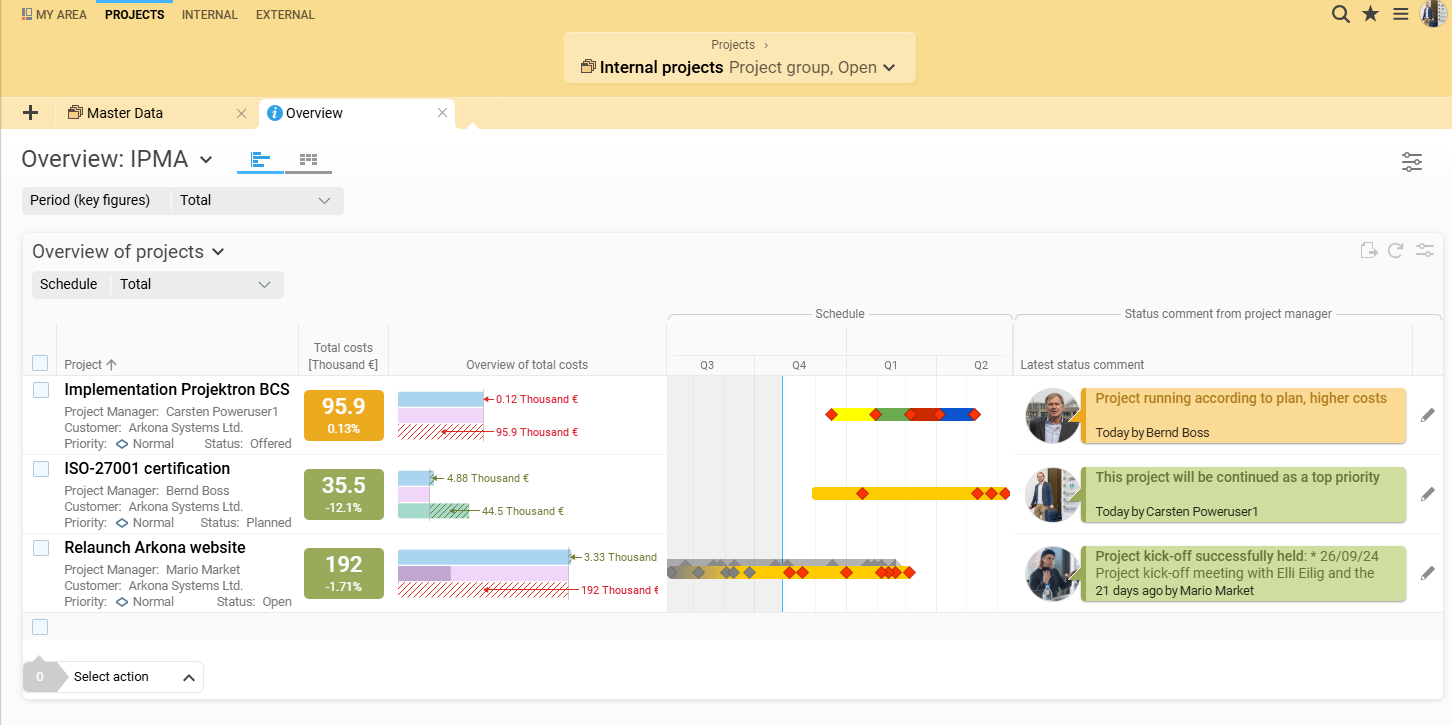
| Project overview: The project overview in the dashboard shows current activities and developments in the project at a glance. | |
| Bar charts: Bar charts illustrate the current status and degree of utilization of resources, the composition of costs and expenses as well as the profit or loss situation. | |
| Speedometer charts: Speedometer graphs make it easier to recognize deviations from plan and their impact on project success. | |
| Customizable project overview: In the project overview, additional elements such as upcoming deadlines, open tasks or risks can be displayed as required and arranged using drag & drop. | |
| Graphic progress display: The interactive Gantt chart is not only used for visualization, but also supports project planning and deadline monitoring, including progress display. | |
| The work breakdown structure (WBS) enables target/actual comparisons and forecasts at all levels of the project structure, supported by a clear tree structure and drill-down functionality. | |
| Evaluations in cost accounting: Classic cost accounting with cost types, cost units and cost centers as well as target/actual comparisons for personnel and material costs are supported. | |
| Interactive sunburst chart: The sunburst chart enables multidimensional and intuitive task evaluation at various WBS levels. | |
| Earned value analysis: The earned value analysis shows the cost and schedule situation at a glance and supports all forecasting methods described in the GPM standard. | |
| Target/actual comparisons with traffic lights: Target/actual comparisons of performance, costs and time are visualized with traffic lights, whereby the threshold values can be configured. | |
| Milestone trend analysis: This analysis makes it possible to show the progress and adherence to deadlines of milestones in a project and is particularly useful for stakeholder reports. | |
| Forecasted budget overruns: Forecasted time and cost overruns are highlighted in red to allow timely countermeasures to be taken. | |
| Standard reports and reporting orders: Standard reports on performance, costs and time can be customized and sent automatically by email. New report templates can also be integrated. |
Project calendar and project communication
| Organization of appointments: The project calendar allows you to quickly and conveniently organize all project-related appointments, from kick-off meetings to status meetings and presentations of project results. | |
| Sub-project goals and milestones: Important sub-project goals and milestones can be viewed directly in the personal calendar to keep track of everything. | |
| Central storage of information: All relevant information is stored centrally and linked to the various elements of the project. | |
| Meeting and agenda planning: With the agenda, meeting results can be recorded directly and meeting minutes can be generated to enable effective team meetings. |
Task allocation and resource planning
| Monitoring views: Use different views such as the Gantt chart or the overview to identify overdue tasks. | |
| Early detection of delays: By flagging overdue tasks, you recognize delays in good time and can take countermeasures to ensure project success. | |
| Integration of vacation and sick leave: The integration of vacation and sick time facilitates resource and resource planning so that you are always in the picture when team members are unavailable. | |
| Detection of missed deadlines: The project controller can identify when the planned end date or planned effort for tasks has been exceeded in the “Critical Tasks” view. | |
| Transparent documentation: Transparent documentation of all agreements, meetings and decisions ensures smooth collaboration and creates legal certainty for everyone involved. | |
| Efficient task distribution: The Kanban board offers easy creation and assignment of tasks, a clear display and convenient working with project tickets. | |
| Status tracking and customization: Tasks can be easily dragged and dropped to different statuses and priorities, and the work-in-progress limit allows control over the workload. |
Change request management
| Transparent approval processes: Change requests are structured in the form of tickets so that approval processes can be tracked transparently. | |
| Status history and customization options: The status history of change requests can be viewed at any time and the configuration of tickets can be adapted to individual requirements. |
Project documentation
| Clear progress logs: Important agreements and results of project meetings are recorded in chronological order to keep all relevant information in one place. | |
| Central document management: Project documents are managed centrally and are available directly on the project or on the associated tasks in order to increase the transparency and efficiency of project management. |
Multi-project management: Control several projects
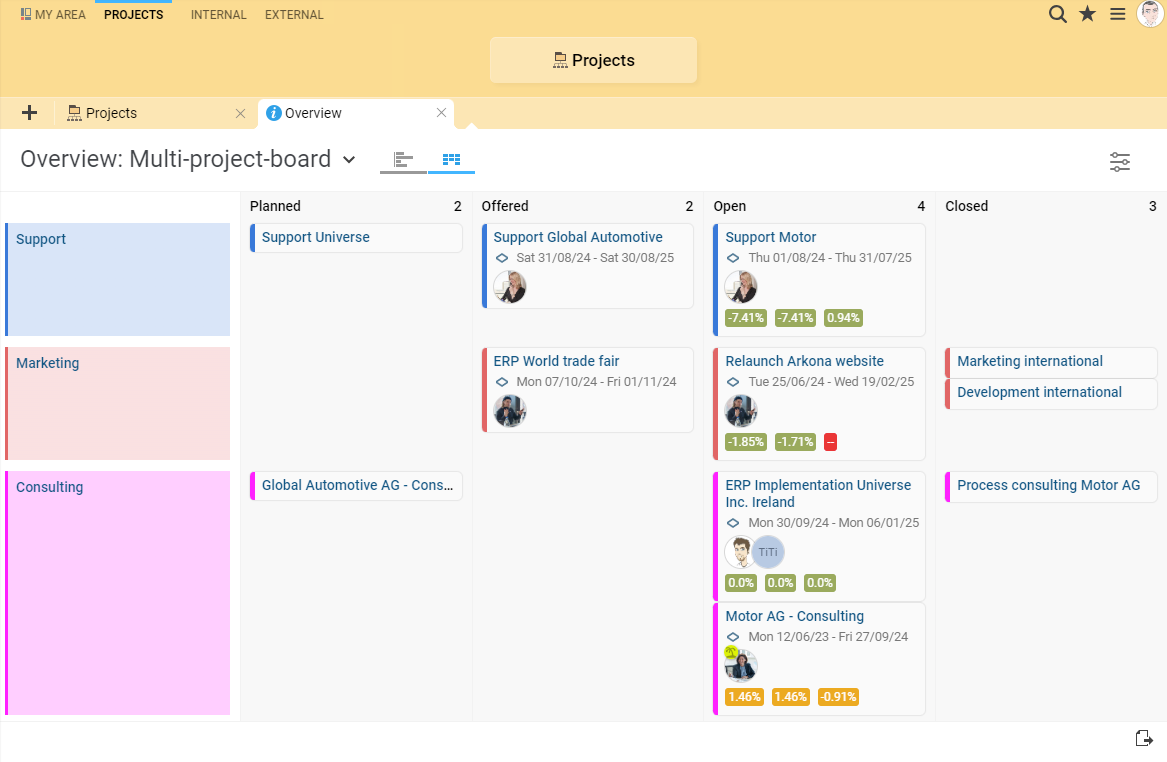
| Graphical display of project statuses: The graphical multi-project evaluation shows critical project statuses quickly and clearly. | |
| The multi-project board provides a comprehensive overview of all projects in the company. The projects are sorted according to their status and displayed as Kanban cards. By simply dragging the projects, it is possible to adjust the status and priority. In addition, key figures on effort, costs and profit for open projects are displayed in comparison to the planned values. When filtering by project manager, only the projects for which the selected employee is the project manager are displayed. | |
| Traffic light scheme for evaluation: Project statuses are evaluated according to a traffic light scheme, whereby both actual values and the percentage deviation from plan are displayed. |
Phase V: Closure
During the project closure phase—as defined in DIN 69901-5, for example—the project organization is dissolved, resources are returned, a final report is prepared, project documentation is archived, and lessons learned are made available for future projects.
IPMA emphasizes that project managers should have the appropriate technical, contextual, and social skills during this phase to ensure a professional conclusion. BCS provides support here through its integrated reporting and document management functions, among other things.
Reporting
With BCS, you can efficiently and conveniently generate a variety of standard reports for your projects and your company. Project applications and project completion reports are available as standard templates that you can adapt to your own requirements. Checklist entries help you to carry out all relevant activities before the project is completed.
The reports provide you with well-founded information and an important basis for decision-making, which is essential for the successful management of projects in accordance with the IPMA standard.
Progress report: Templates for reports on project progress, status report and overview
Effort report: Templates for booked effort, total effort and tickets
Cost report: templates for cost allocation, cost units and project costs
Project reports from BCS also offer great advantages when working with external business partners:
Project preparation report: Contributes to a common understanding of the project
Proof of expenditure for projects and tickets: Increases transparency and ensures trust
Once integrated into BCS, you can design and use your own report templates thanks to the interface to the open source report designer BIRT. These templates can be used just as easily and conveniently for report generation and automated dispatch as the standard reports in BCS.
Document storage and management
| Standardized filing structure: All relevant files are available to the project team in a standardized filing structure, which facilitates collaboration and prevents duplication of work and storage costs for duplicates. | |
| Simple uploading: New documents can be easily and conveniently uploaded to the file repository using drag-and-drop. | |
| Versatile assignment: Documents can be assigned to tasks, projects, tickets, appointments as well as people, organizations, contracts and inventory items in any file format. | |
| Direct editing: Microsoft Office files can be edited directly in the browser, with the version being automatically upgraded after saving. | |
| E-mail attachments: Imported e-mail attachments can be stored in the appropriate structure element, which supports company-wide quality management. | |
| File links: Documents can be linked so that employees can find the information they need directly at the relevant structural element. | |
| Automatic versioning: Each time a document is edited or saved, the version is automatically upgraded so that everyone always works with the latest version. | |
| Avoidance of duplicates: The system prevents unwanted duplicates so that only one version of the document ever exists. | |
| Older versions: All intermediate versions of a document remain accessible via the central document archive, which facilitates traceability and recovery. | |
| Locking parallel changes: Parallel changes are prevented by locking to avoid storage and version conflicts. | |
| Transparency and traceability: The version, storage date and editor of a document are displayed, and the complete document history is traced in detail in the log. | |
| Rights management: Information security and data protection are guaranteed by rights management, so that it is possible to define in detail who can read, delete or update which documents. |
FAQ — IPMA
What is IPMA?
The IPMA (International Project Management Association) is a globally recognized organization for project management. It was founded in 1965 and has its legal headquarters in Switzerland. Today, the IPMA brings together over 70 national project management organizations with a total of more than 40,000 members.
The IPMA's central concern is the further development of project, program, and portfolio management. To this end, it offers international standards, exchange formats, and a globally established certification system for project management professionals. The basis for this is the IPMA Individual Competence Baseline (ICB), which describes competencies in the areas of People, Practice, and Perspective.
The IPMA certification system comprises four levels:
Level D – Certified Project Management Associate: Proof of sound project management knowledge; no management responsibility required.
Level C – Certified Project Manager: For project managers with experience in projects of medium complexity.
Level B – Certified Senior Project Manager: For experienced project managers who manage complex projects.
Level A – Certified Projects Director: For executives responsible for highly complex projects, programs, or portfolios.
In addition, the IPMA promotes the professionalization of project management through training courses, specialist events, awards, and international cooperation. The IPMA's competence-oriented approach serves as a guideline for many companies and professionals in their personal development in project management.
How does project management according to IPMA work?
The IPMA (International Project Management Association) does not specify project phases or processes. Instead, it uses the Individual Competence Baseline (ICB) to define a competence model that describes the skills, behaviors, and experience project managers need to successfully manage projects. These competencies complement the methodological requirements of DIN 69901 and support project managers in implementing projects professionally.
1. People – personal and social competencies
These competencies relate to behavior, communication, collaboration, and leadership, e.g.
Self-reflection and self-management
Communication
Conflict resolution
Leadership & motivation
Teamwork
Integrity & reliability
2. Practice – methodological and technical competencies
These competencies relate to the application of PM methods:
Project requirements & goals
Scope and structure management
Time, resource, and cost planning
Risks & opportunities
Quality & changes
Procurement, contracts, stakeholders
3. Perspective – Contextual and strategic competencies
These competencies relate to the project's integration into the organization, strategy, and environment:
Strategy & governance
Organizational structures
Compliance, standards & values
Sustainability & culture
IPMA thus supplements DIN by focusing on the skills and behavior of project managers, i.e., how projects are managed, rather than how the process is structured.
Project management according to DIN 69901 encompasses all management tasks, organization, techniques, and resources for the initialization, definition, planning, control, and completion of projects. These five phases form the basic process of a project in DIN.
Initialization: Initial clarification of objectives, benefits, and feasibility; definition of responsibilities; selection of the project management processes to be used; formal approval of the project.
Definition: Specification and documentation of project objectives, establishment of the project team, creation of a rough project structure, definition of milestones, cost estimates, and definition of success criteria.
Planning: Development of a detailed project plan with work packages, deadlines, resources, costs, risks, and communication channels.
Implementation/control: Execution and monitoring of project activities, ensuring that objectives are achieved, controlling deviations in terms of time, costs, quality, and risks.
Completion: Formal acceptance of results, final documentation, evaluation of project success, and dissolution of the project team.
Which is better: IPMA or PMI?
It is difficult to say which project management method is “better,” as both IPMA (International Project Management Association) and PMI (Project Management Institute) are internationally recognized organizations that offer high-quality project management standards and certifications. Both approaches have different focuses and are tailored to different requirements.
IPMA places greater emphasis on competencies and leadership, particularly soft skills, team leadership, and the ability to manage projects in an organizational context. IPMA certifications therefore assess the technical, contextual, and personal/social competencies of project managers. IPMA has a particularly strong presence in Europe, but is also active worldwide through its member organizations. The organization has issued thousands of certifications at levels A to D and is particularly valued in European countries such as Germany, France, Spain, Italy, and others.
PMI places greater emphasis on methods, tools, and techniques for standardized project planning, control, and monitoring. It is based on the PMBOK® Guide (Project Management Body of Knowledge), a globally recognized standard that describes the most important processes, knowledge areas, and best practices in project management. PMI certifications such as PMP (Project Management Professional) primarily test practical knowledge and the application of technical methods in project management. PMI is well known and recognized worldwide, especially in North and South America, Asia, and increasingly in other regions.
The choice between IPMA and PMI depends heavily on regional requirements, the industry, and individual career goals:
- Those who work in European countries often benefit from IPMA certification, as it is well established there.
- Those who manage projects globally, especially in America or Asia, or who seek international recognition, often find greater acceptance with PMI certifications.
- In some regions and industries, both certificates are recognized; in this case, it depends on which skills and credentials are more important for the specific project or organization.
Ultimately, project managers should analyze the focus and requirements of their environment and then decide which certification or approach is most suitable. A combination of methodological knowledge (PMI) and leadership skills (IPMA) can be particularly valuable in this regard.
What are the strengths of project management according to IPMA?
Project management according to IPMA has several strengths:
- Focus on competencies: IPMA focuses on the competencies a project manager needs to be successful and offers a standardized competency model that can be certified at different levels. This helps to ensure that project managers at all levels have the necessary skills and experience to manage projects effectively.
- Flexibility: IPMA is a flexible approach to project management that adapts to the needs and requirements of the project and the organization. The IPMA model can be adapted to fit the specific needs of organizations and projects, making it highly adaptable.
- Emphasis on soft skills: IPMA places emphasis not only on the project manager's technical skills, but also on their soft skills, such as leadership, communication, collaboration and negotiation. This helps project managers to communicate more effectively with the team and stakeholders and build better relationships.
- Supporting continuous improvement: Project management according to IPMA emphasizes the continuous improvement of processes and procedures in project management to ensure that projects become more effective and efficient. This helps to improve the quality of projects over time.
- Internationally recognized: IPMA is an internationally recognized standard for project management and offers certifications at various levels that are recognized worldwide. This enables project managers to demonstrate their skills and competencies on an international level and improve their career opportunities.
Does project management according to IPMA have weaknesses?
Although IPMA project management offers many strengths, there are also some challenges:
- Complexity: The IPMA model is comprehensive and multi-layered. It can be overwhelming for some organizations and project managers. Effective application requires training and in-depth knowledge, which can be a hurdle, especially for smaller organizations or projects.
- Time and resource requirements: Implementing the IPMA approach requires time and resources for training, certification, and the continuous optimization of processes and procedures. This can be an obstacle for organizations with limited capacities.
- Emphasis on theoretical concepts: IPMA places a strong focus on competency models, methods, and theoretical principles. Project managers who prefer practical approaches may find it difficult to implement the concepts in their daily project work.
- Focus on soft skills: The emphasis on leadership and communication skills is a strength of the model, but can be challenging for some project managers. Those who still need to develop these skills will require additional support to apply them effectively.
- No industry-specific standards: Unlike specialized methods such as Automotive SPICE or PRINCE2, IPMA does not offer industry-specific guidelines. Organizations in highly regulated or specialized industries may need to consider supplementary standards.
It is important to emphasize that these points do not diminish the quality of the IPMA approach. Rather, they serve as pointers that should be considered when choosing the appropriate project management method for a specific project or organization.