1
Operational Project Level
Project managers plan tasks, timelines, milestones, budgets, risks, and responsibilities.
06/20/2026 - Articles
Many companies are managing an increasing number of projects in parallel, while still relying on status slides, Excel lists and manual coordination. This costs time and makes informed decision-making more difficult. PMO software centralizes project data, highlights resource bottlenecks and provides a reliable basis for project and portfolio decisions. In this article, you will learn which features matter, when PMO software is worthwhile and how to get started successfully.

PMO software creates transparency across the entire project landscape. It brings projects, programs, resources, budgets, risks, and dependencies together in one central place.
The PMO reduces manual reporting effort. Instead of compiling status slides, Excel lists, and individual pieces of information, it works with up-to-date project data from the system.
Project portfolios can be managed based on data. Decision-makers can more quickly identify which projects are strategically important, which resources are missing, and where risks are emerging.
Standards become binding in everyday project work. Project requests, status updates, quality checks, and reports follow consistent processes.
The greatest value comes from clear processes. PMO software works best when companies clearly define roles, responsibilities, data maintenance, and portfolio routines.
PMO software helps the Project Management Office centrally manage projects, programs, resources, budgets, risks, and portfolios. It does not just map individual project plans, but creates an overarching view of a company’s entire project landscape.
An individual project manager primarily focuses on the goals, timelines, tasks, team, budget, and results of their project. The PMO, by contrast, looks at the full set of projects. It asks: Which projects are currently running across the company? Which initiatives support the strategy? Where are projects competing for the same resources? Which risks are accumulating? Which budgets are coming under pressure? Which decisions does executive management need to make?
This is exactly why a PMO needs more than task lists or simple planning tools. It needs software that standardizes project information, makes it comparable, and prepares it for different roles: project managers, team members, department heads, the PMO, executive management, and decision-making committees.
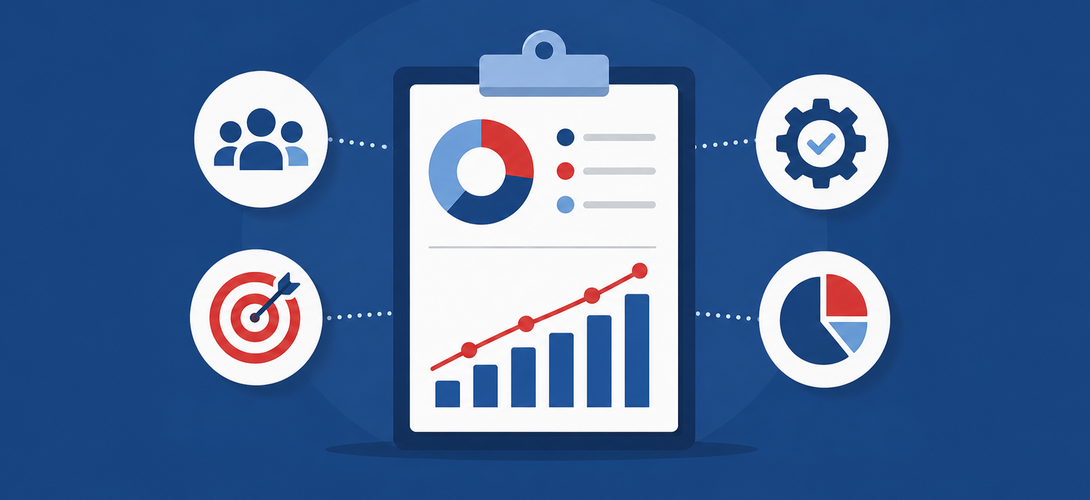
PMO software creates a shared workspace for this purpose. Project ideas, requests, project plans, status information, resource planning, risk overviews, budget data, and reports are no longer created in separate files, but in one shared system. This gives the PMO an up-to-date data foundation and allows it to carry out its management responsibilities much more effectively.
At its core, PMO software connects three levels:
Project managers plan tasks, timelines, milestones, budgets, risks, and responsibilities.
The PMO reviews standards, data quality, status, risks, deviations, and project requests.
Decision-makers evaluate projects based on strategy, value, effort, risk, resource requirements, and priority.
This distinguishes PMO software from simple project management tools. It supports not only project work, but also the management of the entire project portfolio.
Many companies are experiencing the same development: the number of projects is increasing, project types are becoming more diverse, departments are working more closely together, and resources remain limited. At the same time, expectations for transparency, manageability, and traceability are rising.
In this situation, a PMO is expected to provide guidance. It should:
Define standards
Support project managers
Make project status comparable
Keep risks visible
Identify resource bottlenecks
Provide leadership bodies with information they can use to make decisions
In practice, however, manual routines often block these value-adding tasks. A typical scenario looks like this: project managers submit status reports in different formats. The PMO collects the information, follows up on missing data, reconciles figures, updates presentations, and prepares reports for steering committees or management meetings. In the end, decision-makers discuss slides whose data may already be outdated.
Project information is stored in emails, spreadsheets, presentations, ticketing systems, drives, or personal notes. No one can reliably tell which version is current.
One project manager assesses risks very strictly, while another takes a more optimistic view. One department reports resource needs in person-days, another in rough percentages. As a result, the portfolio loses comparability.
The PMO must not only collect information, but also validate, align, and explain it. This work takes a great deal of time and still does not create perfect transparency.
Individual project statuses often do not show which projects depend on each other, which teams are under repeated strain, or which initiatives need the same key people.
If the PMO only identifies delays, budget risks, or resource bottlenecks in the monthly report, the project team has already lost valuable time.
PMO software addresses exactly these issues. It ensures that information is created directly within the project and automatically flows into portfolio views, dashboards, and reports. As a result, the PMO shifts its focus from collecting data to evaluating data.
This development affects not only the tools being used, but also the PMO’s understanding of its role. In an article on the GPM Blog, I describe how the Project Management Office is evolving in the context of digitalization and artificial intelligence from an operational supporter of methods and reporting into a strategic management partner. The central argument: modern PMOs must not only document project landscapes, but actively orchestrate them, make priorities visible, and enable data-driven decisions.
Read the article “Strategic PMO in the Age of AI” on the GPM Blog
PMO software provides the operational foundation for this. It creates the transparency a PMO needs to act more strategically: with up-to-date project data, comparable status information, reliable resource overviews, and portfolio-wide analyses. This turns reporting into true management.
To understand the value of PMO software, it is worth taking a brief look at the responsibilities of a Project Management Office. No two PMOs are exactly alike. Some project offices primarily advise project managers. Others review standards. Still others actively manage project portfolios and prepare management decisions.
In many organizations, the PMO performs a mix of these responsibilities:
The more mature a PMO becomes, the more its focus shifts from administrative support to governance and strategic management. A basic PMO provides templates. An effective PMO creates transparency, prompts decisions, and helps the company execute the right projects at the right time with the right resources.
PMO software supports this level of maturity. It ensures that standards do not merely exist as documents, but appear directly within the work process. It makes required information visible, structures approvals, highlights bottlenecks, and delivers reports based on current data.
This allows the PMO to take a more active role. It no longer waits for manually submitted status reports, but identifies developments within the system. It does not simply ask for missing information, but establishes clear data expectations. It does not just create slides, but supports leadership committees with well-founded analyses.
PMO software is not only worthwhile for large corporations with hundreds of projects. The need often arises much earlier: as soon as projects run across departments, resources are limited, or executive management regularly has to make portfolio decisions.
A company should consider PMO software when several of the following statements apply:
The value is especially high in companies with
regulatory projects
IT and organizational projects
product development initiatives
construction projects
customer projects
strategic transformation programs
In these environments, timelines, costs, resources, and risks are often closely connected. An isolated view of individual projects is no longer sufficient.
PMO software is also worthwhile when the PMO itself is expected to grow. Many project offices start as small units with a high level of personal commitment. Individual employees know the project landscape very well and compensate for the lack of systematic structures through experience. This model only works up to a point. As soon as the number of projects increases or key people are unavailable, transparency can quickly disappear.
Software creates organizational stability in this context. It makes processes less dependent on individual people and ensures that knowledge remains in the system.
Many vendors use terms such as project management software, PPM software, multi-project management software, and PMO software in similar ways. In practice, however, their focus areas differ significantly.
Traditional project management software primarily supports project managers and teams in the planning and execution of individual projects. It provides features for tasks, milestones, schedules, collaboration, documentation, Kanban boards, or time tracking. For individual projects, small teams, or clearly defined initiatives, this is often sufficient.
A PMO, however, needs more. It does not look at just one project, but at the entire project landscape. It needs comparability, governance, portfolios, programs, reporting, resource visibility, and a reliable basis for decisions across multiple projects at the same time.
PMO software therefore goes beyond pure project planning. It connects individual projects into an overarching management layer. It helps the PMO implement standards consistently, compare status data, view resources across multiple projects and programs, and evaluate portfolios based on strategic criteria.
The difference is especially clear in these areas:
| Traditional Project Management Tool | PMO Software |
|---|---|
| Focus on individual projects or teams | Focus on the project landscape, programs, and portfolios |
| Tasks, timelines, collaboration | Standards, governance, reporting, portfolio decisions |
| Team or project manager perspective | PMO, management, and portfolio perspective |
| Operational project management | Operational and strategic management |
| Less binding standards | Consistent processes, templates, and quality gates |
| Limited resource and portfolio analysis | Cross-project resource, budget, and risk analysis |
Other terms are also closely related to PMO software, but they have different focus areas. PPM software focuses primarily on project portfolios. It supports the selection, prioritization, and management of projects with regard to business goals, value, risks, and resources.
Multi-project management software looks at multiple projects in parallel and supports the coordination of timelines, resources, dependencies, and project status. It is especially helpful in environments where many projects are running at the same time and operational interdependencies arise.
In practice, these categories overlap. Powerful PMO software should therefore combine several perspectives:
Project management for operational execution
Multi-project management for managing several projects in parallel
Project portfolio management for strategic decisions
PMO features for standards, governance, reporting, and quality assurance
For small teams, a simple project management tool may be sufficient. For growing project landscapes, regulated environments, cross-departmental programs, or strategic portfolios, however, the PMO needs an integrated solution.
Good PMO software aligns with the responsibilities of the PMO. It should therefore not simply offer a large number of features, but meaningfully connect the right features. The decisive factor is a consistent data foundation: information from project requests, planning, resource management, controlling, and reporting should work together.
Many portfolio problems arise before a project even starts. An idea sounds reasonable, a department sees a strong need, and a sponsor supports the initiative. Nevertheless, key information is often missing: objective, value, effort, budget, risks, resource requirements, or strategic contribution. PMO software helps capture this information in a structured way. It can sort project ideas by category, define mandatory fields, map evaluation logic, and manage approvals.
A good project request should clarify, among other things:
What problem does the project solve?
What objective does the initiative pursue?
What value does the company expect?
What strategic relevance does the idea have?
What costs will be incurred?
What resources does the project need?
What risks exist?
What dependencies are there?
Who takes responsibility?
What decision does the committee need to make?
This allows the company to make decisions not only faster, but also better. It starts fewer projects based on gut feeling and more projects based on comparable information.
Once the company approves a project, the project manager needs a clear structure. This includes subprojects, work packages, tasks, milestones, responsibilities, timelines, and dependencies.
PMO software should support this planning in a way that allows project managers to work efficiently while also providing the PMO with the management information it needs. The software should be able to support different project sizes and project types:
small organizational projects
large-scale IT projects
agile initiatives
traditional waterfall projects
hybrid structures
The PMO should not overload project managers with bureaucracy. Good software helps maintain standards without making day-to-day project work unnecessarily difficult. Assistants, templates, and mandatory fields can be especially helpful here.
Resource management is one of the most critical PMO responsibilities. Projects rarely fail because an organization has too few ideas. They often fail because too many projects access the same employees at the same time, creating resource conflicts.
PMO software should therefore not only plan project tasks, but also make capacities visible. This includes employees, roles, teams, groups of people, skills, absences, working time models, and workloads.
Effective resource management answers questions such as:
Which employees are working on which projects?
Which roles will be missing in the coming months?
Which teams are permanently over capacity?
Which projects are competing for the same key people?
Which initiatives can realistically be started in parallel?
Which prioritization fits the actual capacity?
The PMO must choose the right level of detail. Planning that is too high-level does not help with decisions. Planning that is too detailed creates maintenance effort that the organization cannot sustain over time. Good PMO software therefore supports different levels of planning: strategic capacity planning, operational resource allocation, and workload analysis.
PMO software should make costs, efforts, budgets, timelines, and progress transparent. Project controlling provides the PMO with an objective basis for identifying deviations early.
This includes, for example:
planned and actual efforts
budget consumption
forecasts
milestone status
schedule deviations
cost centers
material costs
internal and external services
risks to budget and schedule
The PMO should not wait until a project has exceeded its budget before reacting. It should identify trends before critical limits are reached. Software helps because it brings planned values, actual values, and forecasts together in one system.
Risks are part of every project. What matters is not whether risks exist, but whether the project team identifies, assesses, and manages them. PMO software should capture risks in a structured way and make their development visible.
The PMO benefits especially from a portfolio-wide view. If several projects report similar risks, this may indicate a structural problem. If a critical project depends on another initiative, management needs this information early.
Dependencies between projects also play a central role. An IT project may need a process decision from an organizational project. A product development project may depend on regulatory approvals. A construction project may require data from a specialist system. Without a central view, such connections often remain hidden.
Reporting is one of the most visible PMO responsibilities. At the same time, in many organizations, it causes the greatest manual effort.
PMO software should not treat reports as a separate layer of work, but generate them from ongoing project data. Project managers maintain status, risks, timelines, budgets, and resources in the system. Dashboards and portfolio views access this data.
Good reports differ by target group:
Project managers need detailed information.
The PMO needs views of quality, deviations, and portfolios.
Department heads need resource and priority information.
Executive management needs a reliable basis for decisions.
Steering committees need status, risks, escalations, and open decisions.
A report should not only provide information, but enable decisions. It should therefore clearly show where action is needed.
PMO software contains sensitive information: budgets, resources, risks, priorities, and management decisions. That is why it needs a clear roles and permissions concept.
Not every user needs to see every piece of information. Project team members need different views than project managers, department heads, or executive management. At the same time, the PMO should be able to control which information is mandatory, which approvals are required, and which changes remain traceable.
Governance is created through clear processes. Software can support these processes by mapping roles, responsibilities, approvals, status changes, and quality reviews.
PMO software rarely operates in isolation. Employee data, organizational units, cost centers, absences, working time models, financial data, supplier and customer data, or time tracking are often stored in other systems.
Interfaces help avoid duplicate maintenance and improve data quality. This plays a major role especially in resource management. If absences, working hours, or organizational structures are missing, workload analysis loses its value. Data quality determines acceptance. If users do not trust reports, they will not use the system consistently.
The PMO should therefore clarify early on:
What data does the software need?
Which systems provide this data?
Which data does the PMO maintain itself?
Which data do project managers maintain?
Which interfaces create the greatest value?
What data quality does management need for decisions?
PMO software benefits not only the PMO. It also improves collaboration between project managers, departments, management, and project teams.
Everyone involved works with up-to-date information. This reduces follow-up questions, version issues, and coordination effort. The PMO can identify more quickly which projects are running smoothly and which ones need support.
When project information is available directly in the system, the PMO does not have to constantly collect it again. It can prepare, review, and interpret reports instead of copying data from different sources.
Project portfolios need clear criteria. PMO software helps evaluate projects based on value, risk, effort, strategy, resource requirements, and urgency. This enables the company to make more informed decisions.
Risks, delays, and budget deviations do not first appear in the monthly meeting. The PMO can identify developments earlier and initiate countermeasures.
Resource bottlenecks cannot be solved through moderation alone. They require transparency. PMO software shows which projects are consuming capacity and which initiatives can realistically be started.
Standards, approvals, templates, and quality reviews no longer exist only in documents. The software embeds them in day-to-day project work.
Leadership committees receive up-to-date portfolio views and do not have to debate data quality. They can focus more on priorities, trade-offs, and decisions.
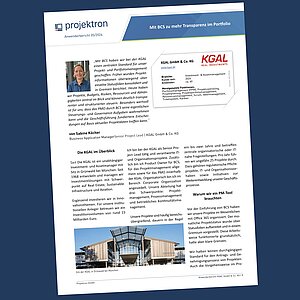
The KGAL GmbH & Co. KG user report shows how PMO software works in practice, without this article itself having to be a user report. The example is especially useful because KGAL describes typical challenges faced by many project organizations: distributed information, manual status slides, lack of comparability, increasing management needs, and the desire for greater transparency across the project portfolio.
KGAL carries out around 25 projects per year. These include mandatory regulatory projects, IT and organizational initiatives, as well as initiatives to further develop business processes. The projects often run across departments and usually last one to two years. This is exactly the kind of project landscape where typical PMO questions arise: Which projects are running in parallel? Which resources are missing? Which budgets are developing critically? Which risks are threatening timelines? Which projects contribute to strategic goals?
Before introducing BCS, KGAL mainly used Office 365 and status slides for project management. This approach worked in principle, but had clear limitations. Information was not stored centrally, project management standards were partly missing, and the PMO had to collect a lot of data manually.

With BCS, we created a central standard for project and portfolio management at KGAL. Previously, project information was mainly consolidated through individual status slides and reported to committees. Today, we have a centralized view of projects, budgets, risks, resources, and dependencies, allowing us to manage everything much more transparently and systematically. What is especially valuable for us is that BCS enables the PMO to focus on its core management and governance responsibilities, while executive management can make more informed decisions based on up-to-date project data.
This statement shows why PMO software does more than provide reporting. It creates a shared framework. Project managers work according to defined standards. The PMO reviews data quality and management needs. Executive management and committees see up-to-date project and portfolio data.
The KGAL example shows the benefits particularly clearly in reporting. Previously, the PMO had to gather information, consolidate it, and transfer it into status slides. Today, portfolio reports access current system data.
Sabine Köcher describes the effect as follows: “Today, around 90 percent of these manual activities have been eliminated. That is an enormous relief.”
This relief changes the role of the PMO. It invests less time in rework and more time in quality, standards, prioritization, and portfolio management. This is exactly where the greatest leverage lies: PMO software not only saves effort, but shifts work toward active management.
Another point from the KGAL example concerns executive management. KGAL reported on the project portfolios directly from BCS in an executive management meeting, without additional slides. Executive management asked many questions that could be answered directly from the system. This shows how valuable up-to-date data is in portfolio management.
KGAL also shows that PMO software changes behavior. Project managers need to maintain data more regularly. Standards create greater transparency. Some employees may initially perceive this as control. Over time, however, many recognize the benefits for their own work: better organization, clearer tasks, centralized information, and fewer follow-up questions.
Read the BCS user report from KGAL
PMO software does not deliver value automatically. Its implementation affects processes, roles, data, leadership, and working habits. Companies should therefore treat the implementation as an organizational project.
Start with an honest assessment of the status quo. Do not begin by asking about features, but about problems.
Typical guiding questions:
Where does the PMO currently lose time?
Which information is regularly missing?
Which reports require particularly high effort?
Which decisions are delayed?
Which projects run without clear approval?
Which resource bottlenecks occur repeatedly?
Where do media disruptions occur?
Which standards exist only on paper?
Which data does management not fully trust?
This analysis shows which requirements truly matter. A PMO with a weak project request process needs different priorities than a PMO with a mature request system but poor resource visibility.
Clarify which role your PMO should take on in the future. Should it support project managers? Should it monitor standards? Should it actively manage project portfolios? Should it become a strategic partner to executive management?
The target vision determines the processes and software selection. A supportive PMO needs training, template, and advisory functions. A steering PMO needs portfolio views, prioritization, resource management, project controlling, and management reporting.
Formulate the target vision clearly. For example:
“Our PMO creates a central standard for project requests, project management, and portfolio reporting. It reduces manual reporting effort and supports executive management in making data-driven prioritization decisions.”
Such a target vision helps keep the implementation focused.
Many companies start by collecting feature requests. This quickly leads to long requirements catalogs, but not automatically to better project management.
First clarify the core processes:
How is a project idea created?
Who is allowed to submit a project request?
What information does a request require?
Who evaluates projects?
How does the company prioritize?
When does a project officially start?
Which status logic applies?
Which data do project managers update each month?
Which quality checks does the PMO perform?
Which reports does executive management need?
How does the PMO escalate risks or resource bottlenecks?
Only then should you derive the required features. Software supports processes best when the organization knows how it wants to work.
A big-bang software implementation may sound efficient, but it often overwhelms the organization. A pilot area usually provides better conditions. It should be large enough to reveal real requirements, but small enough to allow adjustments quickly.
For example, select two to five projects from different categories: an IT project, an organizational project, a regulatory project, and a smaller departmental project. This allows you to test different requirements without involving all users at once.
During the pilot, you should check:
Do the project templates work?
Do project managers understand the mandatory information?
Does the reporting provide useful information?
Is the selected level of detail in resource management sufficient?
Do roles and permissions work?
Are interfaces missing?
Which training questions come up repeatedly?
Which processes need refinement?
A pilot creates acceptance because users experience that their feedback has an impact.
PMO software needs up-to-date data. This sounds obvious, but it often fails in day-to-day work. If project managers do not maintain status information, if resource information is missing, or if master data becomes outdated, the system loses value.
That is why the PMO needs clear rules:
Which data must project managers maintain?
How often do they update status, timelines, risks, and budgets?
Which fields are mandatory?
Who checks data quality?
How does the PMO respond to missing or implausible data?
Which data comes from interfaces?
Which reports does management use as a binding basis?
Data quality does not come from appeals. It comes from routines, responsibility, and visible value. When leadership committees consistently work with system data, data maintenance quality increases significantly.
Not every user needs the same training. Executive management wants to understand portfolio views. Department heads are interested in resources and priorities. Project managers need planning, status maintenance, risks, and reporting. Project team members need tasks, tickets, time entries, or personal overviews.
Provide role-based training. Combine introductions with short practical formats:
Training for executive management and leaders
Training for project managers
Training for project team members
Office hours after go-live
Short help documents
Examples from real projects
Checklists for monthly reporting
PMO reviews with feedback
This reduces uncertainty and promotes acceptance.
Software alone does not change an organization. It needs fixed routines. Therefore, define clear dates and responsibilities.
Examples:
monthly status updates by project managers
monthly quality checks by the PMO
regular portfolio review
quarterly report to executive management
defined process for new project ideas
regular resource review
lessons learned after project completion
Routines make the software part of everyday work. Without routines, it can quickly become a secondary system that no one uses consistently.
The selection of PMO software should not be driven by IT alone. Involve the PMO, project managers, departments, controlling, executive management, and, where applicable, the works council or data protection team early on.
The software should align with your PMO target vision. A task management tool is not enough if you want to build portfolio management, resource management, and governance.
Project ideas, project requests, planning, resources, controlling, risks, and reporting should be connected. The more media breaks there are, the less value the PMO gains.
Your organization has its own project types, approvals, roles, and reports. The software should include standards while still allowing customization.
PMO software may support complex tasks, but it should not discourage users. Project managers and employees must be able to complete their daily tasks efficiently.
Check whether the software supports different target groups: PMO, project managers, departments, executive management, and steering committees.
Resource planning is one of the most important PMO topics. Check which level of detail the software supports and how well it shows workload, availability, and bottlenecks.
Clarify which systems you want to connect: HR, ERP, time tracking, financial systems, ticketing systems, or directory services.
The software should grow with your PMO. Start with a limited set of features, but avoid a solution that reaches its limits after two years.
PMO software affects processes. Therefore, pay attention not only to features, but also to consulting, training, support, and the provider’s experience.
Many difficulties are not caused by the software itself, but by poor implementation or unclear expectations.
A long feature list is no substitute for a PMO concept. Define goals, processes, and roles first.
If all departments have to switch over immediately, resistance increases. A pilot provides better insights and strengthens acceptance.
Planning at too fine a level creates a lot of maintenance effort. Start at a management-relevant level and refine it later.
Reports provide little value if no one derives decisions from them. Design reports so they make the need for action visible.
Up-to-date data does not appear on its own. The PMO needs clear rules, review routines, and backing from leadership.
New transparency changes day-to-day work. Communicate the benefits clearly: less duplicate work, better support, more realistic planning, and faster decisions.
BCS helps PMOs consolidate project information centrally and turn it into reliable management information. Instead of gathering project status, budgets, risks, resources, and dependencies from individual files, the PMO, project managers, and executives work from a shared data foundation.
For the PMO, this creates an end-to-end process: new project ideas are submitted in a structured way, project requests can be reviewed based on consistent criteria, and approved projects move directly into planning, management, and reporting. In this way, BCS connects the path from the initial idea to the portfolio decision in one system.
New project ideas are submitted in a structured way.
Project requests can be reviewed based on consistent criteria.
Approved projects move directly into planning and management.
Current project information flows into reporting and decisions.
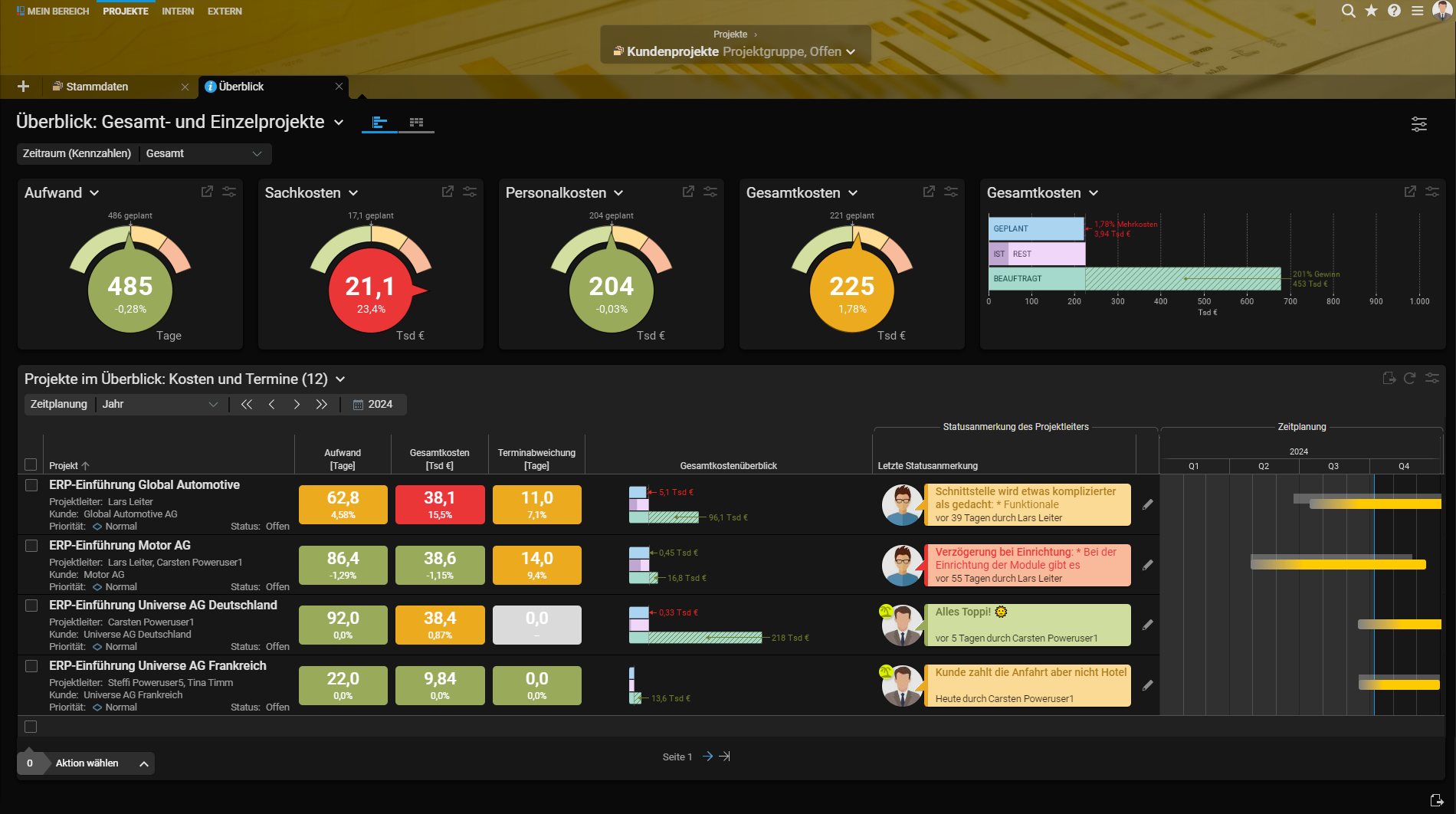
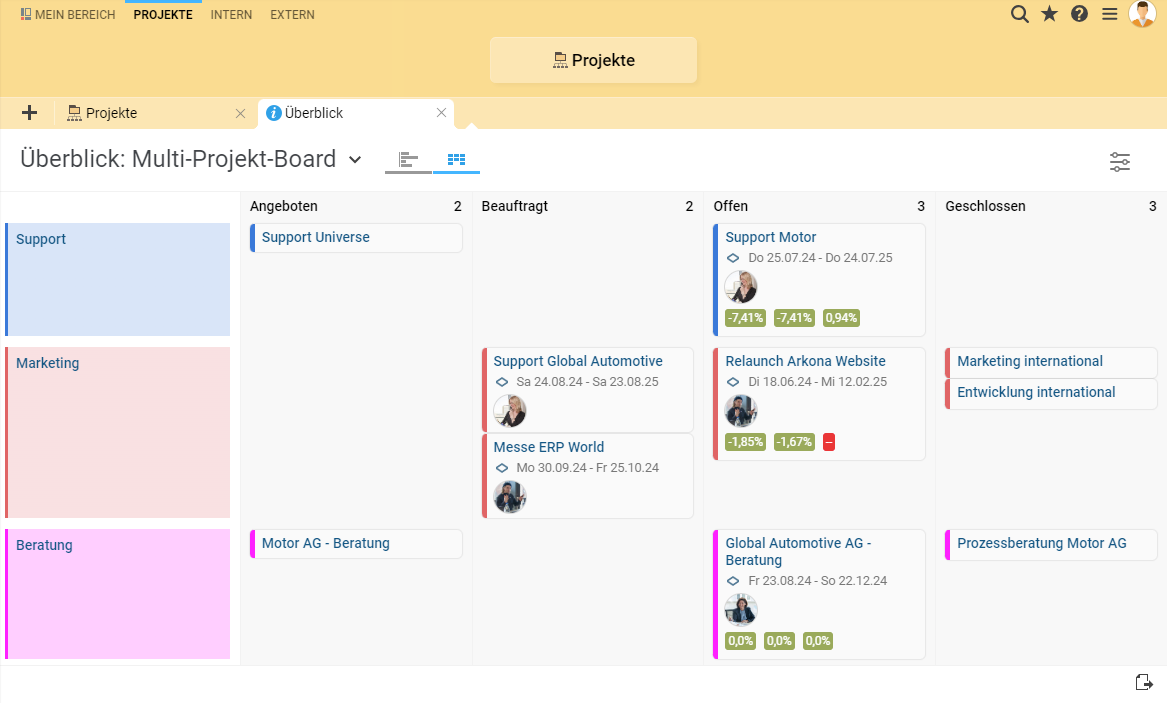
A particular focus is on multi-project management. BCS does not only map individual projects, but also helps organizations plan, prioritize, manage, and analyze their entire project landscape across projects. Programs, project groups, project categories, and portfolios can be structured clearly, allowing the PMO to see at any time which projects are running, how they relate to one another, and where cross-project action is needed.
Multi-project controlling in BCS makes this management measurable. Cross-project analyses show planned and actual values, plan deviations, earned value metrics, estimated remaining effort, and cost information. Personnel costs, material costs, and total costs can be analyzed from different controlling perspectives. Critical tasks, schedule overruns, budget deviations, and cost developments become visible early on. This gives the PMO a reliable foundation not only for documenting past project statuses, but for actively intervening in project management.
The multi-project board complements this view with a particularly clear overview of the project landscape. Projects are displayed as cards in a Kanban format and can be structured by status, priority, or project category. This allows the PMO to see at a glance which projects are planned, open, commissioned, or critical. Status and priorities can be adjusted directly in the board. At the same time, key metrics on effort, costs, and profit are visible, bringing together operational transparency and the management view.
This is especially valuable for organizations that want not only to document project portfolios, but to actively manage them. In BCS, the PMO can identify which projects are becoming critical, where budgets are moving off plan, which resources are becoming scarce, and which dependencies require decisions. Cross-project milestones, resource bottlenecks, and capacity conflicts can also be tracked. This allows the PMO to intervene earlier and provide leadership committees with current, consistent information.
Structured capture and evaluation of project ideas
Standardization of project requests and approvals
Planning and management of projects, programs, and portfolios
Multi-project management across parallel internal and external projects
Multi-project controlling with planned/actual values, remaining effort, cost, and variance analyses
Overview of timelines, budgets, risks, tasks, and responsibilities
Cross-project resource and capacity planning
Visualization of projects in the multi-project board by status, priority, or project category
Analysis of costs, efforts, profits, and critical project statuses
Identification of resource bottlenecks, dependencies, and schedule risks
Reporting for the PMO, departments, steering committees, and executive management
Collaboration in traditional, agile, and hybrid projects
Anyone looking for PMO software will quickly encounter a wide range of solutions: classic project management software, PPM tools, multi-project management systems, enterprise management software, or specialized platforms for resource and portfolio management. Names such as Meisterplan, Blue Ant, Planisware, Valuedesk, Planview, Clarity, Planforge, myPARM, microTOOL, or ServiceNow Strategic Portfolio Management frequently appear in this market environment.
The following comparison contrasts selected PMO software solutions. It does not replace an individual requirements analysis, but it helps identify typical focus areas: resource management, portfolio planning, project controlling, governance, reporting, scenario planning, integrations, and scalability.
Select two tools and start the comparison:
PMO software creates transparency in a project landscape that many companies can no longer reliably manage with status slides, Excel spreadsheets, and manual coordination. It consolidates information, makes projects comparable, supports resource decisions, and provides leadership committees with up-to-date decision-making foundations.
The greatest value does not lie in automated reports alone. The greatest value lies in the changing role of the PMO. It collects less information and manages more actively. It does not only monitor project status, but strengthens standards, quality, prioritization, and governance.
Companies should therefore not view PMO software as a purely tool-based project. They should understand its implementation as a development of project management itself: with clear processes, realistic pilots, a clean data foundation, role-specific training, and continuous improvement.
This creates exactly what modern project organizations need: a PMO that does not merely administer projects, but manages project portfolios transparently, realistically, and strategically.
PMO software supports the Project Management Office with project requests, project planning, resource management, reporting, governance, and portfolio management.
It is worthwhile when several projects run in parallel, resources are limited, project information is scattered, or the PMO spends a lot of time on manual reporting.
A PMO defines standards, supports project managers, reviews project quality, creates reports, and prepares portfolio decisions.
Project management software often supports individual projects. PMO software looks at the entire project landscape and helps with governance, reporting, and portfolio management.
Important features include project requests, project planning, resource management, project controlling, risk overviews, dashboards, reports, roles and permissions, and interfaces.
Excel is suitable for simple lists. With multiple projects, resources, budgets, and dependencies, version issues and manual effort quickly arise.
It uses current project data from the system and makes it available in dashboards, portfolio views, and reports.
It shows workload, availability, roles, bottlenecks, and resource conflicts across multiple projects.
Analyze your starting point, define a PMO target vision, start with a pilot area, ensure data quality, and train users based on their roles.
BCS connects project ideas, project requests, project planning, resource management, project controlling, reporting, and portfolio management in one system.

Kai Sulkowski is an editor in the Marketing department at Projektron. He combines marketing, SEO, and digital communication with professional project management expertise and creates content on project management, PMO structures, project portfolio management, resource management, and organizational management. In his articles, he explains complex topics related to software selection, market comparisons, evaluation methods, and the implementation of enterprise software in an understandable way.
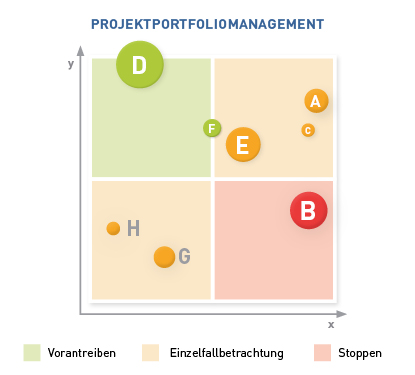
What is project portfolio management, why is it needed, and what are the responsibilities of a project portfolio manager? Discover 5 good reasons for project portfolio management and a proven 7-step strategy for your project portfolio management.

The implementation of enterprise software is complex. What implementation strategies are available? Which strategy is suitable for which purpose? With this knowledge, you can lead your implementation project to success.

Resource planning is a strategically important step in project management. What is a resource plan? What information does it contain? What benefits does resource planning offer in project management? Here you’ll find resource planning from A to Z.
Clear structures, roles, and decision-making processes are essential for successful projects. Learn how project governance creates transparency, control, and reliable alignment between strategy and execution.
Symbolic illustration of a PMO as a strategic compass: project information, resources and decisions are centrally aligned and managed transparently.