Customizing in BCS

Proven standards, tailored flexibly and precisely

BCS provides a stable, field-tested standard for project management and business processes. More than 850 companies worldwide already use BCS. Where this standard fits your requirements, you benefit from faster implementation, consistent processes, and software that remains easy to update over the long term. At the same time, you do not have to force your value-creating, well-established, or unique processes into the rigid framework of standard software. In BCS, you can tailor views, fields, roles, permissions, processes, automations, and integrations specifically to your organization. As much standardization as possible, as much customization as makes sense.


Customization at three levels – tailored to tasks and expertise

Many customizations can be made directly as part of day-to-day work: users tailor their personal workspace, administrators define shared standards, and trained technical administrators implement more advanced business and technical requirements.

For users

Personally customizable

Users tailor their own workspace to their tasks and priorities without changing the views of other employees.

Benefit

Each employee sees the information relevant to their tasks and can access frequently used content more quickly.


For administrators

Administratively configurable

Administrators configure interfaces, standards, and workflows for teams, roles, or the entire company.

Benefit

You create consistent standards, map company-specific processes, and independently adapt the configuration when new requirements arise.

For trained technical administrators

Technically configurable

Trained technical administrators adapt BCS to specialized business processes, data structures, and the existing IT landscape.

Benefit

You can implement specialized business and technical requirements in-house and continue developing the configuration independently as needed.

Software Made in GermanyOMR 2026 Top RatedTÜV Rheinland ISO/IEC 27001, 27017, 27018TISAX Result availableSHiG 2026

Customizations for users: tailor your workspace and user interface

BCS provides all users with a shared working environment. Within this standard framework, each employee can configure views and workspaces to suit their individual tasks. Personal customizations do not affect the working environment of other users.

Customize views and workspaces individually

Users customize tables, overviews, and workspaces to suit their tasks. They show or hide columns, filter content, change sorting and grouping, and organize frequently used areas according to their personal priorities. This allows project managers, controllers, and sales employees to work with the same data while focusing on the information they need for their respective tasks.

Examples:

Organize tabs and workspaces

Show and hide columns

Filter, sort, and group content

Define personal view settings

Use personal preferences and favorites

Users save frequently needed settings for their daily work and define preferred views as their personal defaults. Bookmarks provide direct access to regularly used projects, contacts, tickets, or other content. This allows each employee to start with a workspace tailored to their tasks without changing other users’ settings. Each user can also select their preferred interface language individually.

personal view preferences

personal defaults for frequently used views

bookmarks for important content

individual interface language

Vanessa Zonsius

Vanessa Zonsius

Tech Controlling, Axel Springer National Media & Tech GmbH & Co. KG

Our users can customize the views individually to suit their specific needs.

Jannik Knoblich

Jannik Knoblich

Project Manager, Modernization & Digitalization, E-Government, Hanseatic and University City of Rostock

For most views, we created a specific “Rostock” view.

Configurations for administrators: define shared standards and processes

Administrators configure BCS for teams, roles, or the entire company. They use the proven BCS standard wherever it fits and extend it where company-specific structures or processes require different solutions. This allows BCS to combine consistent standards with the specific needs of the organization.

Design interfaces and settings for roles

Administrators design workspaces for teams, roles, or the entire company. They provide shared views and preferences and simplify the user interface where users do not need certain information or functions. Project managers, for example, receive different overviews than controllers, sales staff, or executives. Everyone works with the same underlying data, but BCS brings the information relevant to each task to the forefront.

Examples:

shared views and preferences

show or hide interface elements

configure BCS components to suit the use case

prepare views for different user groups

Add custom fields, terminology, and structures

Administrators map company-specific information directly in BCS. They add custom fields, define selection values and classifications, and use the terminology that employees already work with within the company. Custom types for projects, tasks, or other objects also support different ways of working within a shared BCS environment. In this way, BCS can represent project types, customer segments, approval categories, or internal classifications without forcing the company to adopt unfamiliar terminology.

Examples:

Custom fields and selection values

Project and task types

Classifications and categories

Company-specific terminology

Multilingual labels

Define roles, permissions, and rules

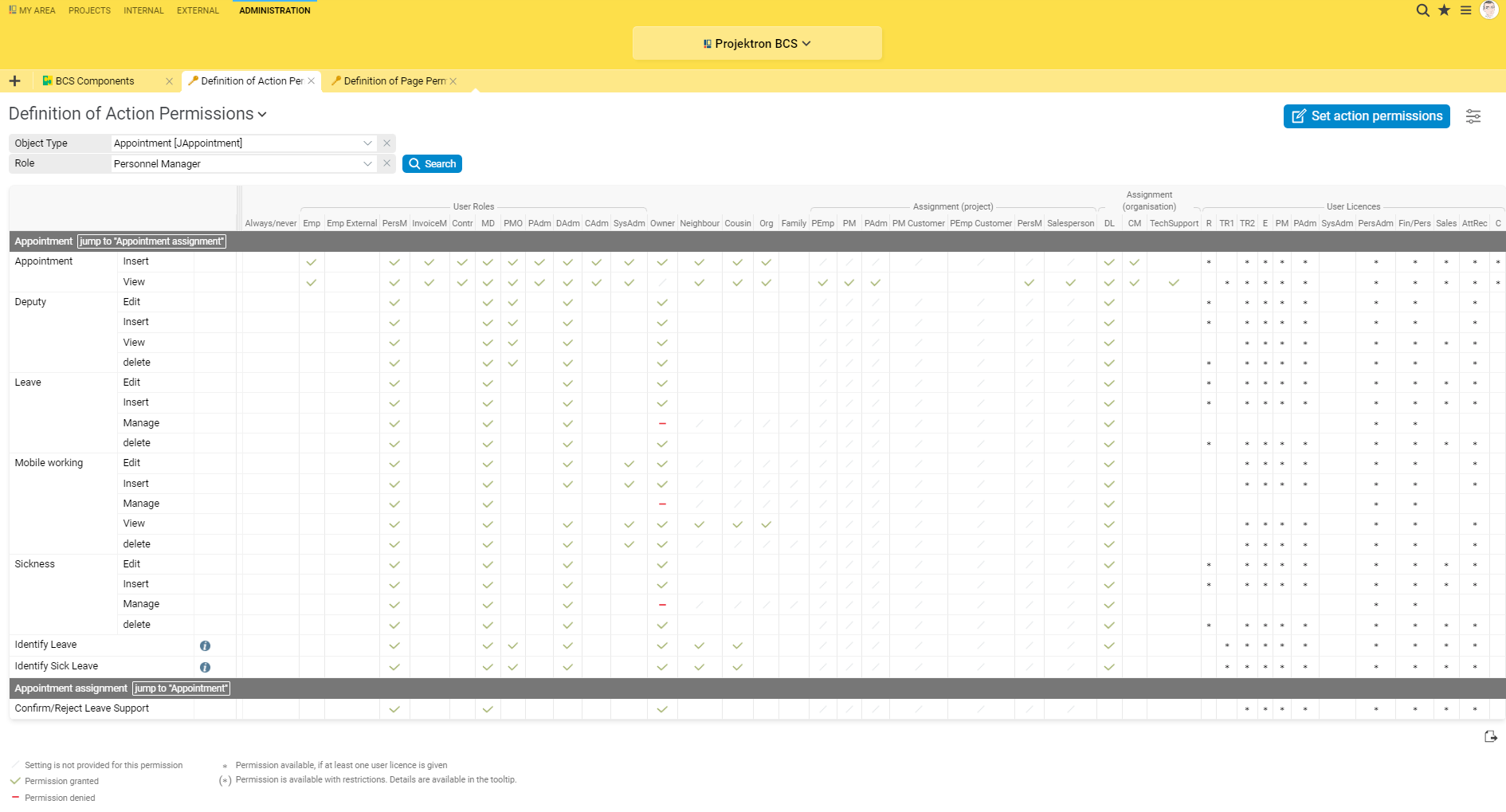
Administrators control which information and actions are available to individual roles. They assign permissions selectively and align access rights with responsibilities within the company. In addition, they define business rules for data entry and status changes. Mandatory fields and plausibility checks support consistent processes and improve the quality of the information entered.

Examples:

Add and customize roles

Configure page and action permissions

Align permissions with responsibilities

Configure status transitions

Link status changes to roles

Design forms and wizards for workflows

Administrators design forms and input areas to support recurring tasks. They define which information users need to enter, the order in which fields appear, and which details are relevant to a specific work step.

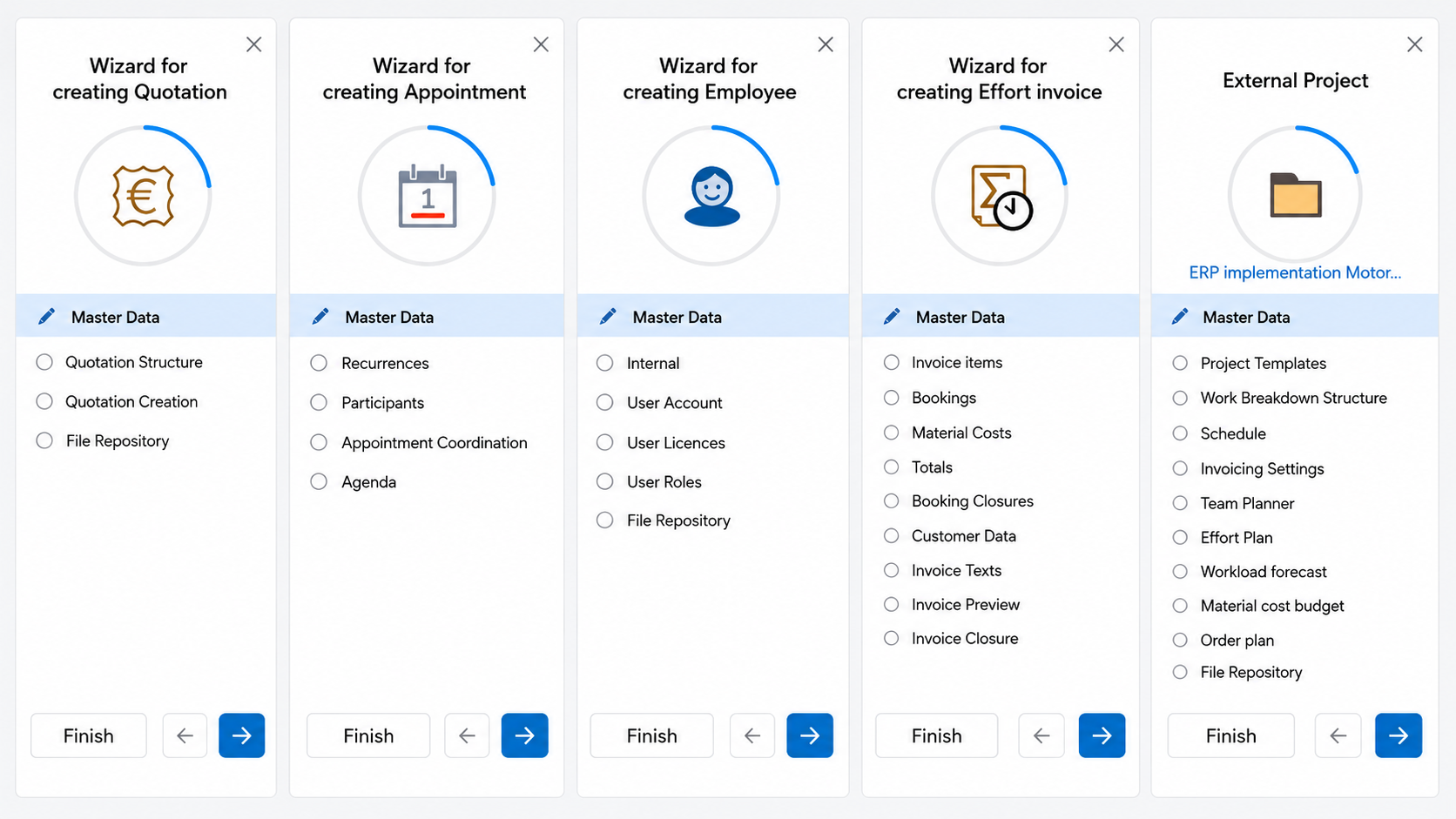
For structured workflows, they configure guided wizards. These can guide users through processes such as project creation and request the required information step by step. Help texts and tooltips provide additional explanations directly where they are needed.

Examples:

Customize detail views and input forms

Define the order and visibility of fields

Add additional fields to views

Configure wizards

Structure project-specific input

Help texts and tooltips

Configure workflows, notifications, and processes

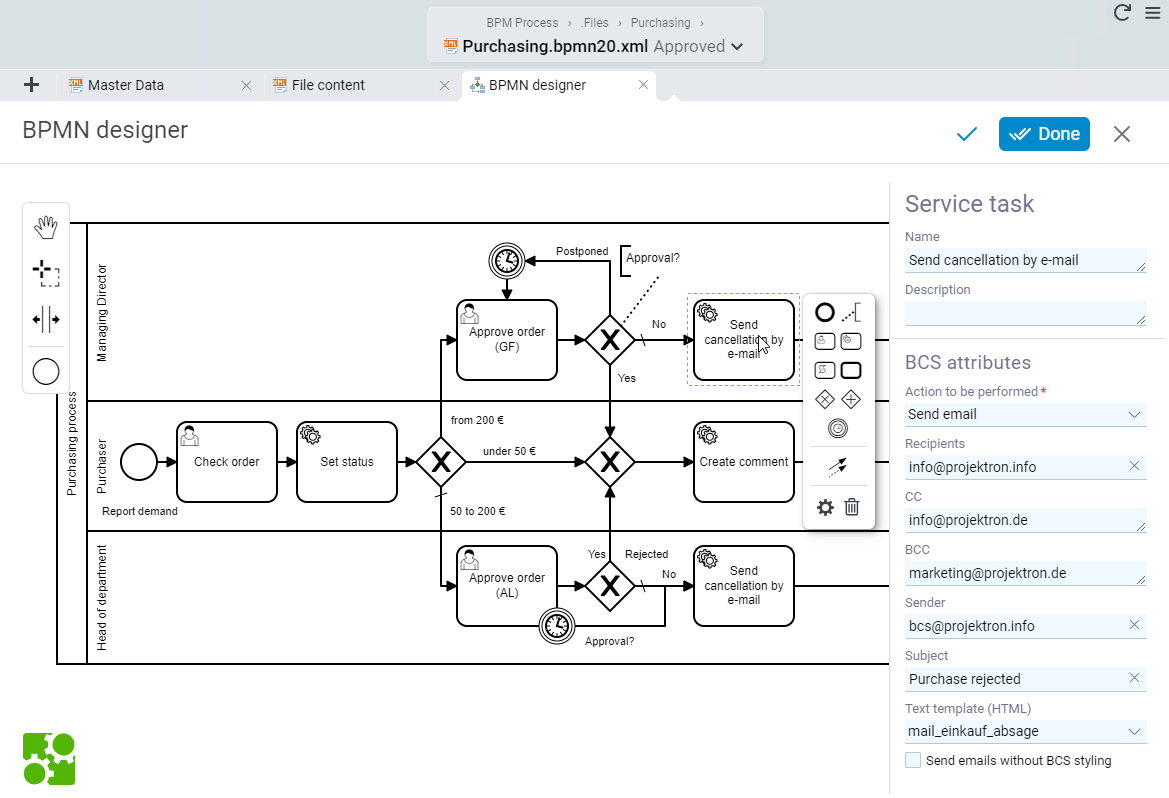
Administrators map recurring workflows in BCS and automate individual work steps. They trigger actions based on defined rules, send reminders or notifications, and manage structured business processes with BPMN. In this way, BCS reduces manual routines and ensures that tasks, information, and approvals reach the responsible people at the right time.

Examples:

Configure custom email templates

Integrate notifications into workflows

Map approval processes

Model BPMN processes

Adapt workflows to company-specific processes

Andrea Fischer

Andrea Fischer

Back Office Project Assistant, team Technology Management GmbH

By defining our own names for drop-down menus or adding custom tabs, BCS enables us to tailor the software specifically to team.

Carsten Münch

Carsten Münch

First Business Partner & Team Coordinator Application Management, Information Technology, TÜV Rheinland Service GmbH

For each phase, we configured a dedicated wizard that prompts users for the information required at that stage.

David Rosenau

David Rosenau

Head of Solution Consulting/SAP Senior Consultant, Mercoline GmbH

We were able to digitally map our invoice workflow and approval processes in BCS very quickly.

Adrian Kamer

Adrian Kamer

Senior System Architect, Deleproject AG

We were able to define our own forms, fields, and permissions, allowing us to tailor the software perfectly to our processes.

GetApp ReviewsGetApp BadgeTrusted Bewertung für BCS, sehr gutCapterra Reviews für BCSOMR Rating Widget für BCSOMR Badge für BCS

Customization for trained technical administrators: Extend BCS technically

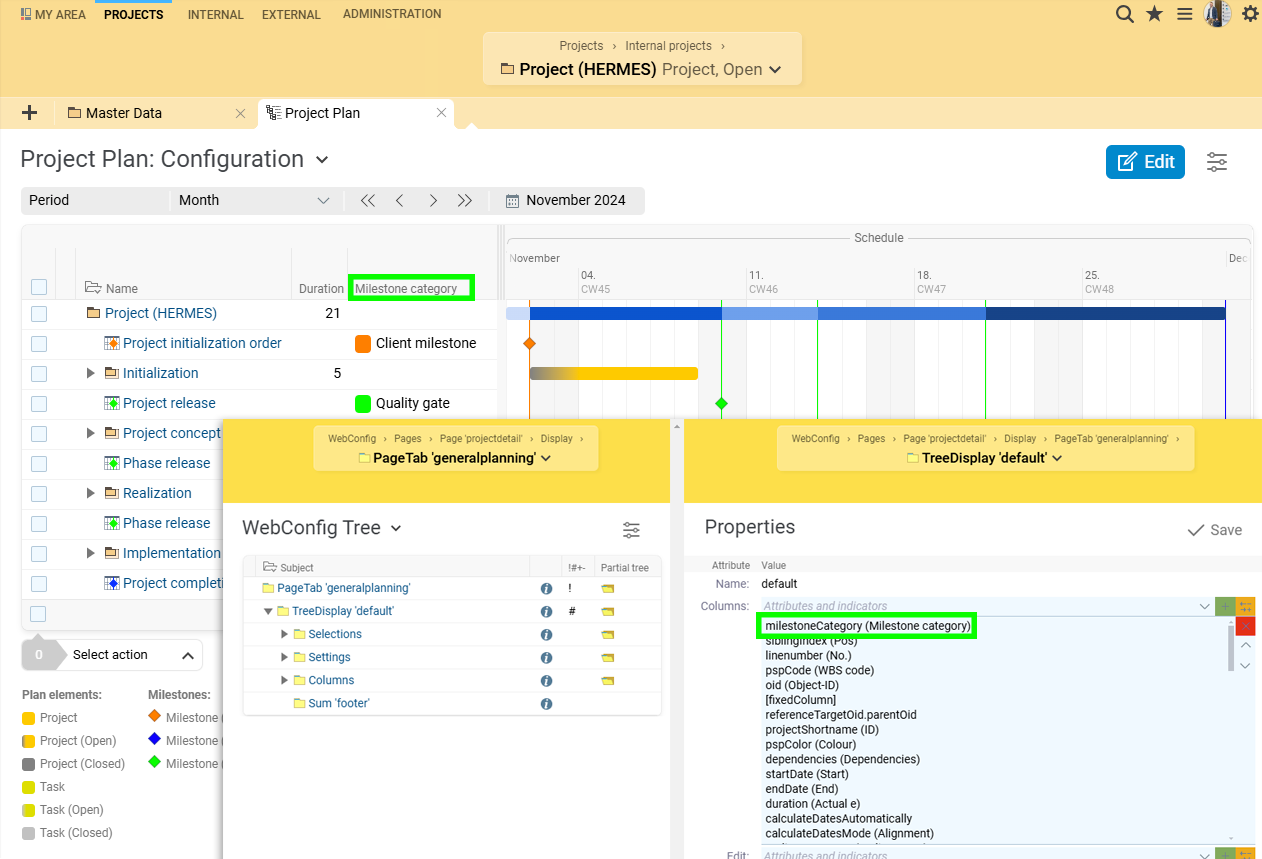
For requirements that go beyond standard administration, BCS offers advanced configuration options. Depending on the operating model and access permissions, trained technical administrators can use tools and technologies such as WebConfig, XML, data model customizations, import and export functions, or CSS. They can extend user interfaces and business logic, adapt the appearance to the corporate design, configure data exchange and reports, and integrate BCS into the existing IT landscape. 

This enables companies to remain flexible even when implementing advanced customizations and to develop their own configurations independently. Which technical customizations a company implements itself and which are handled by Projektron depends on the selected operating model and the respective access permissions.

Extend user interfaces and business logic with WebConfig

With WebConfig, technical administrators can customize user interfaces beyond the administrative settings. They adapt views, input areas, and business logic to meet specific company requirements. For example, they can control whether elements are visible or editable and under which conditions BCS displays them.

Additional XML configurations and CSS provide further options for adapting the interface and visual appearance to company-specific requirements. This also makes it possible to implement requirements that reach deeper into the structure of BCS without having to modify the product standard.

Examples:

Advanced customization of views and forms

Additional business rules

Context-dependent content and actions

Technical configuration with WebConfig

Additional XML configuration

Configure the data model, reports, imports, exports, and interfaces

Technical administrators manage the exchange of data between BCS and other applications. This includes additional attributes in the data model as well as configurable imports and exports. They configure import and export processes, connect interfaces, and make data available automatically to other systems or processes.

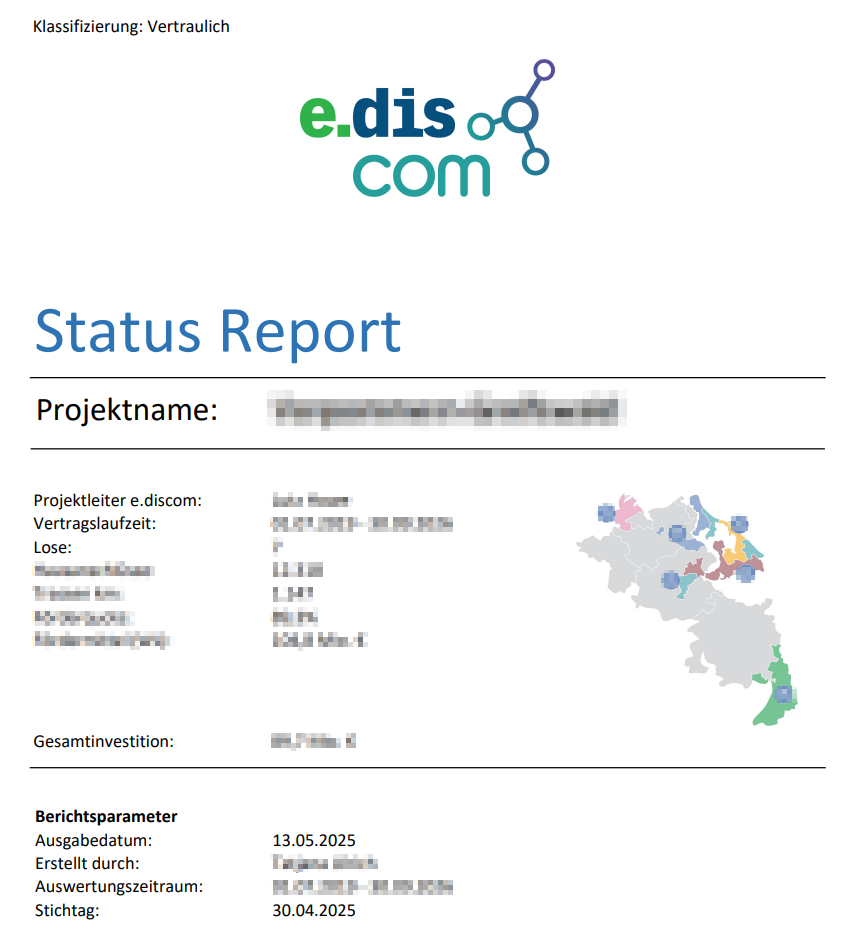
For custom analyses and business documents, BCS uses report templates created with Eclipse BIRT. Companies can use them to design project reports, analyses, quotations, or other documents based on their BCS data in the desired structure and layout.

Examples:

Interfaces to third-party systems

Configure import and export processors

Define value mappings and data processing

Set up automated imports and exports

Use custom BIRT report templates

Adapt reports and documents to the corporate design

Set up scheduled reports and analyses

Adapt user management and authentication to the IT environment

Technical administrators integrate BCS with the company’s existing identity and user management systems. For example, they configure the assignment of users and groups, the exchange of user information, and the desired authentication methods. BCS supports technologies including LDAP, Kerberos, OpenID Connect, SAML, and SCIM, as well as TOTP and passkeys.

Examples:

Connect users and groups

Assign external groups to BCS roles

Synchronize user information

Configure identity providers

Define authentication methods

Test customizations and develop them further while maintaining update compatibility

Technical administrators often continue developing the BCS configuration within their own company for many years. BCS separates individual configurations from the product standard as far as possible. Test, training, and production environments support a controlled approach to new settings and extensions. For installations with separate test and production environments, companies can review changes outside the production system first. Which configurations customers transfer or manage themselves depends on the operating model and their permissions. This allows companies to combine extensive customization options with a solution that remains maintainable and update-compatible over the long term.

Examples:

Implement customizations in a test environment first

Review configurations in a controlled manner and extend them as needed

Test changes in existing test environments and transfer them between environments

Keep individual extensions separate from the product standard

Continue developing existing customizations as new requirements arise

Iván Sándor Szerbin

Iván Sándor Szerbin

Application Support, IDS GmbH

The administrator training taught us how to customize and extend BCS ourselves using XML, the WebConfig Editor, or the user interface.

Ralf Junge

Ralf Junge

Head of PMO, Sandstein Neue Medien

BCS offers maximum customization while remaining fully compatible with updates.

Build in-house BCS customization expertise

In our administration training courses, your employees learn how to customize BCS using the user and administration interfaces, the WebConfig Editor, and advanced technical configurations. This enables internal administrators to understand how the user interface, roles, data model, processes, and technical configuration interact. They can assess change requests from a technical perspective and implement many customizations themselves.

Explore administration training
Projektron Customer Service

Your contact

Projektron Customer Service

Would you like to know which customization options BCS offers for your organization? Projektron Customer Service will answer your questions about views, roles, fields, processes, automations, and integrations.