12/08/2025 - Articles
AI assistance in BCS: Step by step to precise answer quality
With BCS AI assistance, we at Projektron have developed our first productive AI application that enables users to quickly and reliably obtain answers to questions about BCS documentation. The path to this point was iterative: Several rounds of testing and improvement showed that it is not the language model itself, but rather retrieval, splitting, and data preparation that determine the quality of the answers. This article shows how we at Projektron optimized the system step by step – right up to its productive use by customers.
Content
Starting point: The classic RAG setup
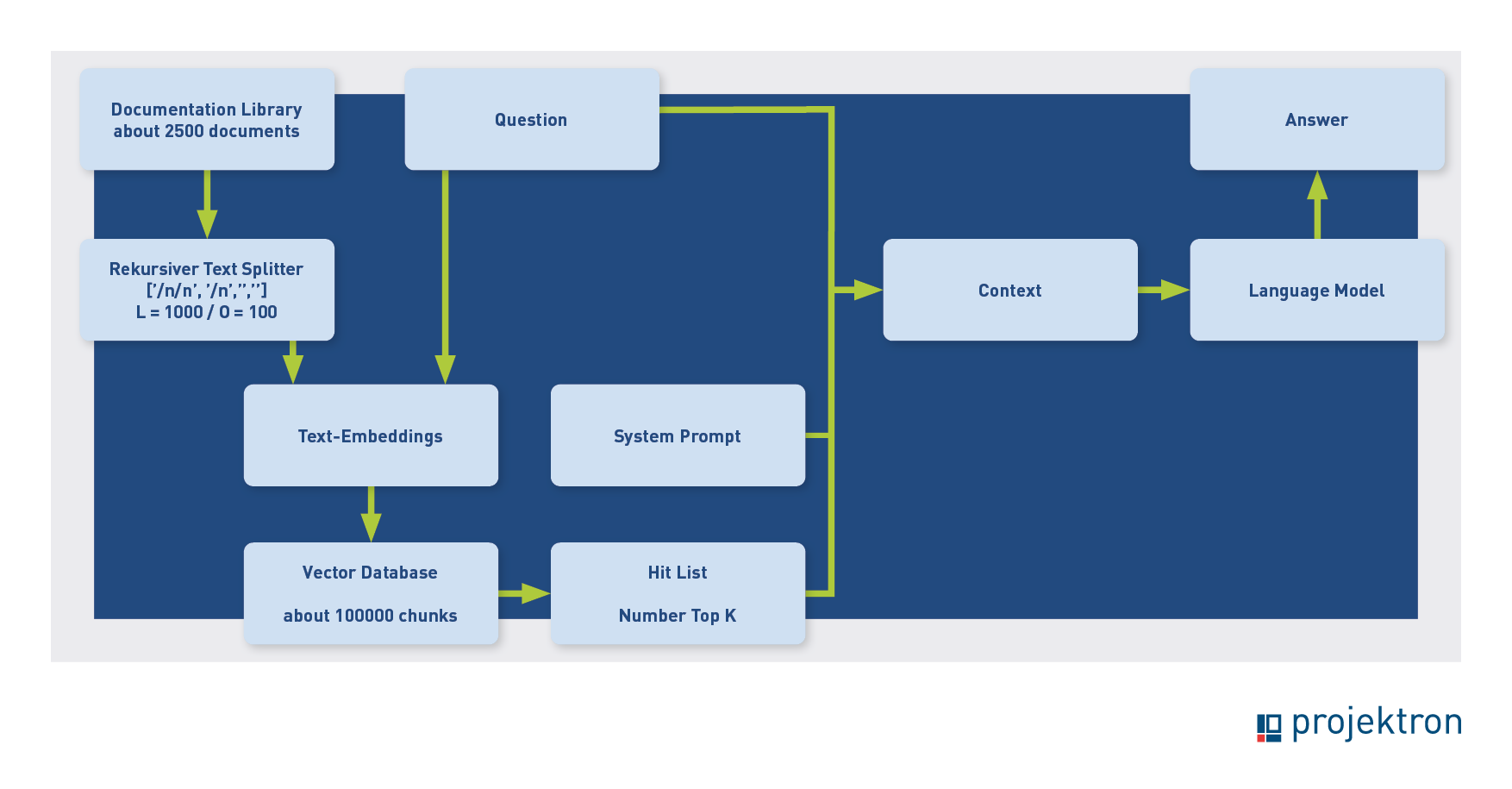
The left side of the images shows the indexing phase, the path from the documents to the vector database. On the right is the inference phase, the path from the user's question to the answer. As a reminder, the question is assigned a semantic vector through text embedding, and then the database is searched for similar vectors—i.e., texts that deal with the same topic as the question. The hits are passed to the language model as context, together with the question and the instruction: “Answer the question based on the texts found.”
Our first attempt at BCS help corresponded to the normal RAG (retrieval-augmented generation) scheme. The following image shows the process flow:
How can you find out whether this setup delivers good results? First, you need good test data. This should be validated question-answer pairs so that you can see whether the AI can reproduce the specified answer to the question. Projektron had good-quality data available for this purpose, as help requests are frequently submitted via the Projektron support server. Our test data therefore consists of resolved help tickets from support that have been accepted by the customer.
We expected that these questions would be a little too difficult for the AI on average, meaning that perhaps around a quarter of them could be answered correctly, as only trained project managers and administrators have access to support. These individuals are familiar with the system and the help and should only have questions that they cannot solve themselves with the help of the documentation processed for a fee. We considered this level of difficulty of the test data set to be advantageous, as there is sufficient room for optimization. Another advantage of the data set is that the test becomes realistic, as we can solve real customer problems (once again).
The documentation department, as the experts for the help, tested the AI functions. Feedback was summarized, usually in Microsoft Word reports with screenshots and observations. The inadequate answers found were then examined, the reasons determined, and ways to improve the process considered. The necessary changes were implemented and tested, followed by a new round of evaluation with the documentation department, resulting in the current outcome.
All blog articles on the main topic of AI: AI knowledge (1-4) and AI at Projektron (5-8)




First finding: Loss of context in retrieval
The following example test result from the first round led to a process change.
Example: the “BT-115 question”
The question “What does BT-115 mean?” could not be answered, even though this is described in the documentation. The BT numbers stand for “Business Terms” and refer to the fields in the electronic invoice. The question is difficult because it lacks context. If the question is slightly expanded to “What does BT-115 mean in electronic invoices?”, the correct answer is given.
However, it is also possible to answer the context-free question correctly. An analysis of the hits from the vector database showed that a text split from the correct help document on electronic invoices was found, but not the split in which BT 115 appeared. With this information, the language model cannot answer the question correctly.
Solution: Parent Document Retrieval
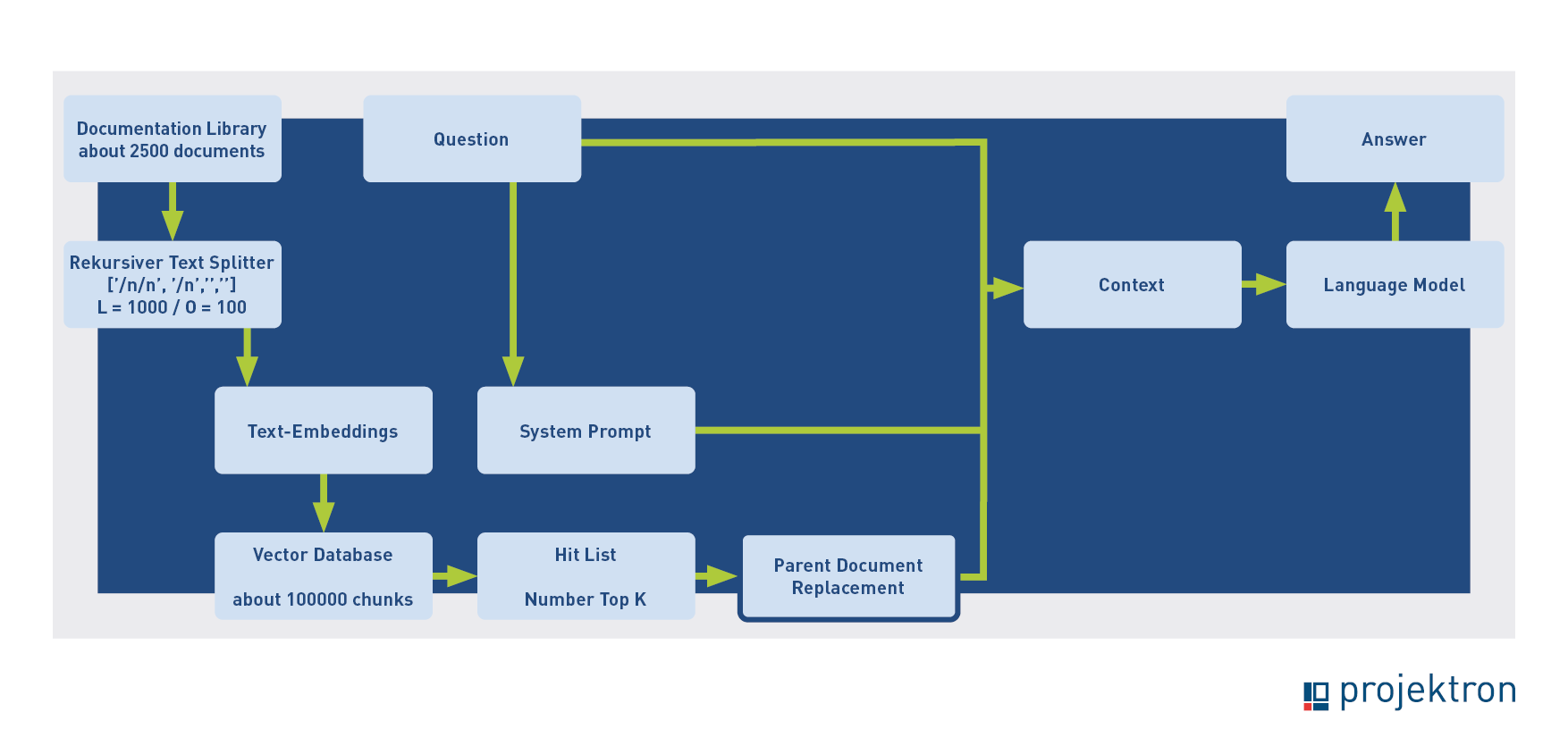
We then implemented a function that, once activated, replaces each split with the entire document, which is then passed on to the language model (“parent document retrieval”). This function also correctly answers the context-free question about BT-115.
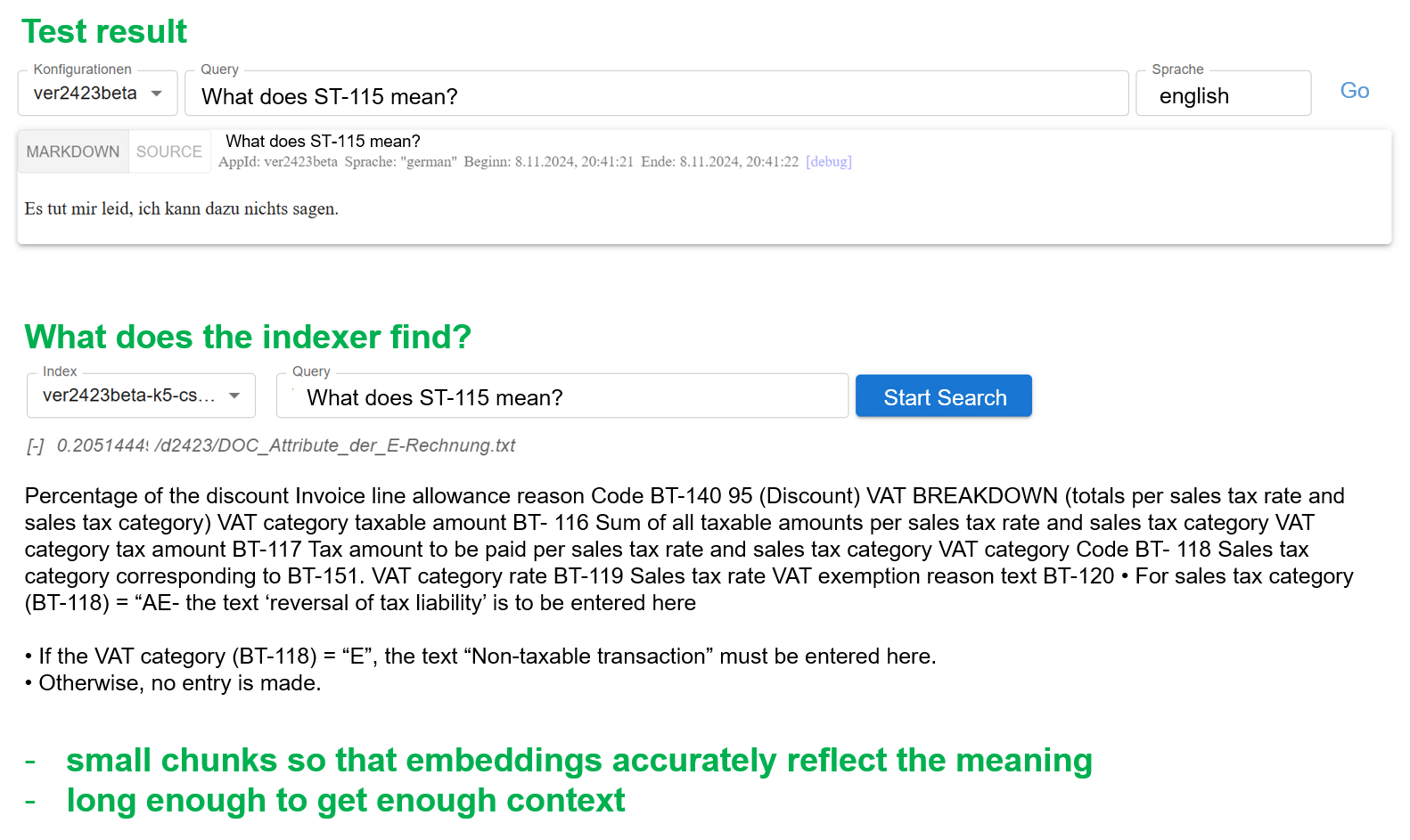
There is a conflict of objectives when determining the optimal size of text splits. On the one hand, the splits must be large enough to provide sufficient context to answer the question, but on the other hand, they must be small enough to contain only one topic so that the vector can accurately reflect the meaning. Parent document retrieval can partially resolve this conflict of objectives.
The second version of the process flow, with parent document retrieval, looked like this:
Second test phase: Irrelevant hits due to highly weighted terms
We then proceeded to a new round of testing. The following screenshots show an excerpt from the test documentation with new observations.
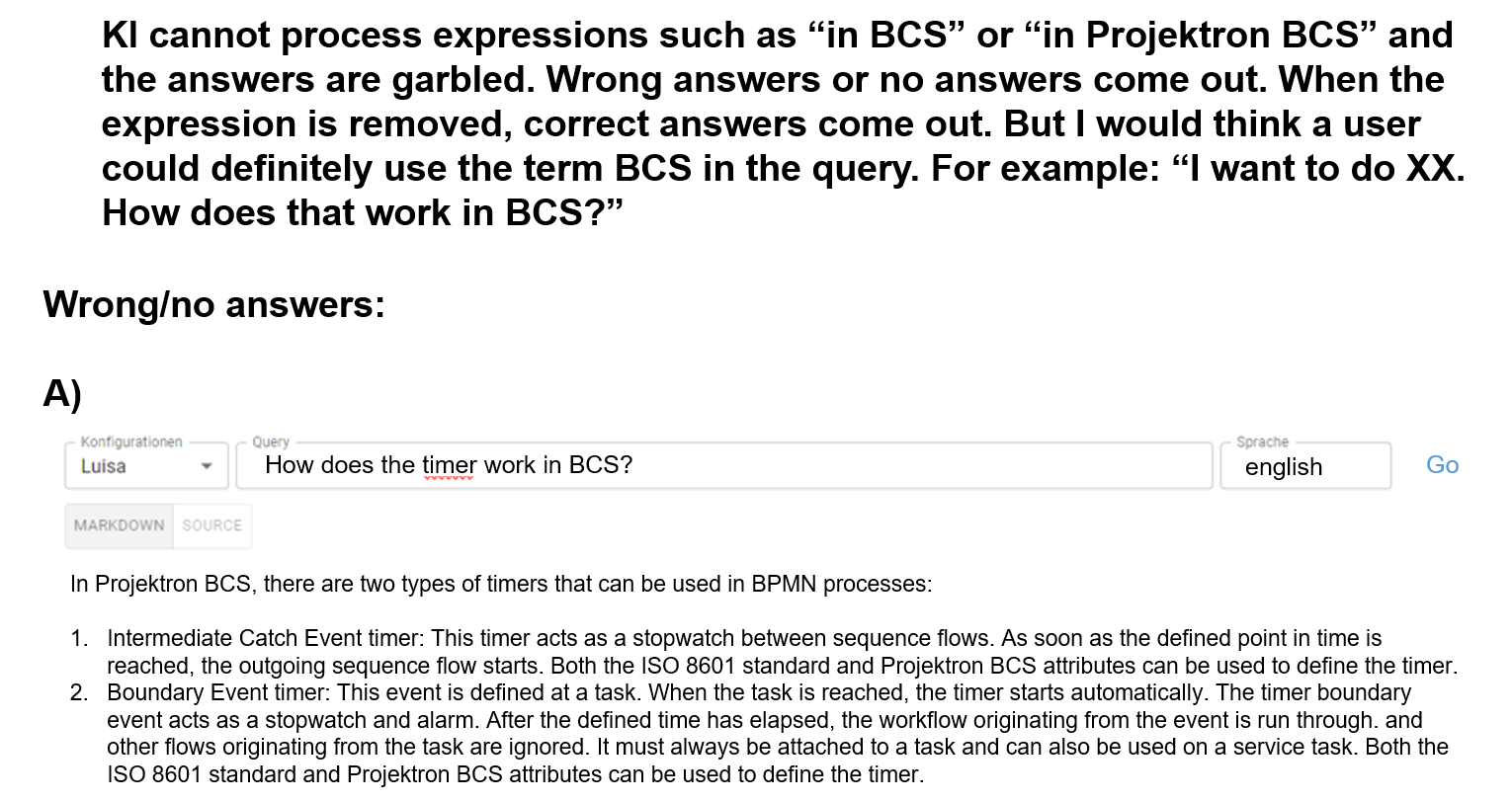
The analysis revealed that the problem here also stems from the retrieval stage. If “BCS” or “Projektron” are included in the question, the vector search often returns very short text fragments that mainly contain ‘BCS’ or “Projektron.” Often, none of the five hits has anything to do with the rest of the question. Even if the split is replaced by the entire document, the language model cannot arrive at a correct answer with this contextual information.
Improvement: Query Rewriting (QRW)
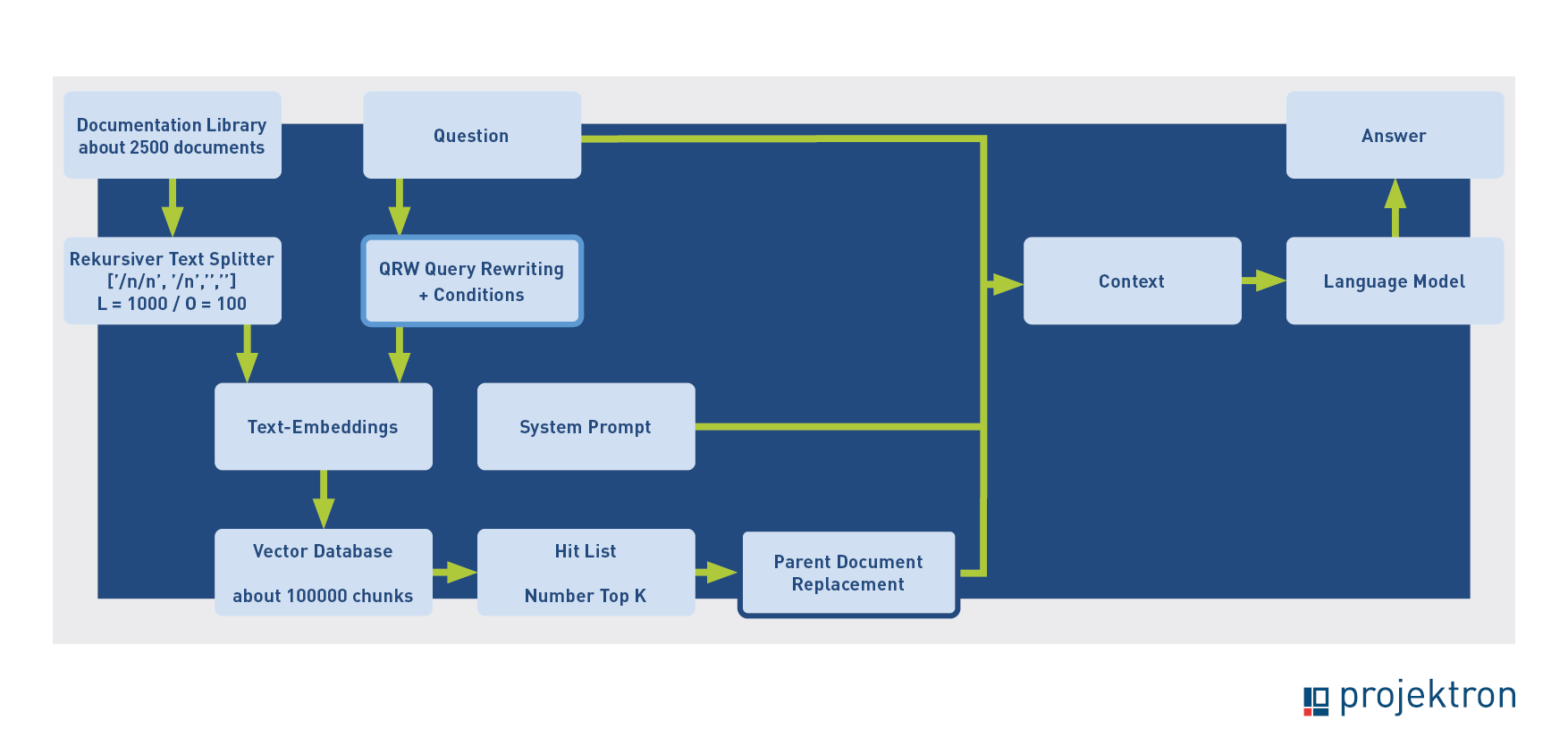
When searching a general text corpus, it is a good strategy to give high weighting to very specific terms such as “BCS” or “Projektron” in order to find the presumably few documents that deal with these topics. In our specific application, however, every text in the corpus deals with BCS, so paying too much attention to these terms is misleading. We therefore rewrite the question if it contains certain terms (here is the filter: “BCS” or “Projektron”). If the terms are not included, the question is used unchanged; otherwise, the terms are removed by an AI application. The question should be changed as little as possible. This is a first example of the chaining of AI applications. The process with query rewriting (QRW) now looks like this:
Third test phase: Missing keywords in short splits
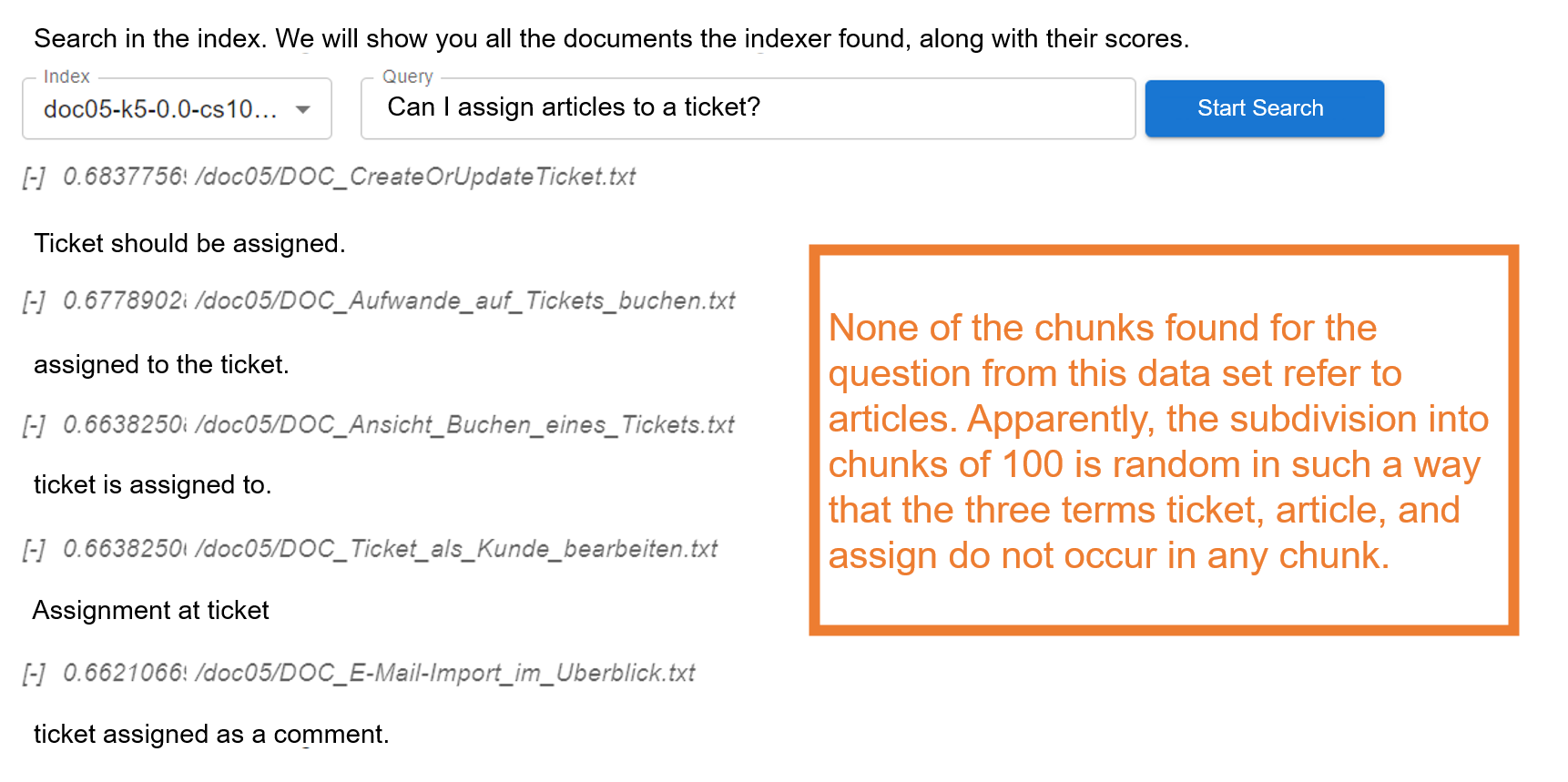
This brings us to a new round of testing. The next finding again has to do with the retrieval stage. We tested whether shorter splits, because they can be semantically vectorized more precisely, deliver better results in combination with parent document retrieval. Surprisingly, this was not necessarily the case, as the example shows. With longer split lengths (250 or 1,000 characters), the test question in the example was answered correctly, but with a length of 100 characters, it was not. Apparently, there is no split that happens to contain all three meaningful terms in the question: “ticket,” “article,” “assign.” The hits mostly revolve around assigning emails to tickets. The question cannot be answered with this contextual material.
Solution: AI-generated supplementary documents
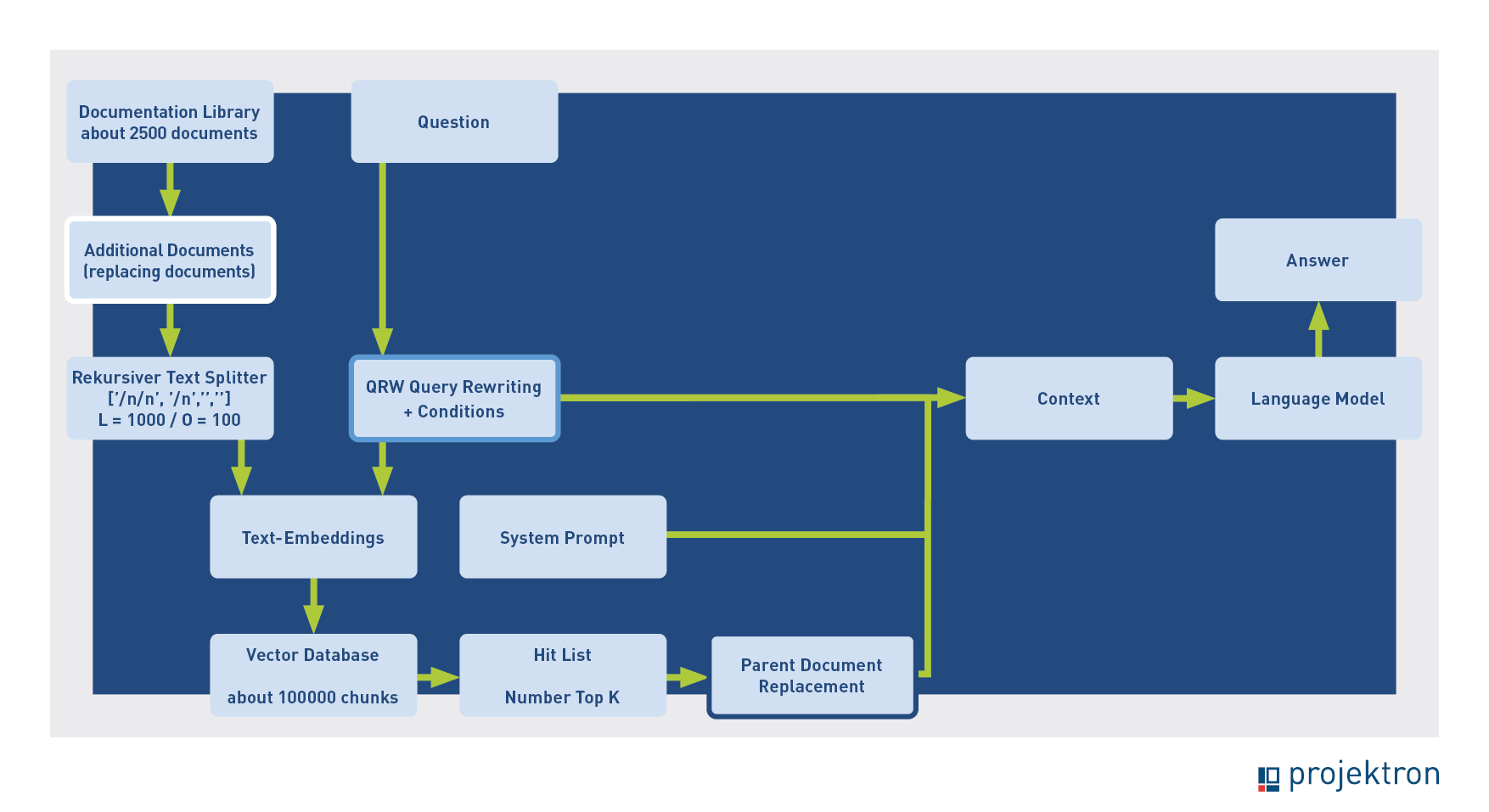
As a solution, we have implemented a feature that allows AI-generated additional documents to be added to the data set. In this case, these are short summaries that contain all the keywords from the relevant help page. The summaries are not split further. When the indexer finds one of these summaries, it is replaced by the entire help page, as with text splits, which is then passed on as context. The process looks like this:
Final optimization: Adjustment of the splitting strategy
The last improvement we would like to introduce also has to do with the splitting and indexing process. We have observed that the splits found by the indexer are often very short. In the default setting of the “Recursive Text Splitter,” splits are first made at double line breaks, then at single line breaks, then at spaces, and finally within words. Since the help documents are highly structured, with many double line breaks, many splits are shorter than the “chunk size.”
The default setting works well for standard texts, but in our special case it delivers less useful results. This is because the semantic search strongly favors these short splits. This often results in a search result as shown in the following figure. Although the split length is set to 1,000, the splits found are only between 16 and 26 characters long.
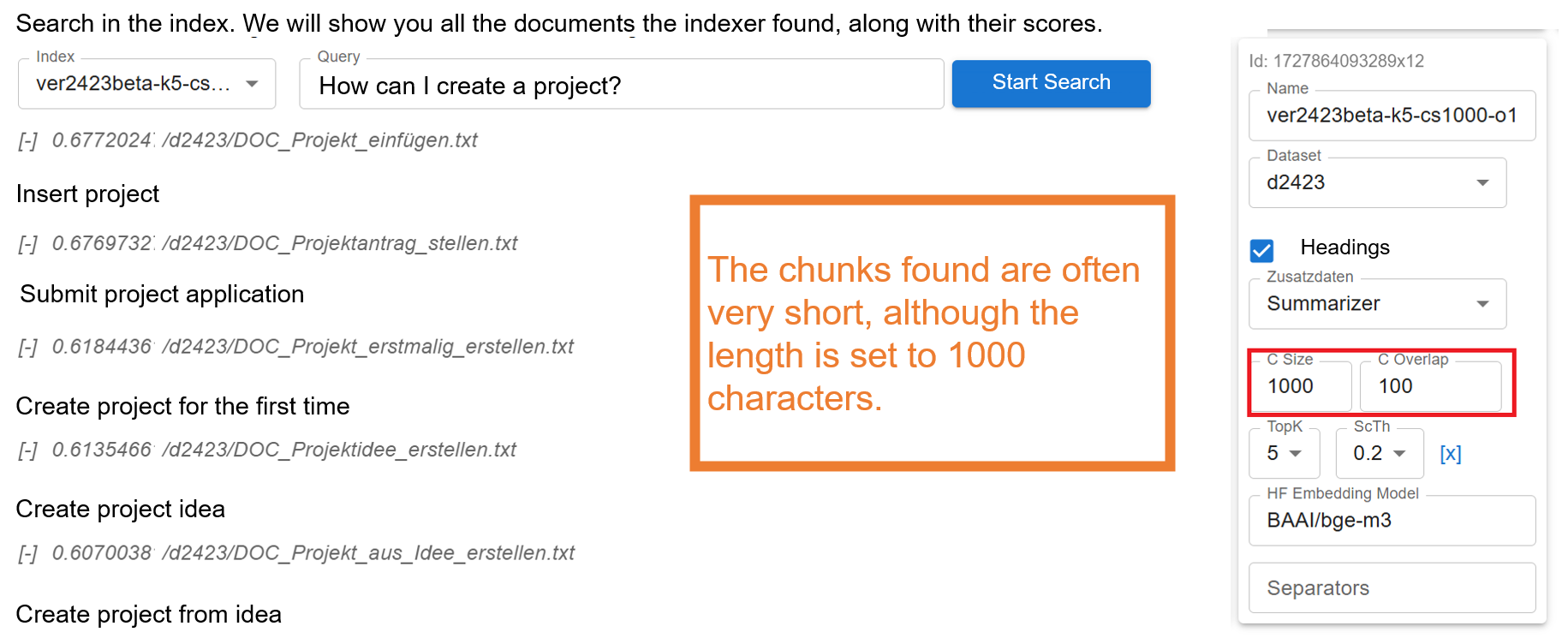
We suspect that (similar to the terms BCS and Projektron) this often results in splits being identified that contain a highly rated term. These are not necessarily the splits that lead to the optimal original document after parent document replacement. We have therefore made the split parameters configurable via the framework so that you can easily set the fixed length without having to consider structures due to line breaks or semantics. A large overlap ensures that contextual relationships are preserved as much as possible. After testing, it appears that this method delivers slightly better results than standard splitting in our specific case. The overall process now looks like this:
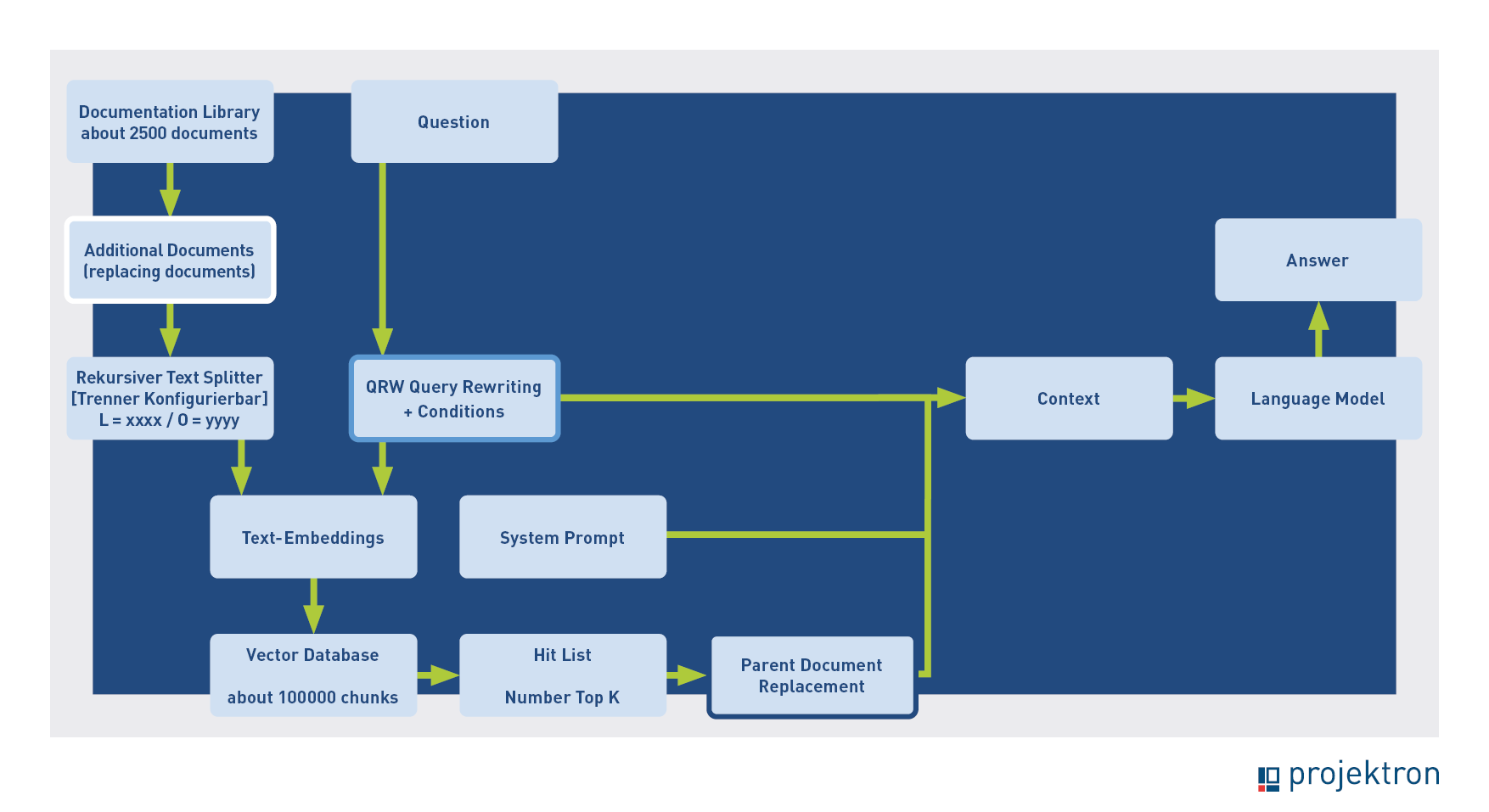
This is the status with which we are delivering the first productive version of the help system. Now we are waiting for the “reality check”: experiences with the first real customers.
Our experience report clearly shows that most of the optimization work focused on retrieval and, in particular, the text splitter. Once the correct context has been determined, the language model also generates a suitable response.
From GPT-4o to Mistral: Reasons for the model change
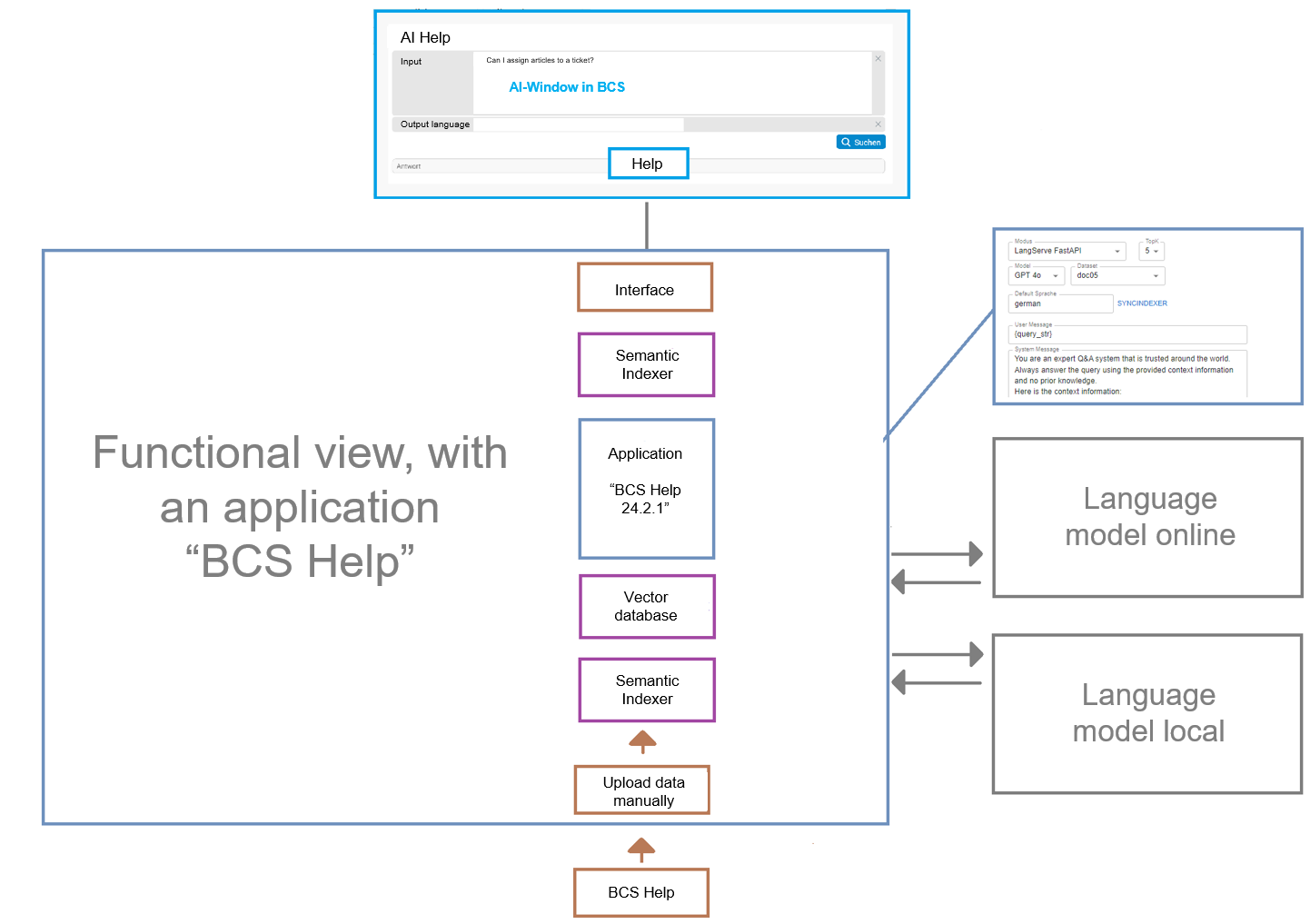
We initially used GPT-4o for AI assistance, as there were no restrictions on data protection or data security. We also tested with local models. On the hardware we have used so far, Gemma 2 27b (15.6 GB) delivered the best results. The test computer had difficulties with even larger models. The results with Gemma were quite good in terms of quality, but did not quite match those of GPT-4o. The performance was significantly worse, but could be improved with a more powerful computer.
We have currently opted for Mistral, which serves as the underlying model for our BCS AI help. The decisive factors were primarily data protection and full data control. Mistral complies with European data protection guidelines, which is important for many customers.
Conclusion: Compact, coherent text with a focus on user benefits
The further development of AI assistance in BCS clearly shows that the focus is not on the language model itself, but on the quality of the context provided. Only through optimized retrieval, chunking tailored to the data set, parent document retrieval, and supplementary additional functions can AI today deliver accurate and consistent answers.
For users, this means one thing above all: they receive a directly relevant answer to their question – without first having to wade through a list of hits. In the past, you had to find the right document and search for the crucial information in it, which was often tedious due to the limited quality of the old search function. Now, AI takes care of this step and provides the relevant information immediately. This saves time, reduces frustration, and makes daily work noticeably more efficient.
A brief look into the future: Currently, AI Help does not have a chat function. In the future, it will be possible to ask questions and further refine answers. AI Help is thus evolving from a useful tool into a reliable companion in everyday work, taking on real tasks and making the use of BCS more pleasant and productive overall.
About the authors

Maik Dorl is one of the three founders and remains one of the managing directors of Projektron GmbH. Since its founding in 2001, he has shaped the strategic direction of the company and is now responsible for sales, customer service, and product management. As product manager, he is the driving force behind the integration of innovative AI applications into the ERP and project management software BCS.

Dr. Marten Huisinga heads teknow GmbH, a platform for laser sheet metal cutting. In the future, AI methods will simplify the offering for amateur customers. Huisinga was one of the three founders and, until 2015, co-managing director of Projektron GmbH, for which he now works as a consultant. As DPO, he is responsible for implementing the first AI applications in order to assess the benefits of AI for BCS and Projektron GmbH.
More interesting articles on the Projektron blog

Product management at Projektron
How does software remain successful for 25 years? Projektron BCS shows that continuous updates, user feedback, and modern technologies ensure long-term success. Learn how product management works at Projektron.

Use cases for AI in BCS
Step by step, an AI ecosystem is emerging at BCS that is making everyday work noticeably easier. The article shows which use cases are already productive and which functions are still to come.

AI-Framework for BCS
Projektron is developing a flexible AI framework for BCS that can be operated entirely locally and meets the highest standards of precision, data protection, and transparency. The article shows the technical and organizational foundations required for the framework and how the architecture is structured.

Comparison: ERP for Service Providers
For service providers, choosing the right ERP solution determines efficiency, transparency, and revenue. Our comparison highlights the best systems, explains which features truly matter, and provides valuable tips for making the right choice. Discover the ERP that will really drive your business forward!

The logo of the new Projektron BCS AI Help, which has been providing precise answers to questions about BCS documentation since version 25.3.