02/23/2026 - Articles
Process modeling according to BPMN 2.0: simply explained, symbols, examples, and instructions
Business processes are often more complex than they appear at first glance: multiple participants, dependencies, decisions, and exceptions. Without a clear structure, chaos quickly ensues. This is exactly where BPMN 2.0 comes in. Learn how to visualize processes clearly with BPMN, which symbols you really need, and how to create your own diagrams step by step. Concrete examples, typical mistakes, and best practices from real-world experience will help you ensure that your process models are not only correct, but also truly useful.
BPMN explained in 30 seconds
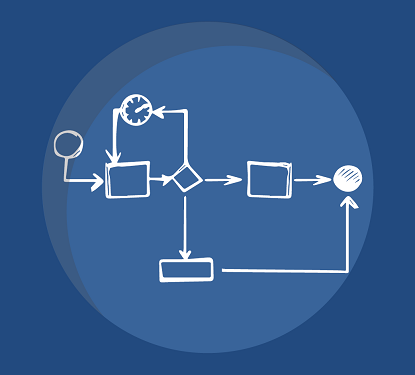
BPMN (Business Process Model and Notation) is a standardized way to visually represent business processes. Instead of complex text descriptions, workflows are modeled as diagrams with clearly defined symbols. This way, everyone involved—from the business team to IT—can understand the same process.

Why BPMN?
BPMN makes processes visible and understandable
All participants speak the “same language”
Processes can be analyzed, improved, and automated
BPMN is primarily used to make processes transparent and systematically improve them:
Document processes (e.g., purchasing, approvals, support)
Analyzing and optimizing processes
Clearly defining responsibilities
Creating a basis for automation
This is important because in many companies, processes exist but are not clearly described. Everyone works “somehow,” and knowledge is stored in people's heads or in emails. BPMN brings structure: processes become visible, comparable, and, above all, improvable.
Contents
What is BPMN 2.0? Definition, purpose, and use cases
BPMN was developed by the Object Management Group (OMG), an international organization that defines standards for IT. The first version was released in 2004 and has been continuously developed since then. BPMN 2.0 is the current version of the international standard for process modeling and is used worldwide by companies of all sizes.
The OMG's goal with BPMN is to provide a vendor-independent and uniform notation. It defines a standardized set of symbols and rules that can be used to represent business processes in a clear and comprehensible manner. This allows business processes to be not only described in an understandable way, but also implemented technically – a decisive advantage for process automation.
Essentially, it is about visualizing complex processes in such a way that they are both technically understandable and technically usable.
BPMN as the standard in business process management (BPM)
BPMN is now the central standard in business process management. The big advantage is that specialist departments and IT work with the same representation.
A process diagram shows not only what happens, but also:
who is involved
when decisions are made
how information flows
This makes BPMN the interface between organization and IT. Processes can not only be described, but also directly transferred to software or automated.
What is BPMN actually used for?
In practice, BPMN appears wherever processes play a role. Typical use cases are:
Approval processes (e.g., vacation requests, invoices)
Purchasing and procurement processes
Onboarding or offboarding processes
Support and ticket processes
Workflows in ERP or BPM systems
The real added value comes not from the diagram itself, but from the clarity it creates. Processes become comparable, weak points become visible, and procedures can be standardized.
When is BPMN useful and when is it not?
BPMN plays to its strengths especially in structured, recurring processes. Whenever multiple roles are involved or decisions have to be made, the method provides clarity.
When BPMN is worth it | When BPMN is not worth it |
|---|---|
|
|
BPMN is not an end in itself. A diagram is only useful if it is clear why the process is being modeled and what the desired outcome is.
BPMN vs. EPC vs. UML: Which modeling approach is the right one?
Anyone involved in process modeling will sooner or later encounter not only BPMN, but also EPK and UML. All three pursue a similar goal: to represent processes in a comprehensible way. The difference lies in how detailed, technical, or specialized this representation is and for whom it is intended.
An overview of the acronyms:
BPMN (Business Process Model and Notation): A standardized notation for modeling business processes that is understood by both business departments and IT.
EPK (event-driven process chain): A more technical method of representing processes that has its roots in business administration (especially the SAP environment).
UML (Unified Modeling Language): A universal modeling language from software development that is primarily used to describe systems, software architectures, and processes.
While BPMN is now considered the standard, EPK and UML are still relevant in certain contexts. Choosing the right method depends largely on what you want to achieve.
| Criterion | BPMN | EPC | UML |
|---|---|---|---|
| Goal | Model business processes | Describe processes from a business perspective | Model software & systems |
| Target audience | Business + IT | Mainly business users | Mainly IT / developers |
| Ease of understanding | High | Very high | More technical |
| Standardization | International standard (OMG) | Less strongly standardized | International standard |
| Automation | Possible | Hardly possible | Indirect |
| Use cases | Processes, workflows, automation | Analysis, documentation | Software architecture |
BPMN positions itself precisely between technical expertise and technology. It is understandable enough for the specialist department and at the same time precise enough for IT. This is exactly what makes the standard so relevant today.
When should you use BPMN instead of EPK?
EPK (event-driven process chains) was the dominant method in process modeling for a long time, especially in the SAP environment. Today, however, it quickly reaches its limits when processes are not only to be documented, but also implemented or automated.
BPMN is usually the better choice when:
Processes are not only to be described, but also executed or automated
Multiple systems or departments are involved
A clear, standardized notation is required
Business departments and IT work together on processes
EPK can still be useful when it comes exclusively to a rough, technical representation. However, as soon as processes become more complex or technical implementation is planned, BPMN shows its strengths.
BPMN symbols explained simply
BPMN thrives on its visual language. Instead of reading long descriptions, you can see at a glance how a process works. However, this only works well if the symbols used are clear and consistent.
Officially, BPMN comprises over 100 different elements. In practice, however, you only need a fraction of them. Anyone who tries to exploit all the possibilities quickly risks ending up with confusing and difficult-to-understand diagrams.
The key is to focus on the essential building blocks.
The 4 categories of BPMN elements
All BPMN symbols can be assigned to four basic categories. This structure helps to logically capture even more complex diagrams.
Flow objects form the core of every process. These include events, activities, and gateways—in other words, everything that actually happens in the process.
Connecting objects link these elements together. They show the order in which tasks are performed or how information flows.
Swimlanes structure the process according to responsibilities. They show which role or department is responsible for which step.
Artifacts add additional information to the diagram, such as documents or comments. They do not influence the process, but they improve understanding.
These four categories are sufficient to clearly map the majority of all business processes.
The most important BPMN symbols (cheat sheet)
Even though BPMN is very comprehensive, the same basic elements are always repeated in practice. If you have a good command of these, you can already model the majority of all processes.
The most important BPMN symbols at a glance
Start Event defines the beginning of a process
Task describes a specific task
Gateway controls decisions and branches
End Event marks the end of a process
Sequence Flow shows the order of steps
Message Flow describes communication between participants
Pool / Lane assigns tasks to roles or departments
These few symbols are sufficient to fully represent many typical business processes. More complex elements such as special event types or sub-processes only come into play when processes need to be modeled in greater detail.
A common mistake in practice is to use too many different symbols. This quickly leads to diagrams that are formally correct but difficult to understand. Less is often more here: a clearly structured, reduced model usually brings the greatest benefit.
BPMN events (start, intermediate event, end event)
Events are one of the central elements in BPMN. They describe when something happens, i.e., the trigger, interruptions, or the end of a process. Unlike activities, they do not perform any work themselves, but rather mark states or events in the process.
Especially in more complex processes, events ensure that processes remain traceable and that exceptions can also be modeled cleanly.
Start Events explained simply

Every process begins with a start event. Therefore, it occurs at least once in every process. The start event can be triggered by various circumstances, e.g., by the receipt of a message (start message event: in this case, the circle for the start event is supplemented by an envelope icon).
In simple cases, the start event is rather generic (“process starts”). In practice, however, it is worth being more specific. This is because the trigger often determines how the process is structured.
Typical examples are:
Receipt of an inquiry or order
Receipt of an email or message
A specific date or deadline
A clearly defined start event helps to clearly delineate processes. Instead of “it starts sometime,” it becomes clear: The process starts here, for this specific reason.
Intermediate Events & Boundary Events
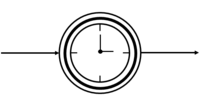
Intermediate events occur during a process. They briefly interrupt the flow or trigger a specific response without completely terminating the process.
A classic example is a timer: after a certain amount of time, a reminder is sent or an alternative path is taken.
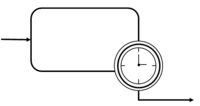
BPMN offers a clearly readable representation of exception handling, particularly in a technical context, using what are known as boundary events. Exception handling is necessary when you have to deal with a situation that you do not expect, but which may occur. Exception handling indicates how an event should be handled if it occurs during the execution of an activity. Boundary events are “attached” to an activity.
Typical use cases:
A deadline is exceeded
An error message occurs
No response is received
Boundary events are a powerful tool for highlighting exceptions and defining exactly how they should be handled.
End events and process completion

End events mark the end of a process. They show when a process has been completed and often also what the result is.
A process can have several possible endings, for example:
Approval granted
Application rejected
Process canceled
It is particularly important to clearly model these different end states in decision-making processes. This makes it immediately apparent what results a process can deliver.
BPMN activities (tasks and subprocesses)
An activity describes a task that needs to be completed in a business process. While events describe when something happens, activities show what is actually done. They represent the actual work steps of a process. In BPMN, a distinction is made between simple tasks and more complex sub-processes. Both follow the same principle: an activity always describes a clearly defined task. It is represented as a rectangle with rounded corners.
Task types (user, service, script)
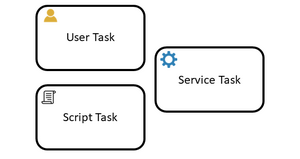
Tasks are the smallest building blocks of a process. They represent specific activities that are performed either by people or by systems. In practice, three types have become established:
A user task is a task that an employee performs manually, such as a check or a decision.
A service task is used to automate the execution of a process step.
A script task is also automated, but controlled directly by logic or scripts. When a process execution arrives at the script task, the corresponding script is executed.
The distinction is more than just formal. It helps to identify where processes are still manual and where there is potential for automation.
Subprocesses: when are they useful?
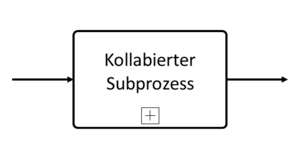
As soon as a process becomes more complex, simple tasks reach their limits. This is where subprocesses come into play. More complex activities are referred to as subprocesses or partial processes. A subprocess combines several related steps into a single unit. This provides clarity and reduces complexity in the main diagram.
Subprocesses are distinguished in the notation by a + symbol. Subprocesses contain several activities and can be displayed in collapsed or expanded form.
Subprocesses are particularly useful when:
a sequence occurs multiple times
a subprocess is very detailed
the overview in the main process should be maintained
A well-used subprocess not only makes diagrams shorter, but also much easier to understand.
BPMN gateways explained simply (XOR, AND, OR)
Gateways are the decision points in the process. They determine which path to take next, or whether to pursue several paths in parallel. This is where many mistakes are made in practice because the differences between the gateway types are not clearly understood.
XOR vs AND vs OR: Differences
The three most important gateway types differ primarily in how many paths can be active at the same time:
XOR (exclusive): Exactly one path is selected, either A or B.
AND (parallel): All paths are executed simultaneously.
OR (inclusive): One or more paths can be selected simultaneously.
An XOR gateway therefore corresponds to a classic decision, while an AND gateway enables parallel processes. The OR gateway lies between the two and is correspondingly more complex.
Choosing the right gateway is crucial for the logic of the entire process.
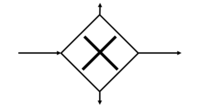
Exclusive/XOR Gateway
Exclusive gateways are used when exactly one condition may be met (“either-or decision”). Exactly one of all outgoing flows is selected.

Parallel/AND Gateway
With parallel gateways, all outgoing process paths are tracked (“and”).

Inclusive/OR Gateway
Inclusive gateways are used when, depending on the situation, one or more process paths can be followed (“and/or”).
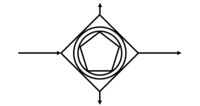
Event-based gateway
With event-based gateways, the flow is tracked based on which event occurs first (e.g., “5 minutes have passed” or “confirmation email received”).
Common mistakes with gateways
In practice, gateways are often used incorrectly.
- A classic mistake is to use an XOR even though several conditions may apply at the same time, or vice versa.
- The merging of paths is also often neglected. If you split processes, you must merge them correctly again later, otherwise logical breaks will occur.
- Another problem is too many decisions at once. If gateways are overloaded, the diagram quickly becomes incomprehensible.
The simple rule is: as little as possible, as clear as necessary.
BPMN flows and communication (sequence flow, message flow)
All flow objects used in a BPMN process are connected to each other via sequence flows, also known as flows or connecting objects. Flows are represented in the form of arrows.
A common mistake is to mix the two. The simple distinction:
Sequence Flow = sequence within a process
Message Flow = communication between participants
Consistently adhering to this distinction ensures much greater clarity in the diagram.
Sequence Flow
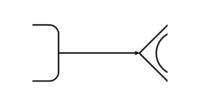
Sequence flows connect tasks, gateways, and events in a process, visualize the order in which the tasks are to be completed, and thus illustrate the logical sequence (flow) of the process.
Message Flow
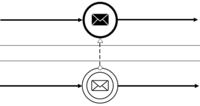
The message flow connects different flow objects or swimlanes. Message flows symbolize the exchange of information with external process participants. They are triggered by activities and can be docked to activities, pools, or message events.
Pools and lanes in BPMN explained clearly
Pools and lanes structure processes according to responsibilities. They answer the central question: Who does what?
The steps of a process are represented within horizontal boundary lines, known as swimlanes. Several swimlanes form a pool. A pool represents an organizational unit, such as a company or a system. The entire process is represented within the pool. Lanes further subdivide this pool, for example according to roles, departments, or specific functions. Each lane shows which tasks are performed by which role.
In BPMN 2.0, pools and lanes are often used to map the various organizational units involved in the process (users, groups of people, roles, and responsibilities).
This not only makes processes clearer, but also more transparent. Responsibilities become clearly visible and handovers traceable.
It is important not to overload pools and lanes. Too many subdivisions can quickly become confusing. The goal is always to create a representation that remains understandable at a glance, even for people who do not see the process on a daily basis.
Pool

The pool represents the entire process and stands for organizational units with clearly defined boundaries, such as companies. The pool is superordinate to one or more lanes and assigns the tasks it contains to the responsible lanes. Flows may not cross the boundary of the pool.
Lane
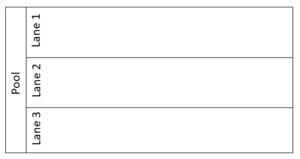
A lane is a subdivision of a pool that extends across the entire length of the pool. It represents a process role or user role in a workflow. This usually corresponds to departments, roles, or individuals. The tasks of the respective process participant are modeled within the lane.
Artifacts
Artifacts are used to promote clarity or understanding of a process. However, they have no significance for the process itself.
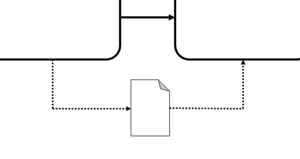
Data Object
Many processes involve steps that require the use or creation of documents and data. The data object can be linked to various flow objects to represent a data flow or assign a document.
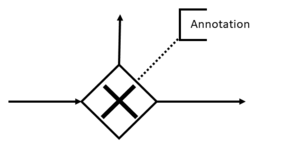
Annotation
All BPMN elements can be annotated in the process modeling tool to achieve a better understanding of the model. The annotation is placed directly in the process.
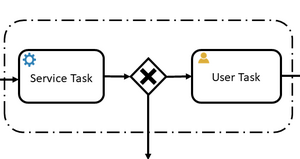
Group
The group is a visual element that combines objects with related content. This serves solely to improve understanding of the model and has no effect on the process logic.
Creating a BPMN diagram: step-by-step guide
A BPMN diagram can be drawn quickly and “somehow.” A good BPMN diagram, on the other hand, is structured in such a way that it can still be understood three months later by colleagues, IT staff, and anyone who wants to improve or automate the process. The following BPMN guide will lead you through five steps to a clean, practical model.

Preliminary note
First model the “happy path” (the standard case), then exceptions, escalations, and special cases.
BPMN modeling in 5 steps: the overall approach
- Set the process name. Clearly state what it’s about (e.g., “Approve invoice” instead of “Invoices”).
- Clarify the start and end criteria. When does the process begin, and when is it considered complete?
- Define the goal. Is it for documentation, optimization, training, or automation?
- Set the scope. What’s included—and what’s intentionally not?
- Choose the level of detail. Decide whether to model at a high level (management) or in detail (implementation/IT).
- Choose the start event. Define the specific trigger (e.g., “Request received,” “Order initiated,” “Timer reached”).
- Define end events. Specify the possible outcomes (e.g., “approved,” “rejected,” “canceled”).
- Allow multiple endings. If the process has different outcomes, model them explicitly. This increases clarity.
- Align terminology. Use consistent phrasing for start and end (events as a state/result, not as an activity).
- Define pools. Which participants are involved (e.g., “Company,” “Supplier,” “System”)?
- Define lanes. Who is responsible within the pool (e.g., “Procurement,” “Department manager,” “Accounting”)?
- Model the happy path. First draw the standard flow without exceptions.
- Name tasks clearly. Use active, precise labels (verb + object), e.g., “Review invoice,” “Approve request.”
- Set task types intentionally. Indicate whether a step is manual (user task) or automated (service/script task).
- Identify decision points. Where does the path change (price, budget, approval, deadline, result)?
- Choose the right gateway. XOR for “exactly one,” AND for “parallel,” OR for “one or more.”
- Write conditions. Add short, unambiguous conditions on outgoing paths (e.g., “> €5,000” / “≤ €5,000”).
- Model exceptions. Add boundary events for typical edge cases (e.g., “deadline exceeded,” “error,” “no response”).
- Close the paths. If you branch, ensure clean merging—or a clear end event per path.
- Test readability. Can someone explain the flow in 30 seconds? If not, simplify.
- Check symbol discipline. Use only the symbols you truly need.
- Verify responsibilities. Every task should be clearly assigned to a lane.
- Validate flows. Don’t mix sequence flow (within a pool) with message flow (between pools).
- Ensure consistency. Consistent naming, consistent modeling rules, no mixed styles.
- Get a review. Have business and IT review it—only then is it truly “done.”

Mini-check
A good BPMN diagram is not the one with the most symbols, but the one that can be understood without explanation.
BPMN best practices: how to model correctly
A BPMN diagram can be created quickly, but that doesn't automatically mean it's good. In practice, it's not so much the correct use of individual symbols that determines success, but rather the consistency and comprehensibility of the entire model.
Good BPMN diagrams can be recognized by the fact that they work without additional explanation. Anyone who sees the process immediately understands what is happening, who is involved, and what decisions are being made.
The following best practices will help you achieve this goal.
Modeling conventions in the company
As soon as several people start modeling processes, a problem quickly arises: everyone does it a little differently. Different symbols, different names, different levels of detail, and suddenly the diagrams are difficult to compare.
This is exactly where modeling conventions come in. They define binding rules according to which processes in the company are modeled.
Typical modeling conventions
Uniform naming of tasks (verb + object, e.g., “check invoice”)
Clear rules for the use of gateway
Defined range of symbols (e.g., only selected event types)
Consistent use of pools and lanes
What is important here is not so much the perfection of the rules, but their consistent application. A simple, uniform system is much more valuable than a complex set of rules that no one follows.
How many symbols should you really use?
The BPMN specification includes over 100 different elements. In practice, however, only a few of these are needed on a regular basis.
Many diagrams fail because they attempt to exploit as many of these possibilities as possible. The result is models that are formally correct but difficult to understand.
Rule of thumb
Focus on the 10-15 most important symbols. These are sufficient to fully map most business processes.
Complexity arises not from too few elements, but from too many. The more simplified a diagram is, the faster it can be understood and the more likely it is to actually be used.
How to keep BPMN diagrams understandable
A good BPMN diagram works like a clear story: it has a beginning, a comprehensible sequence of events, and a clear ending. Anything that distracts from this should be avoided.
Make sure that processes are as linear and logical as possible. Branches should be clearly justified and not unnecessarily nested. If a diagram becomes too complex, this is often a sign that a subprocess would be useful.
Naming also plays an important role. Tasks should be formulated actively and concretely so that it is immediately clear what needs to be done. Unclear or abstract terms quickly lead to misunderstandings.
Practical check for understandable diagrams
Can anyone understand the process without explanation?
Are all tasks clearly named?
Are there any unnecessary branches or complexities?
Is it clear at a glance who is responsible for what?

A BPMN diagram is not an end in itself. It is not intended to impress, but to help. The simpler and clearer its structure, the greater its usefulness in everyday life.
Common BPMN mistakes and how to avoid them
At first glance, BPMN seems simple: a few symbols, a few arrows, and the process diagram is complete. In practice, however, errors can quickly creep in, massively impairing comprehensibility.
The problem is that many of these errors only become apparent when the diagram is used, for example in workshops, during implementation, or in automation. This makes it all the more important to avoid typical pitfalls from the outset.
The 10 most common mistakes: Typical BPMN pitfalls in practice
Trying to use as many BPMN elements as possible makes diagrams unnecessarily complex and hard to read. Less is often more.
Instead of “Review invoice,” labels like “Review” or “Processing” are used. Vague terms lead to ambiguity and misunderstandings.
XOR, AND, and OR are confused or not clearly distinguished, leading to logical errors in the process flow.
Processes split but are not logically merged again later, resulting in inconsistencies or dead ends.
Communication between pools (message flow) and internal flow (sequence flow) are not clearly separated.
Process steps are placed in lanes instead of roles or responsibilities. However, lanes are meant to assign responsibilities.
Complex processes are not broken out (e.g., into subprocesses) and instead clutter the main diagram unnecessarily.
It is not clear when a process is completed or what end states exist.
Special cases such as deadlines, errors, or missing responses are not modeled, resulting in an unrealistic process view.
Different styles, terms, and rules within one diagram or across multiple models make understanding and maintenance more difficult.
Many of these errors have the same root cause: a lack of clarity and standards. If you structure and model consciously, you will automatically avoid most of them.
Checklist for clean BPMN diagrams
A BPMN diagram does not have to be perfect, but it should be clear, consistent, and understandable. This short checklist will help you quickly check the quality of your models.
Checklist: Is your BPMN diagram modeled correctly?
“A good BPMN diagram is not the most formally perfect one, but the one that works in everyday life.”
BPMN examples: typical processes explained simply
Theory is important, but BPMN only becomes truly tangible in practice. Using concrete examples, you will see how typical business processes can be modeled and which patterns are repeated.
The following BPMN examples show classic use cases from everyday business life. Focus less on each individual symbol and more on the structure: start, sequence, decisions, and clear responsibilities.
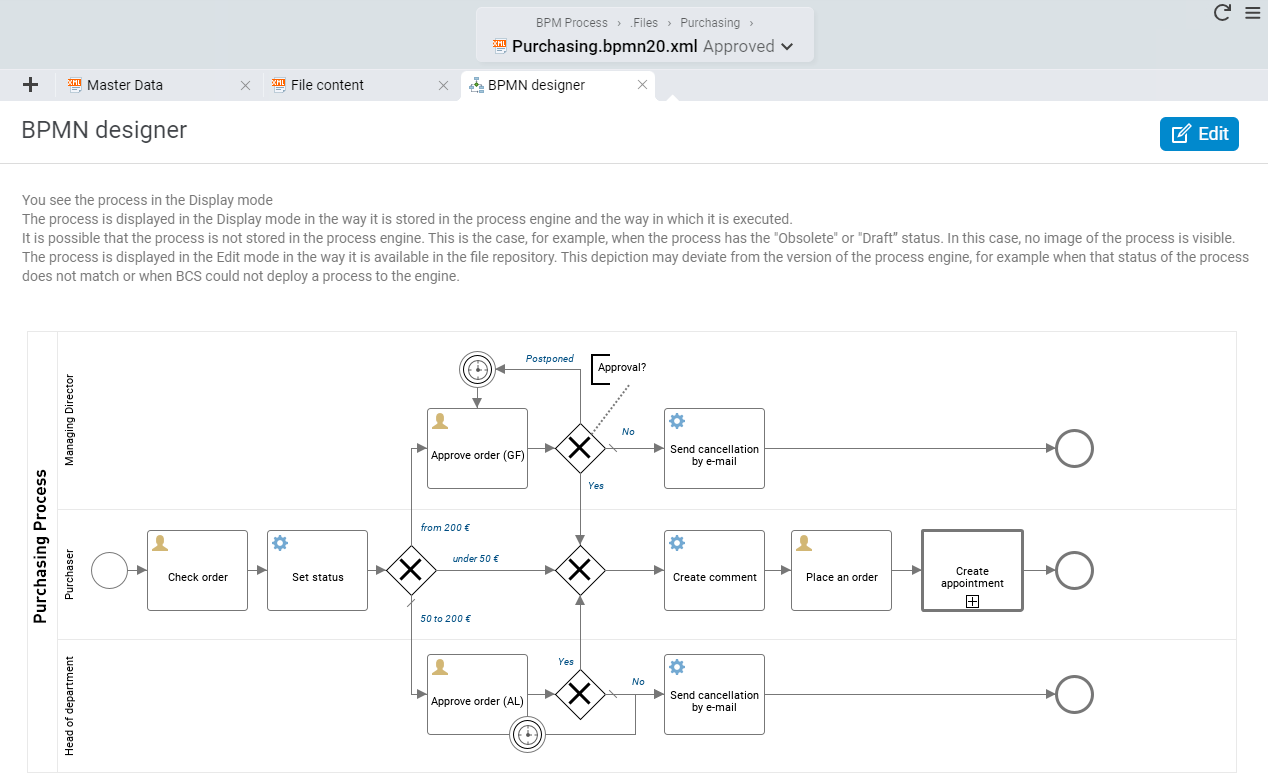
BPMN process model example 1: Purchasing process
The pool for the purchasing process comprises three swimlanes, one each for the process roles involved: department manager, purchaser, and managing director. Depending on the price, approvals from various authorities are required. An exclusive gateway determines in which swimlane the process will continue, depending on the purchase price. The process can end in three different end events. User tasks that require a user's response are marked with a person icon. Service tasks, marked with a gear icon, take place automatically and can be grayed out for clarity. Comments such as “Approval?” allow you to add explanations for end users.
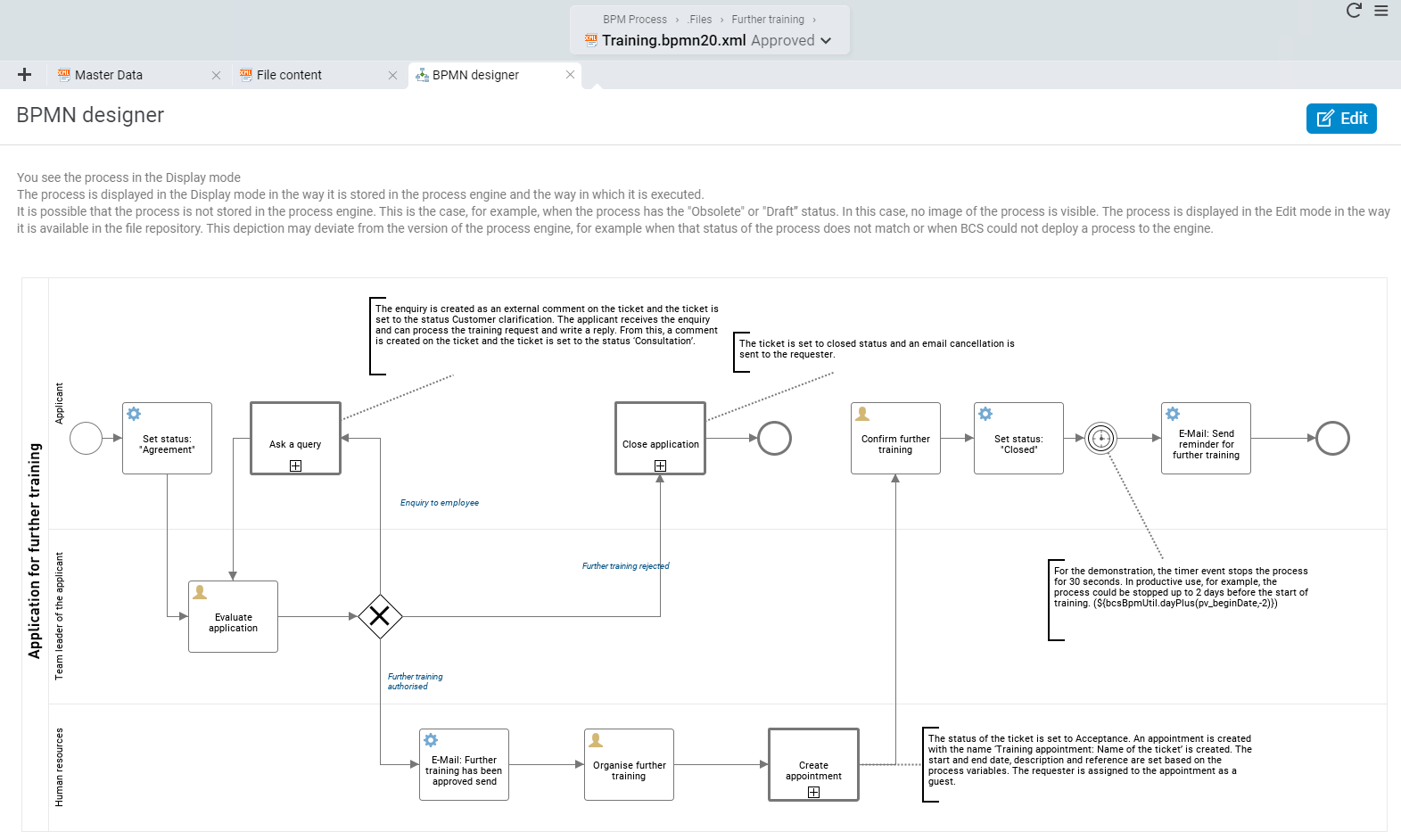
BPMN process model example 2: Continuing education application
The process roles of applicant, applicant's team leader, and human resources management are involved in the training request. The team leader is responsible for assessing the application. If they reject it or do not approve it within a definable period (timer boundary event), an automated rejection is ultimately sent to the applicant. If the application is approved by the team leader, an exclusive gateway ensures that the process is transferred to the swimlane of human resources management, which is responsible for organizing the continuing education.
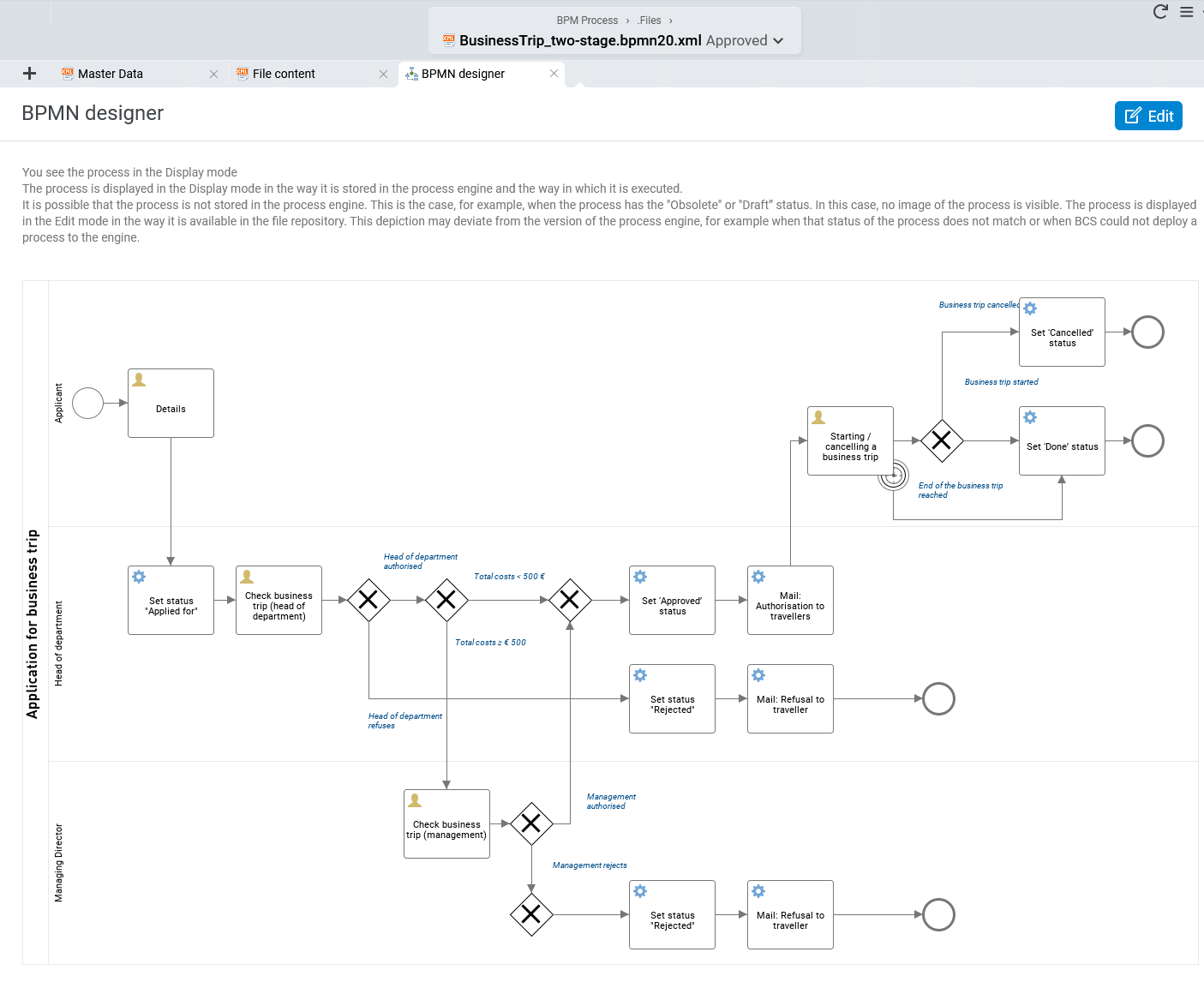
BPMN process model example 3: Business trip request
Three process roles are involved in the business trip request process: the applicant, the department head, and the managing director. After the start event, which is initiated by the applicant with their request, it is first up to the department head to review the request. Depending on the costs of the business trip, further review by the managing director may be required. If the business trip request is first approved by the department head and then by the managing director, an automated email notification is sent to the applicant. The applicant now receives the final user task to decide whether to go on the business trip or cancel it.
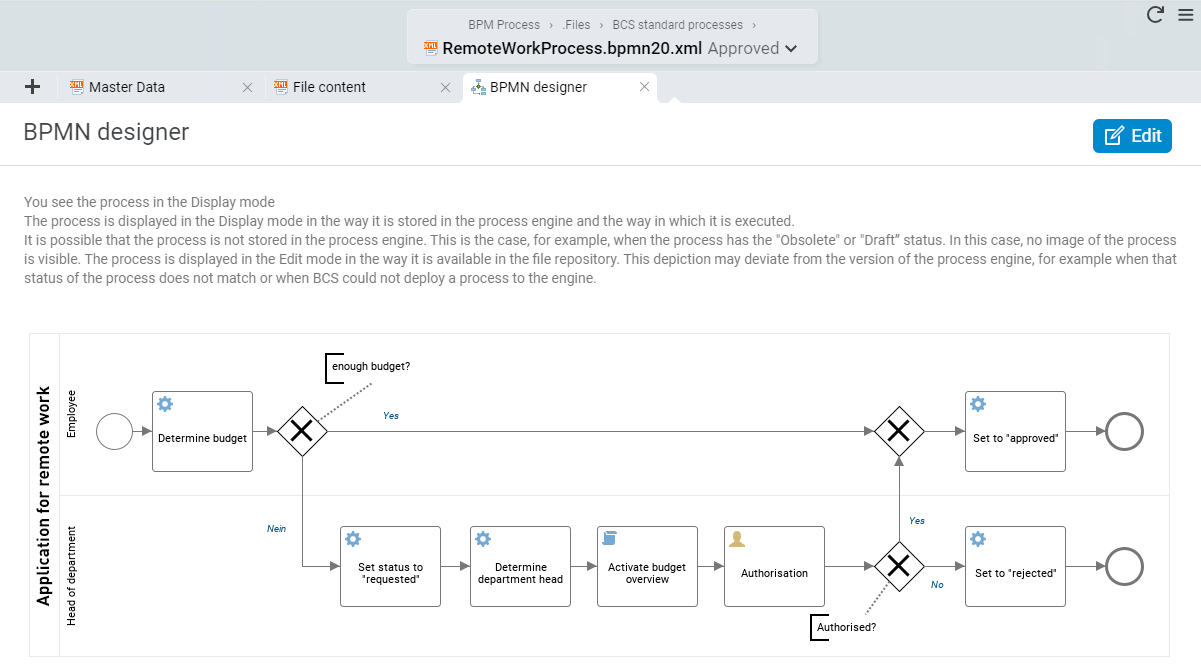
BPMN process model example 4: Request for mobile working
Two process roles are involved in the process of applying for a home office appointment: the applicant (employee) and the department head. The process starts as soon as the employee submits the request. If the previously determined budget is sufficient, the request is automatically approved without the need for review by the department manager. However, if the budget is insufficient, the department manager must review the request and make a decision. If approved, the applicant receives an automated email notification and the process is completed.
BPMN software: overview of process modeling tools
Drawing a BPMN diagram on paper or in PowerPoint is a good place to start. However, once processes need to be used, adapted, or automated on a regular basis, there is no way around specialized BPMN software.
The market offers a wide range of options, from simple modeling tools to complex process platforms. The decisive factor is not so much the tool itself as the question of what you want to achieve with your processes.
Modeling vs. execution
A key point that is often underestimated is that not every BPMN tool can also execute processes.
Many tools are purely modeling tools. They are ideal for visualizing, documenting, and collaborating on processes. What they cannot do, however, is actually execute the processes in the system.
Two basic tool categories
Modeling tools: Focus on visualization and documentation (e.g., creating, coordinating, and sharing diagrams)
Execution or BPM systems: Processes are not only modeled, but also controlled, monitored, and automated
In practice, this means that a technically modeled process is often not directly executable. Additional information must be added for implementation, such as data, rules, or system logic.
BPMN provides the basis for this because business departments and IT can work on the same model. However, the actual “intelligence” only emerges in conjunction with a suitable system.
What to look for in BPMN tools
The selection of a suitable BPMN tool depends heavily on your use case. Nevertheless, there are some criteria that are relevant in almost every scenario.
One important issue is consistency: Can you not only model processes, but also reuse, analyze, and optimize them? Or do they remain isolated diagrams?
Integration also plays a major role. Processes do not exist in a vacuum. They access data, documents, and systems. A tool should therefore fit as seamlessly as possible into your existing IT landscape.
Important selection criteria for BPMN software
Support for the BPMN 2.0 standard (including export, e.g., XML)
Separation or combination of modeling and execution
Integration into existing systems (ERP, CRM, ticket systems)
Options for evaluation and process analysis
User-friendliness and acceptance in the department
Another factor that is often underestimated is acceptance within the company. Even the best tool is of little use if it is not used on a daily basis. Intuitive operation and clear structures are therefore just as important as the range of functions.
Implementing BPMN with BCS
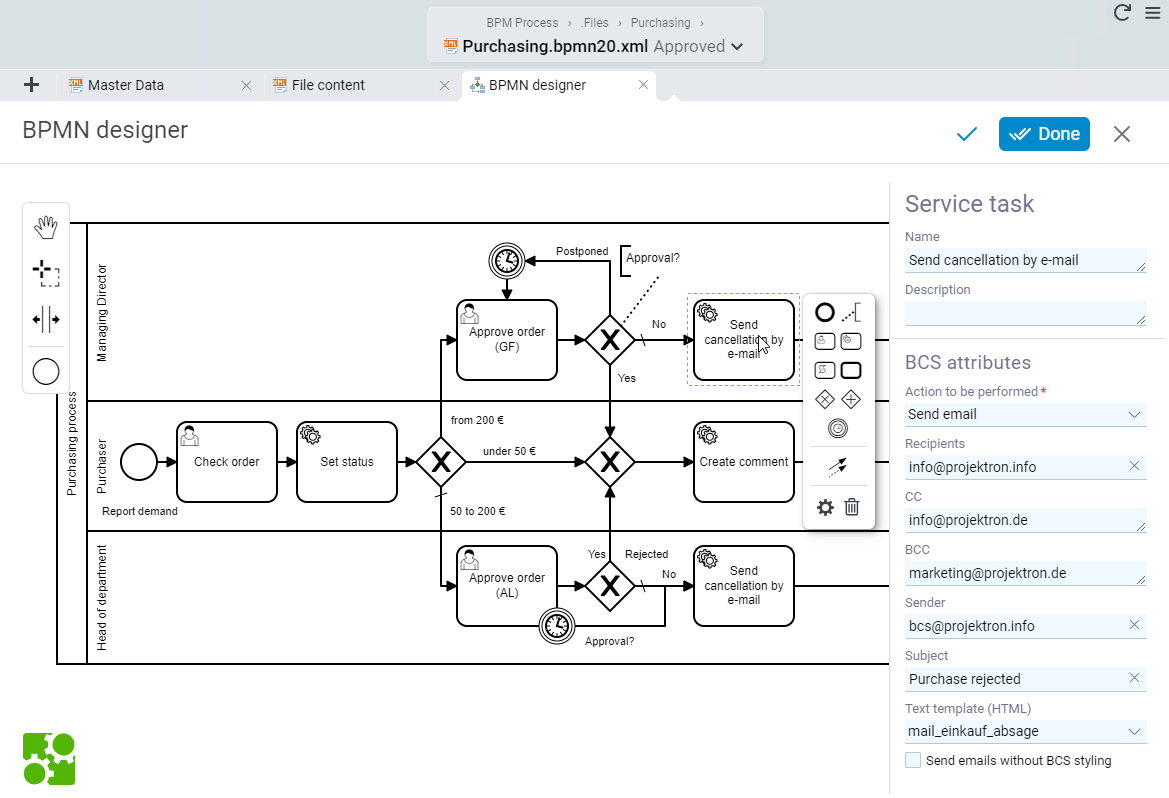
If processes are to be not only documented but also actively controlled and optimized, an integrated solution is the way to go. This is exactly where BCS, the business coordination software from Projektron, comes in.
With BCS, BPMN 2.0-compliant processes can be modeled and executed directly in the system. The advantage: the model, data, and execution are all based on a common foundation. There are no media breaks or additional interfaces.
Modeling is done visually using drag-and-drop. Processes can be linked directly to specific data, roles, and actions. This results not only in diagrams, but also in actually usable workflows.

What BCS enables as an integrated BPMN solution
Not only display processes, but actively control them
Make all relevant information available directly in the process
Automatically document and evaluate processes
Identify optimization potential based on real data
Another advantage is transparency: every process instance can be traced, including processing times, people involved, and decisions made. This creates a solid foundation for continuous improvement.
As a result, BPMN evolves from a pure modeling tool to a central component of operational control within the company.
Conclusion: when BPMN really pays off
BPMN is more than just a method for visualizing processes. Used correctly, it creates transparency, improves collaboration between business departments and IT, and lays the foundation for efficient, scalable processes.
BPMN is particularly useful when processes reach a certain level of complexity: multiple participants, clear decision-making logic, recurring processes, or the desire for automation. In such cases, BPMN helps to visualize structures, identify weaknesses, and improve processes in a targeted manner.
BPMN is less suitable for very simple processes or purely static representations. In these cases, the effort involved would often outweigh the actual benefits.
Ultimately, it is not the diagram itself that is decisive, but the goal behind it. BPMN unfolds its added value above all when processes are actively used, questioned, and further developed.
How to get started with BPMN in 3 steps
- Just get started: Choose an existing, manageable process and start by modeling only the standard procedure.
- Increase complexity step by step: Gradually add decisions, exceptions, and details, but only to the extent that it remains meaningful.
- Coordinate and use within the team: Coordinate the model with the roles involved and actively use it to improve your processes.
A good start is often more important than a perfect model. If you start small and keep at it, you'll quickly see how much clarity and efficiency BPMN can bring to your processes.
If you're not sure how and to what extent BPMN process modeling can help you, just reach out! We'll give you personalized advice for your specific needs.
Individual consultation by our BPMN experts at Projektron
FAQ about BPMN 2.0
BPMN raises many questions, especially at the beginning, mainly because the standard appears more comprehensive at first glance than it is in practice. The following answers will help you quickly clarify typical uncertainties.
Is BPMN hard to learn?
Is BPMN hard to learn?
No—getting started is relatively easy. The basic principles are quick to grasp, especially if you focus on the most important symbols. For most use cases, solid foundational knowledge is enough.
Which BPMN symbols do I actually need?
Which BPMN symbols do I actually need?
In most cases, 10–15 symbols are enough: start/end events, tasks, gateways, connections, and roles. Sticking to these building blocks usually leads to much clearer diagrams.
What’s the difference between BPMN and flowcharts?
What’s the difference between BPMN and flowcharts?
Flowcharts are more general. BPMN is standardized and more precise, and it can support technical handoff or automation.
Can BPMN be automated?
Can BPMN be automated?
Yes. BPMN is a foundation for automation. However, executable processes require additional data, rules, and system logic.
Who is BPMN for?
Who is BPMN for?
BPMN is designed for both business teams and IT. It creates a shared language between process owners and developers.
When should you not use BPMN?
When should you not use BPMN?
For very simple or purely static visuals, BPMN is often overkill. Highly unstructured processes can also be difficult to model.
How detailed should a BPMN diagram be?
How detailed should a BPMN diagram be?
The level of detail depends on your goal. For analysis, a high-level model is enough. For optimization or automation, you’ll need a more detailed representation.
Which tools are good for BPMN?
Which tools are good for BPMN?
There are simple modeling tools as well as full BPM systems. The key question is whether you only want to document processes or also execute them.

About the author
Like all other departments at Projektron GmbH, the marketing department also uses BCS on a daily basis to map work processes. Kai Sulkowski is an editor in the marketing department and is always up to date on the latest developments and innovations in the world of project management and work organization.
More interesting articles on the Projektron blog

Projectmanagement Software Comparison
Get an up-to-date overview: We compare 15 of the most popular and best project management software solutions. Start here, explore the market, and compare them yourself!
Selecting PM Software
If your SME or enterprise is planning to select project management software, you may not know where to start. This guide helps you step by step.

Software Implementation
Implementing enterprise software is complex. With the right strategies, you can lead your implementation project to success.

7 Benefits of PM Software
What are the benefits of project management software? We show you 7 compelling reasons to use it in your organization.
BPMN stands for Business Process Model and Notation and is an internationally used modeling language for business process modeling.